Get 69% Off on Cloud Hosting : Claim Your Offer Now!





- Products
- Solutions
-
Solutions
-
 Cloud
Hosting
Cloud
Hosting
-
VPS
Hosting
-
 GPU
Cloud
GPU
Cloud
-
 Dedicated
Server
Dedicated
Server
-
 Server
Colocation
Server
Colocation
-
 Backup as a Service
-
 CDN
Network
CDN
Network
-
 Window
Cloud Hosting
Window
Cloud Hosting
-
 Linux
Cloud Hosting
Linux
Cloud Hosting
-
Managed
Cloud Service
-
 Storage
as a Service
Storage
as a Service
-
VMware
Public Cloud
-
Multi-Cloud
Hosting
-
Cloud
Server Hosting
-
Bare
Metal Server
-
Virtual
Machine
-
 Magento
Hosting
Magento
Hosting
-
 Remote
Backup
Remote
Backup
-
 DevOps
-
 Kubernetes
-
 Cloud
Storage
Cloud
Storage
-
 NVMe
Hosting
NVMe
Hosting
-
 DR
as s Service
DR
as s Service
-
-
Solutions
- Marketplace
- Pricing
- Resources
- Company
 Remote
Backup
Remote
Backup NVMe
Hosting
NVMe
Hosting Pricing
Calculator
Pricing
Calculator Unlock Cost
Optimization
Unlock Cost
Optimization Overview
 Documentation
 Price
Calculator
Price
Calculator Tools
Tools FAQs
FAQs Terms
of Service
Terms
of Service Privacy
Policy
Privacy
Policy
 Migration
 Container
 Power
Power
 Utilities
 VMware
Private Cloud
VMware
Private Cloud VMware
on AWS
VMware
on AWS VMware
on Azure
VMware
on Azure Certifications
 Partners
 Careers
 Support
 Service
Level Agreement
Service
Level Agreement  Contact
Table of Contents
- What Is Cloud Hosting?
- How Does Cloud Hosting Work?
- Types of Cloud Hosting
- Benefits of Cloud Hosting for Businesses
- Cloud Hosting vs Shared, VPS and Dedicated Hosting
- Cloud Hosting for Real Workloads
- Which Hosting Model Fits? A Decision Tree
- Cloud Hosting Security: Who Does What
- How to Choose a Cloud Hosting Provider?
- What an SLA percentage means in practice
- Cloud Hosting Pricing: What Drives the Cost
- Common Cloud Hosting Mistakes
- How to Migrate to Cloud Hosting
- Cloud Hosting in 2027: Key Factors to Consider
- Why Choose Cyfuture Cloud?
- Cloud Hosting FAQs
- What is cloud hosting in simple terms?
- How does cloud hosting work?
- Is cloud hosting better than traditional web hosting?
- Is cloud hosting suitable for small businesses?
- How much does cloud hosting cost?
- Is cloud hosting secure?
- Can cloud hosting handle high traffic?
- What is the difference between cloud hosting and VPS hosting?
- How do I choose a cloud hosting provider?
- Can I migrate my website to cloud hosting without downtime?
- Is managed cloud hosting worth it?
- What should I look for in a cloud hosting provider in India?
- Conclusion
What Is Cloud Hosting?
Cloud hosting is a way of running websites and applications on a network of connected virtual servers that draw on pooled physical hardware, rather than on one fixed machine. Resources such as CPU, RAM and storage can be added or removed as demand changes, and billing often follows what you provision or use.
Two ideas are packed into that definition. The “cloud” part is pooling plus virtualization: many physical servers act as one resource pool, and software carves virtual servers out of it. The “hosting” part is the job those servers do, which is keeping your site, store, API or application reachable on the internet.
Most cloud hosting is infrastructure as a service (IaaS): you rent virtual compute, storage and networking. Some providers add platform features on top, such as managed databases or load balancers. It’s different from cloud storage (a place to keep files) and from SaaS (finished software you log into). Cloud hosting is where your software runs.
How Does Cloud Hosting Work?
Cloud hosting works by virtualizing a pool of physical servers into virtual servers, placing them across the pool, and distributing traffic between them. Because a virtual server isn’t welded to one machine, it can be resized, moved or restarted elsewhere more flexibly than a workload on a single physical box.
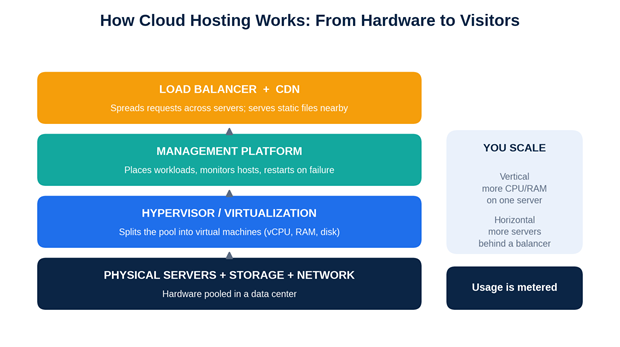
In practice, the sequence looks like this:
- Hardware is pooled. Physical servers, storage systems and networking in a data center are grouped into a shared pool of compute and storage.
- Virtualization splits the pool. A hypervisor creates virtual machines, each with an allocated number of vCPUs, RAM and disk space.
- A management platform places and watches them. It decides which physical host runs which virtual server and can restart a workload on another host if one fails. How automatic this is depending on the provider’s design, so ask.
- Traffic is distributed. A load balancer spreads requests across multiple servers, and a CDN can serve static content from locations closer to visitors.
- You scale. Vertical scaling means giving one server more CPU or RAM. Horizontal scaling means adding more servers. Some providers can resize live; others need a reboot.
- Usage is metered. Billing follows the resources you provision, commonly by the hour or month.
A caution on marketing language: “no single point of failure” describes a design goal for the platform, not your application. If your site runs on one virtual server with one database, your application still has single points of failure even on a resilient platform.
Types of Cloud Hosting
Two separate questions get mixed up here, so it helps to keep them apart. Deployment model answers “who shares the infrastructure?” Service model answers “who does the operations work?”
Public, private and hybrid cloud
- Public cloud. Virtual servers run on infrastructure shared between many customers, logically isolated from each other. It’s the most flexible and usually the cheapest to start with.
- Private cloud. The infrastructure is dedicated to one organization, whether it sits in the provider’s data center or your own. It suits stricter isolation, compliance or performance needs, at a higher cost.
- Hybrid cloud. A mix: for example, sensitive databases on private infrastructure and web front-ends on public cloud. Hybrid adds design and networking work, so it’s worth it only when the split solves a real problem.
Managed and unmanaged cloud hosting
A public cloud server can be managed or unmanaged, and so can a private one.
- Unmanaged: you get the virtual server and administer the operating system, security patches, monitoring and backups yourself. It’s cheaper and gives full control, but it needs skills and time.
- Managed: the provider takes on part of the operations load, such as patching, monitoring, backups, hardening or incident response. What’s included varies widely, so get the scope in writing.
Benefits of Cloud Hosting for Businesses
The benefits are real, but each comes with a condition worth knowing.
- Capacity that follows demand. You can add CPU, RAM or servers when traffic climbs and release them afterwards. The condition: scaling works best when it’s planned and tested before the peak, not improvised during it.
- Better resilience options. Platform-level failover and multiple servers reduce the damage of a hardware fault. The condition: your application and database must be designed to use that resilience.
- A different cost shape. No hardware purchase, and billing that can follow usage. The condition: capacity you forget to scale back keeps billing.
- Fast provisioning. A new virtual server usually takes minutes, not the weeks a hardware order does, which helps development, testing and campaigns.
- Control over the environment. You pick the operating system, software stack and size, with root access on unmanaged plans.
- Location choice. Hosting nearer your users can cut latency, which matters for dynamic and transactional sites.
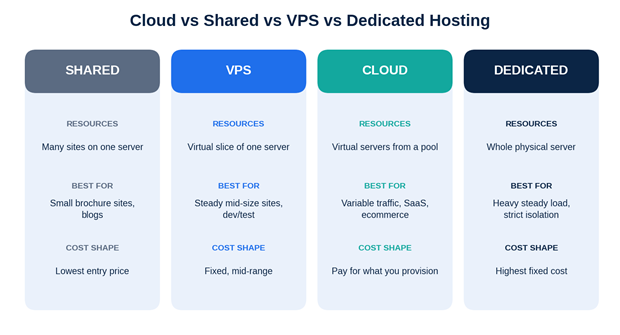
|
Cloud hosting |
Shared hosting |
VPS hosting |
Dedicated server |
|
|---|---|---|---|---|
|
Resource allocation |
Virtual resources from a pooled cluster, sized per plan |
Many sites share one server’s resources |
A virtual slice of one physical server with set vCPU/RAM |
The whole physical server for one customer |
|
Scalability |
Usually adjustable on demand; limits and reboot needs vary |
Limited; upgrade plan or move |
Upgrade within the host’s capacity; larger jumps may need a move |
Hardware upgrade or new server; slowest to change |
|
Performance considerations |
Consistent when sized well; depends on platform design and oversubscription |
Can be affected by busy neighbors |
Predictable slice; neighbors on the host can still matter |
Highest raw single-tenant power, no sharing |
|
Management needed |
Unmanaged or managed; you run OS and apps unless managed |
Provider runs the server; little control |
Usually OS-level admin; managed versions exist |
Full responsibility unless managed |
|
Typical use cases |
Variable traffic, growing apps, ecommerce, SaaS |
Small brochure sites, blogs, low traffic |
Steady mid-size sites, dev/test, custom stacks |
Heavy steady workloads, strict isolation, specific hardware |
|
Cost considerations |
Pay for provisioned or used resources; efficient for variable demand, wasteful if left oversized |
Lowest entry price |
Fixed monthly price, mid-range |
Highest fixed cost; can be cheapest per unit of steady heavy load |
When cloud hosting isn’t the best fit
- A small, steady site. A brochure site with a few thousand visits a month rarely needs elastic capacity. Shared hosting may be enough and cheaper.
- Flat, predictable heavy load. If a workload runs near capacity around the clock, a dedicated server can cost less per unit of performance.
- Specific hardware or licensing rules. Some software licenses, hardware dependencies or isolation requirements point to dedicated or private infrastructure.
- No one to run it. Unmanaged cloud hosting hands you the admin work. Without in-house skills, choose a managed plan or a simpler product.
- Data-transfer-heavy workloads. Outbound bandwidth is billed on some plans and can dominate the cost. Model it before you commit.
Cloud Hosting for Real Workloads
The scenarios below are illustrative situations, not customer case studies.
An ecommerce store with seasonal peaks
Picture an online store that runs at modest load most of the year, then sees several times normal traffic during a festival sale. On a fixed server you either buy for the peak and pay for idle capacity most months, or buy for the average and risk slowdowns exactly when revenue is highest. With cloud hosting you size for normal days, add CPU and RAM before the sale, and scale back afterwards.
Three cautions. Scale before the event, not during it. Check whether a resize needs a reboot. And load-test first, because the database and payment integrations often hit their limits before the web servers do.
A growing SaaS application
A typical SaaS stack has stateless app servers, a database, background workers and backups. Cloud hosting lets those tiers scale independently: more app servers behind a load balancer when sign-ups spike, a larger or replicated database when queries slow. The common trap is architecture. If sessions or uploads live on one server’s local disk, adding servers won’t help until that state moves to shared storage or a database.
A small business with no IT team
A business running an ERP, a website and email-related services without a sysadmin is better served by managed cloud hosting. Ask exactly what “managed” covers: OS patching, monitoring, backups, security hardening, response times, and whether application-level issues are included.
Agencies hosting many client sites
There’s a trade-off. Putting every client on one large server is cheaper, but one compromised site can put the others at risk. Separate instances per client contain problems and make billing clearer, at a higher total cost. Many agencies group clients by risk and traffic.
Which Hosting Model Fits? A Decision Tree
Work through these in order and stop at the first that matches.
- One small site, low steady traffic, no custom software? Shared hosting is probably enough. Revisit it if you see traffic spikes or slow responses.
- Need root access or custom software, but your load is steady? A VPS (or cloud VPS) is usually the better value.
- Does traffic vary sharply, does downtime cost you money, or do you expect fast growth? Cloud hosting is a strong candidate. Then ask two follow-ups:
- Do you have sysadmin or DevOps capacity? If yes, unmanaged can work. If no, choose managed.
- Is the data sensitive or regulated? If yes, evaluate private or hybrid cloud, with encryption, access control and logging requirements written into the contract.
- Heavy load 24/7, specific hardware or strict single-tenant isolation? Consider a dedicated server, possibly paired with cloud capacity for bursts.
If two answers apply, start with the one that is easiest to change later. Cloud and VPS plans are usually easier to resize than a dedicated server.
Cloud Hosting Security: Who Does What
Cloud hosting can be secure, but security is shared. AWS documents this as security “of” the cloud (the provider) versus security “in” the cloud (the customer), and the principle applies to any IaaS provider (AWS Shared Responsibility Model). Your share grows when you buy unmanaged servers and shrinks when you buy managed services.
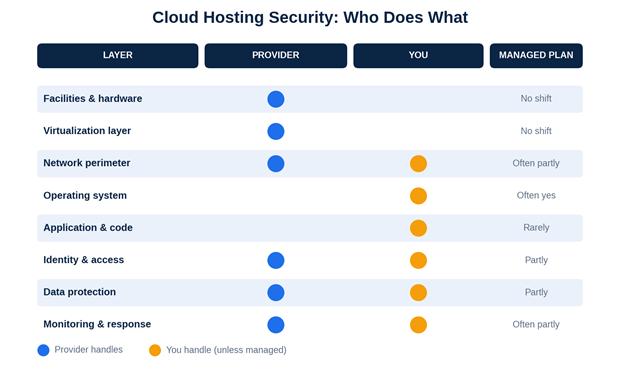
|
Layer |
Provider typically handles |
You typically handle |
A managed plan may shift |
|---|---|---|---|
|
Facilities and hardware |
Physical security, power, cooling, hardware |
Nothing, but verify certifications |
No |
|
Virtualization layer |
Hypervisor and host security |
Nothing |
No |
|
Network perimeter |
Core network, basic protections |
Firewall rules, open ports |
Often partly |
|
Operating system |
Base image availability |
Patching, hardening |
Often yes |
|
Application and code |
Nothing |
Updates, plugins, code security |
Rarely |
|
Identity and access |
Control panel security features |
Passwords, MFA, who has access |
Partly |
|
Data protection |
Storage platform |
Encryption choices, backup configuration |
Partly |
|
Monitoring and response |
Infrastructure monitoring |
Application logs, alerts, response |
Often partly |
Controls worth insisting on
- Multi-factor authentication on the control panel, and SSH keys instead of passwords.
- Least-privilege access, with a clear off-boarding process.
- A patch schedule for the OS and every application, with an owner.
- Firewall rules that open only the ports you use.
- TLS for data in transit, and encryption at rest where the platform supports it.
- Backups stored separately from the primary server, with restores tested on a schedule.
- Logging and alerts someone actually reads.
The DPDP angle for Indian businesses
India notified the Digital Personal Data Protection Rules on 13–14 November 2025, with a phased 18-month rollout (PIB summary). Law-firm summaries put the operational obligations, including security safeguards and breach notification, at mid-May 2027 (AZB & Partners; Hogan Lovells). The rules describe safeguards such as encryption, access controls, monitoring and backups, and require security terms in contracts with data processors. PIB notes that the highest penalty, up to ₹250 crores, applies to failing to maintain reasonable security safeguards.
For hosting, that means asking providers what they offer for encryption, access logging and backup, and getting security responsibilities into the contract. This is general information, not legal advice. Have counsel check how the rules apply to you.
How to Choose a Cloud Hosting Provider?
Start with your workload, not the provider’s brochure: peak and average traffic, data sensitivity, who will administer the server, and what an hour of downtime costs. Then use the table below, and get the answers in writing.
|
Criterion |
What to ask the provider |
Why it matters |
|---|---|---|
|
CPU, RAM, storage, bandwidth |
Are vCPUs dedicated or shared? What is the real bandwidth allowance and overage rate? |
“4 vCPU” can mean very different things; bandwidth overages surprise buyers |
|
Storage type |
SSD or NVMe? What RAID or replication protects it? |
Disk speed shapes database and page-load performance |
|
Scalability |
Can I resize live? Is a reboot needed? Any caps? |
Determines whether you can react to traffic in time |
|
Uptime and SLA |
What is the contractual uptime, how is it measured, what are the exclusions and remedies? |
A headline percentage means little without the terms |
|
Backup and disaster recovery |
How often, where stored, how long retained, how fast restored? Is DR tested? |
A backup you can’t restore is not a backup |
|
Monitoring and support |
Support hours, channels, response times, escalation path |
Out-of-hours incidents are when support quality shows |
|
Security and access |
MFA, role-based access, firewalls, logging, vulnerability handling, compliance certificates |
Defines your share of the responsibility |
|
Data center location |
Which cities, what tier, what latency to your users? |
Latency and data-residency questions |
|
Pricing and billing |
Hourly or monthly? Currency, GST, bandwidth, backup, license and support charges? |
Total cost, not the headline plan price |
|
Migration help |
What assistance is included, and what is charged? |
Migration is the riskiest week of the project |
What an SLA percentage means in practice
The arithmetic below is simple, and I calculated it myself: a 365-day year has 8,760 hours.
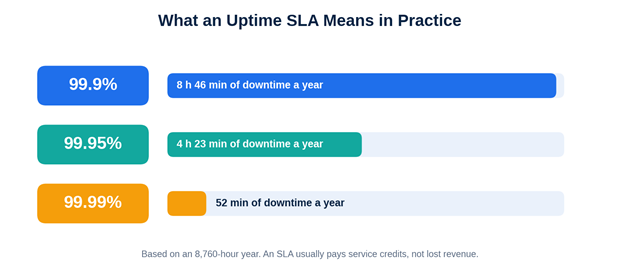
|
Uptime target |
Allowed downtime per year (approx.) |
|---|---|
|
99.9% |
8 hours 46 minutes |
|
99.95% |
4 hours 23 minutes |
|
99.99% |
52 minutes |
An SLA also isn’t compensation for lost revenue. It usually offers service credits, measured per month, with exclusions such as scheduled maintenance.
Cloud Hosting Pricing: What Drives the Cost
Cloud hosting prices run from low-cost entry servers to high-spec multi-server architectures, so a single “average price” isn’t useful. What matters is which factors move your bill.
Cost drivers
- Compute: vCPU count and RAM.
- Storage: capacity and type, plus snapshots.
- Bandwidth: often the biggest variable, particularly outbound traffic.
- Backups and DR: usually priced per GB or as a separate service.
- Licenses: Windows Server or Microsoft SQL Server cost more than open-source equivalents.
- Management and support tier: managed services are typically billed on top.
- Tax: in India, check whether quotes include GST.
- Billing model: hourly, monthly, prepaid or committed.
An illustrative example: planning for a sale week
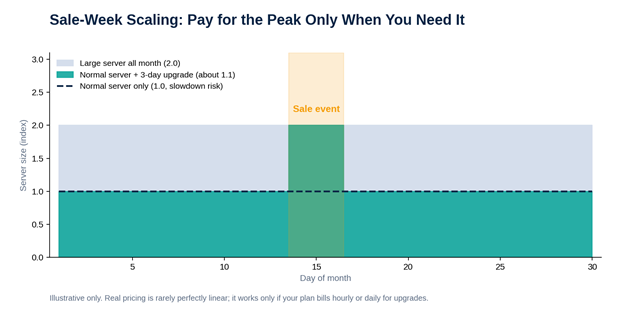
Suppose a store’s normal server configuration costs 1.0 unit a month, and a configuration with double the resources costs roughly 2.0 units a month (real pricing is rarely perfectly linear).
|
Approach |
Calculation |
Monthly cost index |
|---|---|---|
|
Run the larger server all month |
2.0 × 30 days |
2.0 |
|
Run the normal server all month |
1.0 × 30 days |
1.0 (risk of slowdown in the sale) |
|
Normal server, upgrade for a 3-day sale |
1.0 + (1.0 extra × 3/30) |
about 1.1 |
The on-demand approach only works if your plan bills by the hour or day for upgrades and you scale back afterwards. Check the billing rules before assuming the saving.
A simple cost-comparison framework
For every provider you shortlist, fill in the same sheet:
- Monthly cost at baseline load.
- Monthly cost in a peak month.
- Add backups, extra IPs, licenses, management and support.
- Add outbound bandwidth at your expected volume.
- Add one-off costs: migration, setup, SSL.
- Add GST and compare in the same currency.
- Divide by something meaningful, such as cost per 1,000 orders or per active user.
Cyfuture Cloud lists plans on its cloud hosting and pricing page, and offers a cost calculator.
Common Cloud Hosting Mistakes
- Buying on the headline price. Bandwidth, backup, license and support charges decide the real bill.
- Oversizing “just in case” and never revisiting. Review utilization monthly and resize.
- Assuming the provider handles everything. Unmanaged means you patch, back up and monitor.
- Never testing a restore. Run a restore drill before you need one.
- Putting everything on one server. Cloud hosting enables resilience; it doesn’t create it by default.
- Skipping the load test. Scaling plans fail on bottlenecks you haven’t found yet.
- Ignoring data location and contracts. Latency and DPDP-related processor terms are easier to settle before signing.
- Migrating on a deadline with no rollback. Schedule it away from your peak and keep the old environment until you’re sure.
How to Migrate to Cloud Hosting
Migration is a project with a plan, an owner and an exit route.
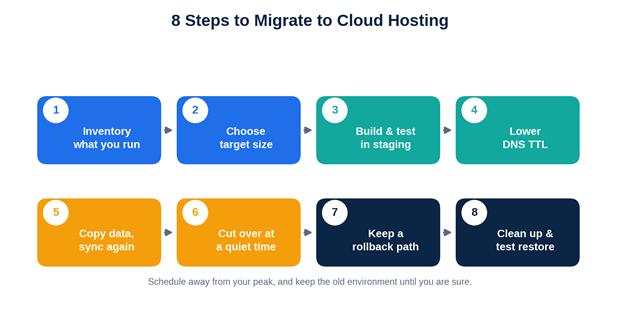
- Inventory what you run. Applications, databases, email, SSL certificates, DNS records, integrations and traffic patterns.
- Choose the target size. Use real utilization data from your current server, then leave headroom. Measure again after launch.
- Build and test in a staging environment. Match software versions and configuration, and check performance under load.
- Lower DNS TTL a day or two before cut-over so the switch propagates quickly.
- Copy data and sync again. Do a full copy early and a final incremental sync just before switching. For active databases, schedule a short write freeze or use replication.
- Cut over at a quiet time. Point DNS or the load balancer to the new environment, then watch errors, latency and orders.
- Keep a rollback path. Leave the old environment running, untouched, until you’re confident, typically for several days.
- Clean up. Confirm backups run on the new server, restore one, tighten firewall rules, and decommission the old setup.
Cloud Hosting in 2027: Key Factors to Consider
These are the key trends and developments shaping cloud hosting decisions in 2027. We distinguish verified facts from expert insights to help you make informed decisions.
- Cost discipline is now a normal part of cloud work. The FinOps Foundation’s State of FinOps 2026 survey (966 responses, per published summaries) shows optimisation still a top priority, with governance, forecasting and unit economics gaining weight (Holori summary; nOps, 19 Feb 2026). For you, that means tagging resources by project, setting budget alerts and reviewing utilisation monthly. Check the primary report at finops.org before quoting these figures elsewhere.
- Data protection is becoming enforceable. Fact: the DPDP Rules’ main obligations are scheduled for mid-May 2027 (see Section 8). Treat provider security terms, logging and backup as compliance inputs, not extras.
- Resilience has to be proven. Judgement: untested backups and untested failover are the typical weak points. Schedule restore drills and, for critical systems, a failover test.
- Automation reduces human error. Infrastructure-as-code, scripted deployments and automated backups make environments reproducible, which helps both recovery and migration.
- Location still matters. Latency to your users and data-residency questions favor in-country data centers for many Indian workloads. Verify actual cities and tiers, not just “India”.
- AI workloads are a separate buying decision. If you need GPUs for training or inference, evaluate GPU servers on their own terms (Cyfuture Cloud lists GPU cloud servers).
Why Choose Cyfuture Cloud?
At Cyfuture Cloud, we deliver reliable, scalable, and secure cloud infrastructure designed to support businesses at every stage of growth. From startups to large enterprises, we combine flexible cloud solutions, high-performance infrastructure, and dedicated support to help businesses optimize operations and accelerate digital transformation.
- Comprehensive Cloud Portfolio: Cyfuture Cloud lists cloud hosting (including Linux and Windows options), VPS, managed cloud services, dedicated servers, colocation, load balancing, backup as a service, disaster recovery, a CDN and a security portfolio (WAF, DDoS protection, multi-factor authentication and more).
- Flexible Cloud Solutions: We provide cloud environments tailored to diverse business requirements, from self-service Lite Cloud for smaller teams to enterprise-grade cloud management for complex workloads and large-scale deployments.
- Flexible Billing and High-Performance Storage: We offer flexible billing options, including hourly billing on eligible Lite Cloud plans, along with NVMe storage options to support performance-intensive applications and business workloads.
- India-Based Data Centre Infrastructure: We offer data center infrastructure across locations including Noida, Jaipur, and Chennai. Our infrastructure portfolio highlights Tier III facilities and MeitY empanelment, supporting businesses with infrastructure options aligned with their operational and compliance requirements.
- Round-the-Clock Support and Service Commitments: Our 24×7 support helps businesses address technical issues and maintain operational continuity.
Cloud Hosting FAQs
What is cloud hosting in simple terms?
It’s renting computing capacity from a pool of connected servers instead of one fixed machine. You choose how much CPU, memory and storage you need and can change it later. If an underlying server has a problem, the provider’s platform can often restart your workload elsewhere, though failover design varies by provider.
How does cloud hosting work?
Virtualization divides pooled physical servers into virtual servers. A management layer places them, a load balancer spreads incoming traffic, and billing tracks what you provision or use. Since a virtual server isn’t tied to one machine, resources can be resized and workloads recovered more flexibly than on a single physical server.
Is cloud hosting better than traditional web hosting?
Not always. It suits variable traffic, growth and uptime-sensitive applications. A small brochure site with steady, low traffic can run well and cheaper on shared hosting. The right choice depends on your traffic pattern, technical skills, budget and the cost of downtime to your business.
Is cloud hosting suitable for small businesses?
Yes, when the business expects growth or has uneven traffic, especially with a managed plan if nobody on staff administers servers. If you run one low-traffic site with no growth plans, shared or entry-level VPS hosting may be enough. Start modest and scale based on measured usage.
How much does cloud hosting cost?
It ranges widely with vCPU, RAM, storage, bandwidth, backups, licenses, support level and tax. Compare total monthly cost at baseline and at peak, in rupees including 18% GST.
Is cloud hosting secure?
It can be, but security is shared. The provider secures facilities, hardware and virtualisation; you usually remain responsible for your operating system, applications, access control and configuration unless you buy managed services. Weak credentials and misconfiguration can undo strong infrastructure, so ask what each side covers.
Can cloud hosting handle high traffic?
Yes, if the architecture allows it: enough resources, a load balancer, caching or a CDN, and a database that keeps up. Cloud hosting makes adding capacity easier, but it won’t fix inefficient code or one overloaded database. Load-test before your peak event.
What is the difference between cloud hosting and VPS hosting?
A VPS is a virtual slice of one physical server. Cloud hosting draws on a pool of servers, which can improve flexibility and failover. Providers blur the terms, and some “cloud VPS” plans run on cloud infrastructure, so compare scaling behavior, specifications and the SLA rather than the label.
How do I choose a cloud hosting provider?
Define your workload first, then compare SLA terms, security controls, backup and DR, support hours, data-center location, pricing transparency and migration help. Use the checklist in this guide, get answers in writing, and run a trial or proof of concept where the provider offers one.
Can I migrate my website to cloud hosting without downtime?
Often close to it, never guaranteed. Build and test the new environment, copy data, lower DNS TTL beforehand, sync final changes during a short freeze, then switch traffic with a rollback plan. Sites with busy databases or frequent writes need extra planning.
Is managed cloud hosting worth it?
If your team lacks the time or expertise for patching, monitoring and incident response, often yes, because you’re paying to offload operations. If you have capable DevOps staff, unmanaged can cost less.
What should I look for in a cloud hosting provider in India?
Indian data-center locations for latency and residency, INR billing with GST clarity, support hours that match your working day, a named SLA, in-country backup and DR if you need them, and a willingness to discuss security safeguards and processor contract terms under the DPDP Rules.
Conclusion
Cloud hosting isn’t automatically the best answer, and it isn’t a single product. It’s a flexible way to run workloads that change, grow or can’t afford much downtime, and it rewards buyers who ask precise questions. Define your workload, work through the decision tree, compare providers, and plan migration with a rollback path. In 2027 add one more habit: treat security terms and cost visibility as part of the purchase, not afterthoughts.


















Stay Ahead of the Curve.
Join the Cloud Movement, today!
Send this to a friend