Get 69% Off on Cloud Hosting : Claim Your Offer Now!





- Products
- Solutions
-
Solutions
-
 Cloud
Hosting
Cloud
Hosting
-
VPS
Hosting
-
 GPU
Cloud
GPU
Cloud
-
 Dedicated
Server
Dedicated
Server
-
 Server
Colocation
Server
Colocation
-
 Backup as a Service
-
 CDN
Network
CDN
Network
-
 Window
Cloud Hosting
Window
Cloud Hosting
-
 Linux
Cloud Hosting
Linux
Cloud Hosting
-
Managed
Cloud Service
-
 Storage
as a Service
Storage
as a Service
-
VMware
Public Cloud
-
Multi-Cloud
Hosting
-
Cloud
Server Hosting
-
Bare
Metal Server
-
Virtual
Machine
-
 Magento
Hosting
Magento
Hosting
-
 Remote
Backup
Remote
Backup
-
 DevOps
-
 Kubernetes
-
 Cloud
Storage
Cloud
Storage
-
 NVMe
Hosting
NVMe
Hosting
-
 DR
as s Service
DR
as s Service
-
-
Solutions
- Marketplace
- Pricing
- Resources
- Company
 Remote
Backup
Remote
Backup NVMe
Hosting
NVMe
Hosting Pricing
Calculator
Pricing
Calculator Unlock Cost
Optimization
Unlock Cost
Optimization Overview
 Documentation
 Price
Calculator
Price
Calculator Tools
Tools FAQs
FAQs Terms
of Service
Terms
of Service Privacy
Policy
Privacy
Policy
 Migration
 Container
 Power
Power
 Utilities
 VMware
Private Cloud
VMware
Private Cloud VMware
on AWS
VMware
on AWS VMware
on Azure
VMware
on Azure Certifications
 Partners
 Careers
 Support
 Service
Level Agreement
Service
Level Agreement  Contact
Table of Contents
- What Is NVIDIA RTX PRO 6000 Blackwell?
- Key Specifications of NVIDIA RTX PRO 6000 Blackwell
- Why Is NVIDIA RTX PRO 6000 Blackwell Suitable for AI?
- NVIDIA RTX PRO 6000 Blackwell for Professional Computing
- NVIDIA RTX PRO 6000 Blackwell in a Data Center
- How Cloud Hosting Makes GPU Access Easier
- NVIDIA RTX PRO 6000 Blackwell GPU Server
- Who Can Benefit From NVIDIA RTX PRO 6000 Blackwell?
- NVIDIA RTX PRO 6000 Blackwell vs Traditional CPU Servers
- What Should You Consider Before Choosing This GPU?
- Why Choose Cyfuture Cloud for GPU Computing?
- Conclusion
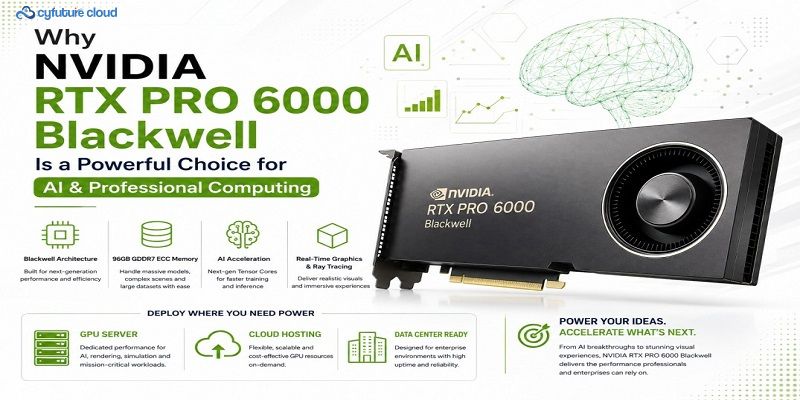
The NVIDIA RTX PRO 6000 Blackwell is a professional GPU built for demanding AI, graphics, rendering, simulation, and accelerated computing workloads. Based on NVIDIA’s Blackwell architecture, it features 96 GB of GDDR7 ECC memory, making it suitable for applications that require substantial GPU memory. Its advanced Tensor Cores and RT Cores further support AI processing and professional visualization workloads.
For businesses, accessing this level of GPU performance does not always require purchasing and maintaining physical hardware. Cyfuture Cloud provides GPU infrastructure and Cloud Hosting options that can help organizations access high-performance computing resources based on their workload requirements. A dedicated GPU Server can also provide predictable resources for intensive applications.
In this article, we will explore the capabilities of the NVIDIA RTX PRO 6000 Blackwell, its applications, and its role in a modern Data Center. We will also discuss AI use cases, professional workloads, GPU server deployment, cloud-based access, and key factors to consider before choosing this GPU.
What Is NVIDIA RTX PRO 6000 Blackwell?
The NVIDIA RTX PRO 6000 Blackwell is a professional GPU designed for advanced computing and visualization workloads. It belongs to NVIDIA’s RTX PRO family and uses the Blackwell architecture.
Professional GPUs target applications that require more than standard graphics performance. These include AI development, engineering, architecture, scientific visualization, 3D rendering, simulation, and media production.
One of its major advantages is its 96 GB GDDR7 ECC memory. Large GPU memory allows applications to keep more data directly on the GPU. As a result, memory-intensive workloads can process large datasets and complex models more efficiently.
Key Specifications of NVIDIA RTX PRO 6000 Blackwell
The following table highlights some important specifications and capabilities:
| Feature | NVIDIA RTX PRO 6000 Blackwell |
|---|
| Architecture | NVIDIA Blackwell |
| GPU Memory | 96 GB GDDR7 ECC |
| Memory Type | GDDR7 |
| AI Acceleration | Tensor Cores |
| Ray Tracing | RT Cores |
| Primary Workloads | AI, rendering, simulation, visualization |
| Deployment Options | Workstation, GPU Server, Cloud |
| Target Users | Enterprises, developers, engineers, designers, researchers |
These specifications make the RTX PRO 6000 Blackwell particularly relevant for professional workloads that require large memory capacity and accelerated processing.
Why Is NVIDIA RTX PRO 6000 Blackwell Suitable for AI?
AI workloads continue to become more demanding. Generative AI, computer vision, large language models, and AI-powered applications can require significant GPU resources.
The NVIDIA RTX PRO 6000 Blackwell combines large GPU memory with dedicated AI acceleration hardware. This combination can help developers run demanding AI workloads more efficiently.
Generative AI
Generative AI applications often process large models and datasets. GPU memory plays an important role because models need to load parameters and intermediate data during processing.
With 96 GB of memory, the RTX PRO 6000 Blackwell can support memory-intensive AI workloads. However, the actual model size and performance depend on software optimization and workload characteristics.
AI Inference
Inference involves using a trained AI model to generate predictions or responses. Organizations may use inference for chatbots, image processing, recommendation systems, computer vision, and other applications.
A powerful GPU can accelerate supported inference workloads and reduce processing time.
AI Development
Developers can use GPU infrastructure to experiment with machine learning models, test AI applications, and optimize inference pipelines.
Moreover, cloud-based GPU access allows development teams to access computing resources without purchasing dedicated hardware for every project.
NVIDIA RTX PRO 6000 Blackwell for Professional Computing
AI is only one part of the RTX PRO 6000 Blackwell’s capabilities. The GPU also targets professional graphics and computing workloads.
3D Rendering and Visualization
Architects, designers, and digital artists work with complex 3D models and visual environments. These workloads can require substantial GPU resources.
The RTX PRO 6000 Blackwell can accelerate supported rendering and visualization applications. Its large memory capacity can also help professionals work with complex scenes and high-resolution assets.
Engineering and Simulation
Engineering teams use simulation tools to analyze products, structures, materials, and systems.
GPU acceleration can improve performance for applications designed to use parallel computing. Additionally, faster visualization can help engineers interact with complex models more effectively.
Media and Content Creation
Modern content creation increasingly uses GPU acceleration. Video editing, rendering, visual effects, AI-powered image generation, and other creative workflows can benefit from professional GPUs.
Therefore, creative teams can use high-performance GPU infrastructure to reduce rendering times and improve productivity.
NVIDIA RTX PRO 6000 Blackwell in a Data Center
Modern Data Center infrastructure increasingly supports AI and accelerated computing. Traditional CPU-based servers may not provide sufficient performance for every GPU-intensive application.
A GPU-enabled data center can provide specialized computing resources for AI, rendering, simulation, and visualization.
The RTX PRO 6000 Blackwell can be deployed in appropriate server configurations to support professional workloads. Businesses can then provide GPU resources to internal teams or customers through suitable infrastructure.
Centralized GPU Resources
Centralizing GPU resources can improve infrastructure management. Instead of providing a high-end workstation to every employee, organizations can host GPU resources centrally.
Users can then access these resources remotely.
Moreover, centralized infrastructure can simplify hardware management, monitoring, maintenance, and resource allocation.
How Cloud Hosting Makes GPU Access Easier
Purchasing a high-end GPU server can require significant upfront investment. Businesses also need to manage power, cooling, networking, hardware maintenance, and physical infrastructure.
Cloud Hosting provides another option.
With GPU cloud infrastructure, organizations can access computing resources remotely. This model can be useful when GPU requirements change over time.
For example, a company may need significant GPU capacity during an AI development project but require fewer resources afterward. Cloud infrastructure can provide greater flexibility in such situations.
NVIDIA RTX PRO 6000 Blackwell GPU Server
A dedicated GPU Server can provide direct access to high-performance GPU resources.
Organizations can use GPU servers for:
- AI model development
- AI inference
- Generative AI
- 3D rendering
- Engineering simulation
- Scientific computing
- Video processing
- Professional visualization
However, the GPU is only one part of the server. Businesses should also evaluate the CPU, system memory, storage, networking, operating system, cooling, and virtualization environment.
A balanced server configuration helps ensure that the GPU does not remain underutilized because of another system bottleneck.
Who Can Benefit From NVIDIA RTX PRO 6000 Blackwell?
AI Developers
AI developers can use the GPU for model development, testing, inference, and AI application deployment.
The large memory capacity can be particularly useful when working with memory-intensive models.
Architects and Designers
Architecture and design professionals can use GPU resources for CAD, 3D modeling, visualization, and rendering applications.
Engineers
Engineering teams can use accelerated computing for simulation, visualization, and other supported workloads.
Researchers
Research organizations can use GPUs for scientific computing, data analysis, simulations, and visualization.
Media Professionals
Video editors, 3D artists, and visual-effects teams can use GPU acceleration for rendering and AI-assisted creative workflows.
NVIDIA RTX PRO 6000 Blackwell vs Traditional CPU Servers
CPUs remain essential for general-purpose computing. However, GPUs provide a different type of processing architecture.
GPUs contain many processing units designed to perform parallel operations. This makes them particularly useful for workloads such as AI, rendering, and scientific computing.
Therefore, organizations should not view GPUs as replacements for CPUs. Instead, modern infrastructure generally combines both.
The CPU can handle application logic and general system tasks, while the GPU accelerates workloads that benefit from parallel processing.
What Should You Consider Before Choosing This GPU?
The RTX PRO 6000 Blackwell provides powerful capabilities. However, businesses should evaluate their actual requirements before selecting it.
Consider the following factors:
1. Workload Requirements
Identify whether the workload involves AI, rendering, simulation, visualization, or another GPU-accelerated application.
2. GPU Memory
Check how much GPU memory the application requires. Large models and complex datasets can benefit from higher memory capacity.
3. Software Compatibility
Confirm that the required applications and frameworks support the GPU architecture and available drivers.
4. Infrastructure
For a GPU Server deployment, evaluate CPU, RAM, storage, networking, power, and cooling requirements.
5. Cloud or Dedicated Infrastructure
Determine whether Cloud Hosting or dedicated infrastructure provides better value based on workload duration, utilization, scalability, and budget.
Why Choose Cyfuture Cloud for GPU Computing?
Organizations looking for GPU infrastructure can consider cloud-based deployment when they want flexible access to accelerated computing resources.
Cyfuture Cloud provides cloud infrastructure designed to support different enterprise computing requirements. GPU-enabled infrastructure can help businesses access computing resources for AI, machine learning, rendering, and other demanding applications.
Additionally, cloud deployment can reduce the operational responsibility associated with maintaining physical GPU hardware.
For organizations evaluating NVIDIA RTX PRO 6000 Blackwell infrastructure, the right approach should begin with workload analysis. This helps determine the required GPU memory, compute resources, storage, networking, and deployment model.
Conclusion
The NVIDIA RTX PRO 6000 Blackwell combines the Blackwell architecture, 96 GB GDDR7 ECC memory, and specialized AI and graphics acceleration for demanding professional workloads. Its capabilities make it relevant to AI development, generative AI, rendering, engineering, simulation, visualization, and content creation.
Businesses can deploy these capabilities through a dedicated GPU Server, professional workstation, or Cloud Hosting environment. In a modern Data Center, GPU infrastructure can also provide centralized resources for multiple teams and applications.
For organizations considering high-performance GPU computing, the key is to match the GPU with actual workload requirements. Factors such as memory, software compatibility, utilization, infrastructure, scalability, and budget should guide the decision.
With the right configuration, NVIDIA RTX PRO 6000 Blackwell can provide a powerful foundation for modern AI and professional computing workloads.














Stay Ahead of the Curve.
Join the Cloud Movement, today!
Send this to a friend