Get 69% Off on Cloud Hosting : Claim Your Offer Now!





- Products
- Solutions
-
Solutions
-
 Cloud
Hosting
Cloud
Hosting
-
VPS
Hosting
-
 GPU
Cloud
GPU
Cloud
-
 Dedicated
Server
Dedicated
Server
-
 Server
Colocation
Server
Colocation
-
 Backup as a Service
-
 CDN
Network
CDN
Network
-
 Window
Cloud Hosting
Window
Cloud Hosting
-
 Linux
Cloud Hosting
Linux
Cloud Hosting
-
Managed
Cloud Service
-
 Storage
as a Service
Storage
as a Service
-
VMware
Public Cloud
-
Multi-Cloud
Hosting
-
Cloud
Server Hosting
-
Bare
Metal Server
-
Virtual
Machine
-
 Magento
Hosting
Magento
Hosting
-
 Remote
Backup
Remote
Backup
-
 DevOps
-
 Kubernetes
-
 Cloud
Storage
Cloud
Storage
-
 NVMe
Hosting
NVMe
Hosting
-
 DR
as s Service
DR
as s Service
-
-
Solutions
- Marketplace
- Pricing
- Resources
- Company
 Remote
Backup
Remote
Backup NVMe
Hosting
NVMe
Hosting Pricing
Calculator
Pricing
Calculator Unlock Cost
Optimization
Unlock Cost
Optimization Overview
 Documentation
 Price
Calculator
Price
Calculator Tools
Tools FAQs
FAQs Terms
of Service
Terms
of Service Privacy
Policy
Privacy
Policy
 Migration
 Container
 Power
Power
 Utilities
 VMware
Private Cloud
VMware
Private Cloud VMware
on AWS
VMware
on AWS VMware
on Azure
VMware
on Azure Certifications
 Partners
 Careers
 Support
 Service
Level Agreement
Service
Level Agreement  Contact
Table of Contents
- Why Migrate GPU Clusters from Cloud to Colocation?
- 1. Evaluate Colocation Facility Requirements
- 2. Design the Physical and Network Architecture
- 3. Establish the Software and Orchestration Layer
- 4. Execute Data and Workload Migration
- 5. Plan for Day-2 Operations and Maintenance
- 6. Common Challenges During GPU Cluster Migration
- Conclusion
GPU clusters play a vital role in artificial intelligence (AI), machine learning (ML), deep learning, and high-performance computing. Many businesses initially deploy these workloads through cloud hosting because it offers flexible resources and quick deployment.
However, as GPU usage grows, recurring infrastructure costs, resource availability, and performance requirements may encourage businesses to explore colocation. Migrating GPU clusters to a colocation data center lets businesses deploy their own GPU servers in a professionally managed facility that provides power, cooling, physical security, and network connectivity. Depending on the configuration, GPU racks may require 30 kW to 100 kW or more, compared with approximately 5–10 kW for many conventional racks. Actual requirements vary by server design and deployment density.
This knowledge base article explains how to plan and execute GPU cluster migration. It covers facility selection, network architecture, software orchestration, data transfer, workload migration, and ongoing maintenance. It also explains how Server Colocation in India can support businesses seeking greater control over their AI infrastructure.
Why Migrate GPU Clusters from Cloud to Colocation?
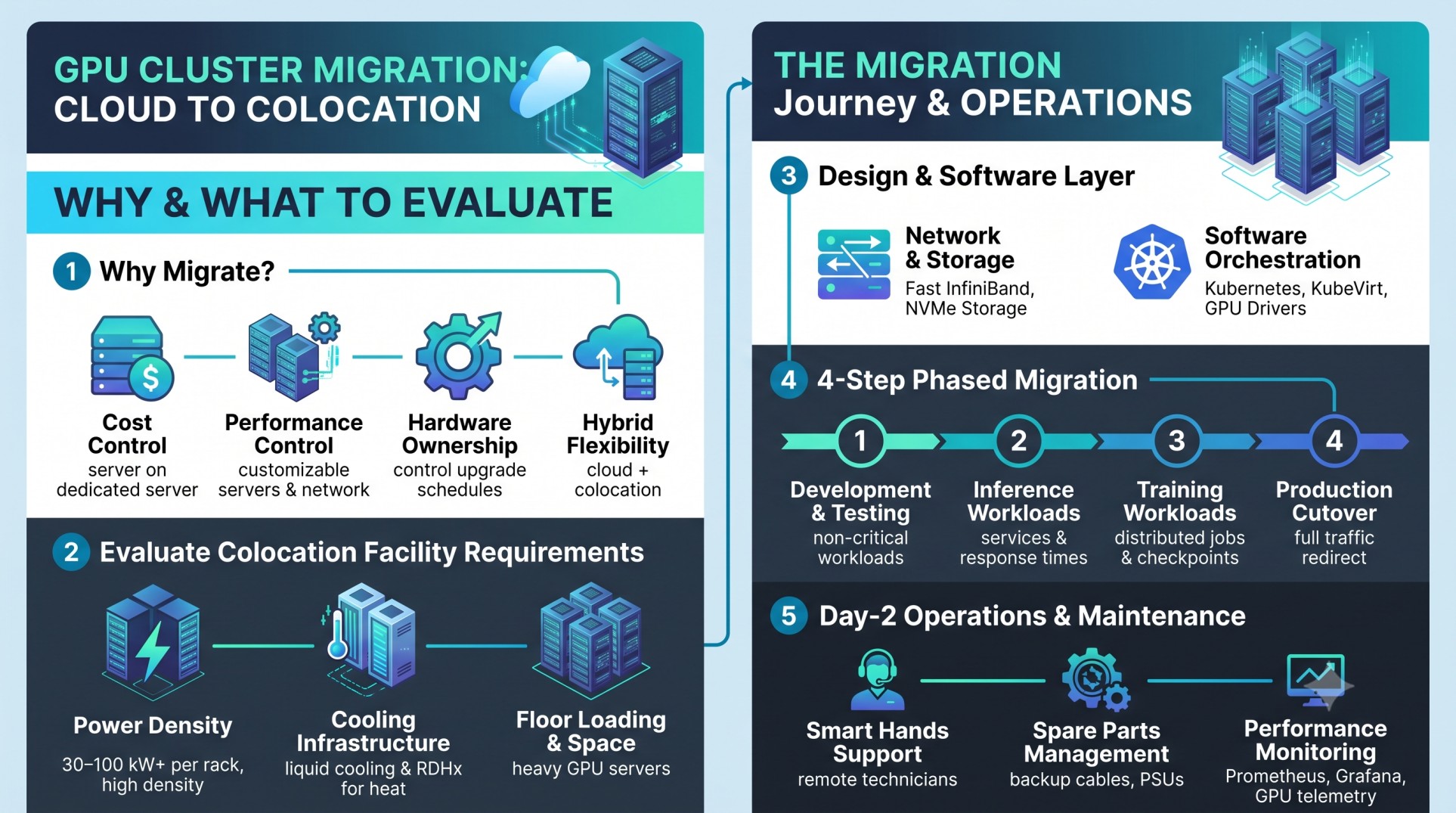
Businesses often start with cloud hosting to access GPU resources quickly. However, large AI workloads can increase monthly costs through compute hours, storage, and data transfer. Colocation offers an alternative for organizations that want to own and manage their GPU hardware.
- Cost control: Dedicated hardware may reduce long-term costs for predictable, continuous workloads.
- Performance control: Businesses can customize GPU servers, storage, and networking.
- Hardware ownership: Organizations control GPU configurations and upgrade schedules.
- Infrastructure flexibility: A hybrid setup lets businesses keep selected applications in the cloud while running GPU-intensive workloads in colocation.
Compare hardware investment, electricity, cooling, maintenance, and connectivity costs before deciding. Colocation does not automatically cost less for every workload.
1. Evaluate Colocation Facility Requirements
GPU clusters, including systems using NVIDIA H100, H200, or B200 GPUs, require specialized infrastructure. Confirm that your chosen data center can support your hardware.
Power Density
Conventional racks may provide around 5–10 kW, while dense GPU deployments can require 30–100 kW or more per rack. Actual requirements depend on the server configuration. Check power capacity, redundant feeds, backup systems, and power distribution units (PDUs).
Cooling Infrastructure
High-performance GPUs generate significant heat. Air cooling may not be sufficient for every high-density deployment. Look for suitable options such as rear-door heat exchangers (RDHx) or direct-to-chip liquid cooling. Confirm cooling capacity and compatibility with your server models.
Floor Loading and Rack Space
GPU servers can be considerably heavier than conventional servers. Check floor load-bearing capacity, rack dimensions, cable routing, and installation requirements before moving equipment.
2. Design the Physical and Network Architecture
Cloud platforms abstract much of the underlying networking. In colocation, you must plan the physical network to maintain performance across GPU nodes.
Backend Network for GPU Communication
Distributed AI training requires fast communication between GPU servers. Consider InfiniBand or RoCEv2 (RDMA over Converged Ethernet), depending on workload requirements and hardware compatibility. Design for throughput, latency, congestion management, and redundancy, then test performance before production migration.
Frontend Connectivity
Use redundant network connections and appropriate upstream providers to reduce connectivity risks. Additionally, consider hybrid connectivity if applications, databases, or storage systems will remain in the cloud. Private connectivity services or supported network exchange providers may be suitable.
High-Performance Storage
GPU workloads need fast access to training datasets and model checkpoints. Evaluate parallel file systems, NVMe storage, and NVMe over Fabrics (NVMe-oF). Place storage close to the GPU cluster and test read/write throughput against workload requirements.
3. Establish the Software and Orchestration Layer
A successful migration requires more than moving physical servers. You must also recreate the software environment that supports development, training, and inference.
Containerization and Cluster Management
Use containers to package applications and dependencies consistently. Kubernetes can orchestrate containerized workloads across GPU nodes. If your environment requires virtual machines, evaluate a compatible platform such as KubeVirt.
GPU Drivers and Provisioning
Install compatible GPU drivers, CUDA components, and vendor management tools. The NVIDIA GPU Operator can help automate driver management, device discovery, and monitoring in supported Kubernetes environments. Use tools such as Ansible or suitable bare-metal provisioning platforms to standardize operating system deployment, firmware configuration, and updates.
Before migration, test application compatibility, GPU visibility, container images, security policies, and job scheduling.
4. Execute Data and Workload Migration
Data transfer is often one of the most challenging stages of GPU cluster migration. Large training datasets, model files, and checkpoints require careful planning.
Choose the Right Data Transfer Strategy
For smaller datasets, a dedicated network connection or encrypted transfer may be sufficient. Larger datasets may require parallel transfer tools, temporary storage, or physical data transfer appliances where available. Estimate transfer time using available bandwidth and expected throughput. Verify data integrity after every transfer.
Follow a Phased Migration Approach
- Development and testing: Move non-critical workloads first and validate the new environment.
- Inference workloads: Migrate suitable inference services and monitor response times, throughput, and availability.
- Training workloads: Move distributed training jobs after validating GPU communication, storage performance, and checkpoint recovery.
- Production cutover: Redirect production traffic after successful testing and stakeholder approval.
Keep the cloud environment available during the transition when practical. Establish a rollback plan in case the new environment fails acceptance tests.
5. Plan for Day-2 Operations and Maintenance
After migration, your team must maintain the hardware, software, and infrastructure throughout its operational life.
Smart Hands Support
Choose a Server Colocation provider that offers remote hands or smart hands support. Depending on the agreement, technicians may assist with physical reboots, cable replacements, equipment installation, and basic troubleshooting.
Spare Parts Management
Maintain an inventory of critical components, including cables, power supplies, fans, and compatible replacement hardware. Define replacement procedures and escalation paths with your hardware vendor and colocation provider.
Monitoring and Performance Management
Use Prometheus and Grafana to track system performance. NVIDIA Data Center GPU Manager (DCGM) can provide GPU telemetry in supported environments. Monitor GPU utilization, temperature, power consumption, memory usage, network throughput, storage latency, and hardware errors. Set alerts to identify problems before they disrupt workloads.
6. Common Challenges During GPU Cluster Migration
Planning for common issues helps reduce downtime and performance problems.
|
Challenge |
Recommended approach |
|
Unexpected infrastructure costs |
Prepare a total cost of ownership estimate. |
|
Insufficient power or cooling |
Validate requirements with the facility before deployment. |
|
Slow dataset transfers |
Benchmark network throughput and schedule transfers. |
|
Software incompatibility |
Test drivers, libraries, containers, and dependencies. |
|
Network bottlenecks |
Benchmark GPU-to-GPU communication. |
|
Extended downtime |
Use phased migration and a tested rollback plan. |
Conclusion
Migrating GPU clusters from cloud hosting to colocation data centers requires careful planning, infrastructure validation, and workload testing. Businesses should evaluate power density, cooling, networking, storage, software orchestration, and ongoing maintenance before beginning the process.
Server Colocation in India can provide a suitable environment for organizations that need greater control over GPU hardware and predictable access to dedicated infrastructure. Nevertheless, the right choice depends on workload patterns, operational capabilities, and total cost of ownership. By following a phased migration strategy, businesses can reduce transition risks, maintain application reliability, and build a scalable foundation for AI training, inference, and other GPU-intensive workloads.
Recent Post



Stay Ahead of the Curve.
Join the Cloud Movement, today!
Send this to a friend