Get 69% Off on Cloud Hosting : Claim Your Offer Now!





- Products
- Solutions
-
Solutions
-
 Cloud
Hosting
Cloud
Hosting
-
VPS
Hosting
-
 GPU
Cloud
GPU
Cloud
-
 Dedicated
Server
Dedicated
Server
-
 Server
Colocation
Server
Colocation
-
 Backup as a Service
-
 CDN
Network
CDN
Network
-
 Window
Cloud Hosting
Window
Cloud Hosting
-
 Linux
Cloud Hosting
Linux
Cloud Hosting
-
Managed
Cloud Service
-
 Storage
as a Service
Storage
as a Service
-
VMware
Public Cloud
-
Multi-Cloud
Hosting
-
Cloud
Server Hosting
-
Bare
Metal Server
-
Virtual
Machine
-
 Magento
Hosting
Magento
Hosting
-
 Remote
Backup
Remote
Backup
-
 DevOps
-
 Kubernetes
-
 Cloud
Storage
Cloud
Storage
-
 NVMe
Hosting
NVMe
Hosting
-
 DR
as s Service
DR
as s Service
-
-
Solutions
- Marketplace
- Pricing
- Resources
- Company
 Remote
Backup
Remote
Backup NVMe
Hosting
NVMe
Hosting Pricing
Calculator
Pricing
Calculator Unlock Cost
Optimization
Unlock Cost
Optimization Overview
 Documentation
 Price
Calculator
Price
Calculator Tools
Tools FAQs
FAQs Terms
of Service
Terms
of Service Privacy
Policy
Privacy
Policy
 Migration
 Container
 Power
Power
 Utilities
 VMware
Private Cloud
VMware
Private Cloud VMware
on AWS
VMware
on AWS VMware
on Azure
VMware
on Azure Certifications
 Partners
 Careers
 Support
 Service
Level Agreement
Service
Level Agreement  Contact
Table of Contents
- What is GPU-accelerated cloud hosting?
- Why AI workloads need specialised compute
- GPU architecture and AI performance
- How GPU cloud supports the AI lifecycle
- Major AI workloads supported
- GPU cloud deployment models
- Technical considerations before choosing GPU cloud hosting
- Cost and efficiency considerations
- Security and governance
- CPU-focused cloud vs GPU-accelerated cloud
- GPU-accelerated AI infrastructure with Cyfuture Cloud
Modern AI systems do not just store and retrieve data—they repeatedly perform massive volumes of mathematical operations across large datasets. Training a language model, running computer-vision inference, or simulating a physical system can require parallel matrix and tensor calculations at a scale that conventional CPU-only infrastructure struggles to serve economically.
GPU-accelerated cloud hosting gives organisations access to specialised accelerator capacity without buying, housing, powering, cooling, and maintaining physical GPU servers. Instead of treating AI compute as a fixed capital asset, teams can provision GPU instances for experiments, training runs, fine-tuning, inference, and high-performance computing (HPC) workloads as demand changes.
What is GPU-accelerated cloud hosting?
GPU-accelerated cloud hosting is cloud infrastructure that combines virtualised or dedicated compute resources with GPUs or other accelerators, along with the networking, storage, software, orchestration, monitoring, and security required to run demanding workloads.
A useful way to understand it is as a complete AI execution environment rather than “a virtual machine with a GPU attached.” A production-ready GPU cloud environment typically includes:
- GPU or accelerator capacity, either shared, dedicated, or clustered.
- Host CPUs, system memory, and local or network-attached storage.
- High-bandwidth networking for data movement and multi-GPU communication.
- GPU drivers, CUDA or equivalent runtime environments where applicable, containers, and AI frameworks.
- Scheduling, orchestration, monitoring, identity controls, and operational support.
- Console, API, or CLI-based access for provisioning and managing resources.
The distinction matters because GPUs require workload-aware infrastructure. Kubernetes, for example, exposes GPUs as schedulable resources through vendor device plugins; teams request GPUs in container specifications much as they request CPU or memory. Driver versions, CUDA compatibility, container images, storage throughput, and network topology can all affect whether a GPU instance performs well in practice.
GPU cloud infrastructure is therefore not uniform. Two platforms offering the same GPU model may deliver different results depending on VRAM, host configuration, interconnect, virtualisation overhead, storage performance, network design, and the software stack.
Why AI workloads need specialised compute
A CPU is designed for broad, general-purpose computing. It typically has a smaller number of powerful cores suited to operating systems, databases, application logic, transaction processing, and varied sequential tasks.
A GPU is designed differently. It contains many smaller processing units that can execute similar operations across large datasets simultaneously. This architecture is well suited to AI, where models repeatedly perform operations such as matrix multiplication, vector calculations, tensor operations, convolutions, and attention mechanisms.
A simplified conceptual model is:
AI workload performance≈parallel compute capacity+memory bandwidth+data movement efficiency
This is not a universal performance formula. Real-world performance also depends on model architecture, batch size, precision, data pipeline efficiency, GPU memory capacity, interconnect bandwidth, and software optimisation.
AI models are computationally dense because training and inference involve processing large tensors. During training, the system performs forward passes, calculates loss, propagates errors backwards through the network, and updates model parameters. These operations can often be divided into thousands or millions of independent calculations, making them a strong fit for parallel GPU execution. NVIDIA describes CUDA as a parallel-computing platform that uses the many cores in a GPU for general-purpose mathematical calculation.
GPU architecture and AI performance
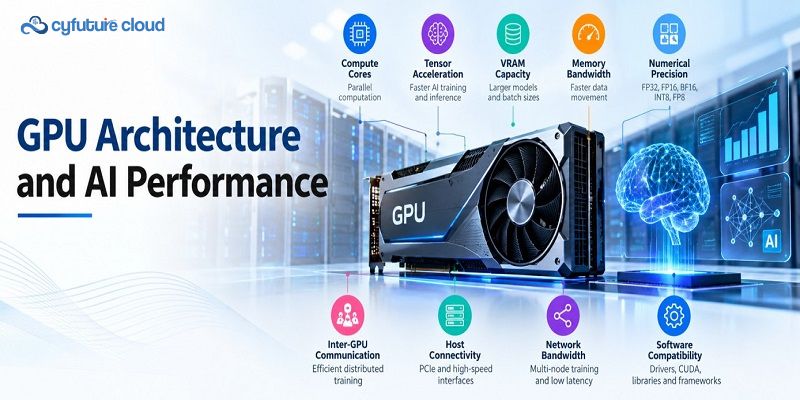
When evaluating GPU servers for AI, teams should look beyond headline compute figures. Several hardware and software characteristics determine whether a GPU instance is appropriate for a workload:
- Compute cores or streaming multiprocessors: Influence how much parallel computation the accelerator can execute.
- Tensor or matrix acceleration units: Particularly relevant for deep-learning training and inference.
- VRAM capacity: Determines the model size, batch size, context length, and amount of data that can reside close to the GPU.
- Memory bandwidth: Affects how quickly data moves between GPU memory and processing units.
- Numerical precision: FP32, FP16, BF16, INT8, and FP8—where supported—offer different trade-offs between throughput, memory use, and numerical accuracy.
- Inter-GPU communication: Important for distributed training and large-model inference.
- Host connectivity: PCIe or other host interfaces affect GPU-to-CPU and GPU-to-storage data transfer.
- Network bandwidth and latency: Critical for multi-node training and distributed inference.
- Software compatibility: Drivers, CUDA versions, containers, libraries, and frameworks must align with the workload.
Lower-precision formats can improve throughput and reduce memory consumption, but they must be managed carefully to avoid accuracy degradation. Mixed-precision training combines numerical formats: it uses lower-precision operations where appropriate while retaining higher-precision information for critical parts of the network, such as weight updates and gradient handling.
How GPU cloud supports the AI lifecycle
GPU-accelerated cloud hosting is most valuable when it supports the full AI lifecycle—not only the final model-training stage.
Data preparation
AI projects begin with data ingestion, cleaning, transformation, labelling, feature engineering, and validation. CPUs remain essential for orchestration, databases, application logic, and many preprocessing tasks. GPUs can accelerate selected data-processing operations, especially image processing, video processing, embedding generation, and large-scale numerical transformations.
Fast storage and efficient data pipelines are equally important. A powerful GPU can be underutilised if it waits for data to arrive from slow storage or a poorly designed network path.
Model development
Data scientists and ML engineers need isolated environments for experimentation: notebooks, containers, dependency management, version control, and reproducible framework configurations.
Cloud GPU instances allow teams to test different model architectures, hyperparameters, datasets, and inference strategies without waiting for scarce on-premises hardware. This is particularly useful during prototyping, where compute needs are variable and experiments may be short-lived.
Model training
Training is one of the most compute-intensive stages of the AI lifecycle. A training job repeatedly processes batches of data, calculates predictions, measures error, computes gradients, and updates model weights.
GPU acceleration can reduce training time for parallelisable workloads, especially deep-learning models. For large models, teams may require multiple GPUs and distributed-training techniques. In these cases, GPU-to-GPU communication, cluster topology, network performance, and scheduling become as important as raw GPU performance.
Fine-tuning
Fine-tuning adapts a pre-trained model to a specific domain, product, language, or task. Instead of training a model from scratch, teams start with existing model weights and adjust them using task-specific data.
Common approaches include:
- Supervised fine-tuning: Training on labelled examples for a defined task.
- Parameter-efficient fine-tuning: Updating a small subset of parameters rather than the entire model.
- Low-rank adaptation (LoRA): Adding compact trainable components to reduce the compute and memory footprint of adaptation.
The right approach depends on model size, data availability, quality requirements, latency targets, and budget. GPU cloud hosting is useful here because teams can scale capacity up for intensive adaptation work and release it when the task is complete.
Inference
Inference is the stage where a trained model generates a prediction, classification, embedding, recommendation, image, or response. It is often the workload that directly affects user experience.
Key inference considerations include:
- Latency: Time taken to return a single response.
- Throughput: Number of requests or tokens processed over time.
- Concurrency: Number of simultaneous users or requests.
- Batching: Grouping requests to improve GPU utilisation.
- Memory capacity: Determines model size, context length, and concurrent sessions.
- Autoscaling: Adds or removes GPU capacity as traffic changes.
A GPU cloud for inference is particularly relevant for demanding or latency-sensitive applications, such as generative AI assistants, real-time vision systems, speech interfaces, and recommendation engines. Smaller or lightweight models may still run efficiently on CPU infrastructure.
Production deployment
Moving a model into production requires more than deploying a trained file. Teams need model serving, API integration, containers, orchestration, monitoring, version control, rollback capability, security controls, cost management, and reliability planning.
Kubernetes is commonly used for this purpose. Its device-plugin framework allows GPUs to be advertised and scheduled as cluster resources, while vendor tooling can support GPU sharing mechanisms such as time-slicing where appropriate. Production teams should also separate development, staging, and production environments to reduce risk and control costs.
Major AI workloads supported
GPU-accelerated cloud hosting supports a broad range of AI and compute-intensive workloads. However, not every workload needs a GPU; suitability depends on model size, dataset scale, latency requirements, concurrency, software compatibility, and cost constraints.
| Workload | Why GPU acceleration can help |
| Large language models | Training, fine-tuning, and inference involve large tensor operations and high memory requirements. |
| Generative AI | Text, image, audio, and video generation rely on parallel model computation and fast inference. |
| Retrieval-augmented generation (RAG) | Combines embeddings, vector search, and language-model inference; GPU capacity can help with embedding and generation stages. |
| Computer vision | Image classification, object detection, segmentation, and video analytics use convolutional and transformer-based models. |
| Speech recognition and synthesis | Real-time transcription and voice generation benefit from low-latency parallel inference. |
| Recommendation systems | Large-scale embedding, ranking, and personalisation workloads can benefit from GPU acceleration. |
| Fraud detection | Real-time scoring and pattern recognition may require low-latency inference at high concurrency. |
| Predictive analytics | GPU acceleration can support large-scale model training and complex feature processing. |
| Digital twins and simulation | Physical, engineering, and operational simulations often involve parallel numerical computation. |
| Scientific computing | Research workloads such as computational chemistry, genomics, climate modelling, and physics simulations can use GPU acceleration. |
| 3D rendering and visualisation | Rendering, ray tracing, and visual simulation benefit from massively parallel processing. |
| High-performance computing | Scientific and engineering HPC workloads often require dense parallel computation and fast interconnects. |
GPU cloud deployment models
Organisations can consume GPU capacity in several ways. The right model depends on workload duration, sensitivity, predictability, isolation requirements, and operational maturity.
On-demand GPU instances
On-demand GPU computing is well suited to experiments, development environments, short-term training, prototyping, burst workloads, and variable demand. Teams provision capacity when required and release it when the workload finishes.
Usage-based billing can improve flexibility, but it is not automatically cheaper. A long-running, highly predictable workload may be more cost-effective with reserved capacity or a dedicated environment, depending on the provider’s pricing model and the workload’s utilisation.
Dedicated GPU servers or clusters
Dedicated GPU servers or clusters provide more predictable capacity and stronger isolation. They can suit continuous training, high-throughput inference, regulated workloads, data-sensitive applications, and teams that need consistent access to a defined hardware configuration.
This model reduces some of the variability associated with shared infrastructure but requires more capacity planning and operational responsibility.
Managed GPU infrastructure
Managed GPU infrastructure shifts more of the operational burden to the cloud provider. Depending on the service, management may include architecture planning, GPU selection, networking design, storage configuration, driver and software setup, cluster deployment, monitoring, maintenance, and technical support.
This approach can be valuable for teams that want to focus on models and products rather than accelerator operations. It is especially relevant where internal GPU, networking, or MLOps expertise is limited.
Hybrid CPU-GPU infrastructure
Most AI systems need both CPUs and GPUs. CPUs handle orchestration, APIs, databases, preprocessing, application logic, security controls, and data movement. GPUs handle the parallel computation at the core of model training and inference.
A typical pipeline looks like this:
Data ingestion→CPU preprocessing→GPU training or inference→CP
Designing the CPU and GPU layers together helps avoid bottlenecks. For example, a high-performance GPU may remain idle if storage, network, or preprocessing cannot supply data quickly enough.
Technical considerations before choosing GPU cloud hosting
The best GPU environment is not necessarily the one with the highest theoretical performance. It is the one that matches the workload, software stack, memory requirement, latency target, and operating model.
Before selecting GPU cloud infrastructure, evaluate:
- GPU model and accelerator capability.
- VRAM capacity and memory bandwidth.
- Supported precision formats.
- Number of GPUs required per instance or job.
- GPU-to-GPU interconnect and multi-node networking.
- Host CPU capacity and system memory.
- Storage performance, capacity, and data-transfer requirements.
- Container, Kubernetes, and orchestration support.
- Framework, driver, CUDA, and library compatibility.
- Security, compliance, tenancy, and isolation requirements.
- Monitoring, logging, and observability.
- Availability, redundancy, and regional data location.
- Pricing model, provisioning time, scaling options, and technical support.
For Kubernetes-based deployments, confirm that GPU drivers, device plugins, container runtimes, and scheduling policies are supported end to end. Kubernetes uses device plugins to expose specialised hardware such as GPUs to workloads, and vendor plugins make GPUs available as schedulable resources.
Cost and efficiency considerations
GPU cloud costs are broader than the hourly price of a GPU instance. A realistic cost model should include:
- GPU usage.
- CPU, RAM, and local storage.
- Persistent volumes and object storage.
- Data transfer and networking services.
- Managed services and support.
- Software licences, where applicable.
- Idle capacity.
- Engineering and operational overhead.
A useful planning metric is:
Effective cost=Infrastructure and operating cost/ Completed training runs, inferences, or useful outputs
This is a planning metric rather than a universal pricing formula. Two teams may pay similar hourly rates for GPU capacity but achieve very different effective costs depending on utilisation, batching, model efficiency, and workflow design.
Practical efficiency techniques include:
- Right-sizing GPU instances to the workload.
- Autoscaling inference capacity.
- Scheduling training jobs and shutting down idle resources.
- Separating development and production environments.
- Using checkpointing to protect long-running training jobs.
- Applying mixed precision where accuracy requirements allow.
- Using model quantisation where appropriate for inference.
- Optimising batching and concurrency.
- Considering interruptible or spot capacity only for fault-tolerant workloads.
Cyfuture Cloud describes its GPU-as-a-Service model as usage-based, with GPU instances that include associated vCPU, RAM, and storage resources; its documentation also notes that idle instances can continue to accrue charges, making autoscaling and resource management important.
Security and governance
AI infrastructure security must extend beyond the underlying cloud environment. Datasets, model weights, APIs, notebooks, containers, credentials, and user access all require protection.
Key controls include:
- Identity and access management with least-privilege access.
- Network segmentation and private networking where appropriate.
- Encryption for data in transit and at rest.
- Secure API gateways and authenticated model endpoints.
- Secrets management for API keys, tokens, and credentials.
- Logging, monitoring, and auditability.
- Vulnerability management for containers, drivers, and AI libraries.
- Tenant isolation and workload separation.
- Data-residency and compliance controls.
- Granular access controls for datasets, model artefacts, and inference APIs.
For regulated sectors, governance should also cover data lineage, model versioning, access reviews, incident response, and documentation of how models are trained, evaluated, and deployed.
CPU-focused cloud vs GPU-accelerated cloud
| Requirement | CPU-focused cloud | GPU-accelerated cloud |
| General application workloads | Strong fit | May be unnecessary |
| Parallel AI computation | Limited for many workloads | Strong fit |
| Model training | Often slower for large workloads | Designed for acceleration |
| AI inference | Suitable for smaller or lightweight models | Useful for demanding or latency-sensitive models |
| Cost model | Usually lower per instance | Higher per instance but potentially faster for suitable workloads |
| Best use case | Web apps, databases, orchestration, general compute | Training, inference, simulation, rendering, and HPC |
Actual performance varies by workload, software stack, batch size, model architecture, and infrastructure configuration. GPUs do not universally outperform CPUs; they are most valuable when a workload can exploit parallelism effectively.
GPU-accelerated AI infrastructure with Cyfuture Cloud
Cyfuture Cloud provides GPU-powered cloud solutions designed for AI, machine learning, deep learning, data science, analytics, and high-performance computing workloads. Its GPU rental guidance describes access to cloud-based GPU resources for model training, testing, simulation, and inference without purchasing physical GPU hardware.
Cyfuture’s NVIDIA GPU Cloud offering is positioned for AI, deep learning, and HPC workloads, with GPU server hosting, on-demand resources, and flexible billing described on its service page. Cyfuture Cloud also describes managed cloud services that include infrastructure management, monitoring, updates, and security support.
For organisations building AI products, Cyfuture Cloud can support:
- AI development and experimentation.
- Model training and distributed compute-intensive workloads.
- Fine-tuning of foundation and domain-specific models.
- Inference and model serving.
- Generative AI applications.
- Computer vision, NLP, speech, and recommendation workloads.
- Scientific computing, simulation, digital twins, rendering, and HPC.
The right GPU environment depends on the workload. At Cyfuture Cloud, the focus should be on aligning accelerator capacity, memory, networking, storage, orchestration, and operational support with the customer’s actual AI requirements—not simply selecting the most powerful GPU available.
Recent Post













Stay Ahead of the Curve.
Join the Cloud Movement, today!
Send this to a friend