Get 69% Off on Cloud Hosting : Claim Your Offer Now!


- Products
- Solutions
-
Solutions
-
 Cloud
Hosting
-
VPS
Hosting
-
 GPU
Cloud
-
 Dedicated
Server
-
 Server
Colocation
-
 Backup as a Service
-
 CDN
Network
-
 Window
Cloud Hosting
-
 Linux
Cloud Hosting
-
Managed
Cloud Service
-
 Storage
as a Service
-
VMware
Public Cloud
-
Multi-Cloud
Hosting
-
Cloud
Server Hosting
-
Bare
Metal Server
-
Virtual
Machine
-
 Magento
Hosting
-
 Remote
Backup
-
 DevOps
-
 Kubernetes
-
 Cloud
Storage
-
 NVMe
Hosting
-
 DR
as s Service
-
-
Solutions
- Marketplace
- Pricing
- Resources
- Company
 Remote
Backup
 NVMe
Hosting
 Pricing
Calculator
 Unlock Cost
Optimization
 Overview
 Documentation
 Price
Calculator
 Tools
 FAQs
 Terms
of Service
 Privacy
Policy
 Migration
 Container
 Power
 Utilities
 VMware
Private Cloud
 VMware
on AWS
 VMware
on Azure
 Certifications
 Partners
 Careers
 Support
 Service
Level Agreement
 Contact
Table of Contents
- What fully managed cloud hosting means
- What managed hosting may include
- Availability, downtime, and reliability terminology
- Types of downtime
- SLAs, SLOs, SLIs, and error budgets
- RTO and RPO: Recovery targets that matter
- Why downtime is costly for enterprises
- Architecture for high availability
- Managed operations and automation
- Key observability signals
- Service-level indicators
- Alerting
- Security and compliance
- Disaster recovery and business continuity
- Capacity, performance, and cost management
- How Cyfuture Cloud helps enterprises meet availability and SLA goals
- Practical implementation framework
- Realistic expectations: Zero downtime as a design goal
- FAQs
- What is fully managed cloud hosting?
- Can managed cloud hosting guarantee zero downtime?
- What is the difference between an SLA, SLO, SLI, and error budget?
- What is the difference between RTO and RPO?
- How does managed cloud hosting improve application availability?
- How often should enterprises test disaster recovery?
- What should enterprises look for in a cloud SLA?
- How does Cyfuture Cloud support managed cloud hosting?
- Conclusion
“Zero downtime” is not a feature that can be switched on. It is an engineering and operational objective that depends on resilient architecture, automated operations, observability, capacity planning, incident response, and continuous testing.
Fully managed cloud hosting can help enterprises reduce the probability, duration, and business impact of outages. Cyfuture Cloud offers managed cloud services, autoscaling, load balancing, backup and disaster-recovery services, real-time monitoring and logging, and 24×7 support.
But no infrastructure can eliminate every possible failure scenario. External dependencies fail, human error occurs, maintenance is sometimes necessary, and recovery takes time. The practical objective is to design systems that detect failures quickly, limit their impact, recover automatically where possible, and restore service within agreed business tolerances.
What fully managed cloud hosting means
Fully managed cloud hosting shifts significant operational responsibility from the customer to the cloud provider. Instead of managing every layer of infrastructure internally, an enterprise can use provider-operated capabilities for provisioning, monitoring, maintenance, support, and recovery.
“Fully managed” does not mean the provider takes responsibility for every business outcome. The exact division of responsibility depends on the service model, contract, and deployment architecture.
What managed hosting may include
Depending on the service and agreement, fully managed cloud hosting may include:
- Infrastructure provisioning.
- Server and storage management.
- Network configuration.
- Operating-system patching.
- Security monitoring.
- Backup and recovery.
- Performance monitoring.
- Capacity planning.
- Incident detection and response.
- Platform upgrades.
- Technical support.
- Compliance support, where applicable.
Cyfuture Cloud lists managed cloud services including real-time monitoring and logging, infrastructure maintenance and optimisation, application and database performance services, security managed services, backup as a service, data backup and restore, remote backup, and disaster recovery.
Managed hosting does not remove the need for good application architecture, testing, access control, and operational governance. It reduces operational complexity, but it does not replace engineering discipline.
Availability, downtime, and reliability terminology
Availability is the proportion of time a service is usable when users need it.
Availability=Total operational time−downtimeTotal operational time×100
For a 365-day year, availability targets translate into the following maximum annual downtime:
|
Availability target |
Maximum annual downtime |
Practical implication |
|
99% |
3 days 15 hours 39 minutes |
Suitable for non-critical workloads |
|
99.9% |
8 hours 45 minutes 57 seconds |
Suitable for many business applications |
|
99.95% |
4 hours 22 minutes 48 seconds |
Suitable for important customer-facing services |
|
99.99% |
52 minutes 35 seconds |
Requires strong redundancy and automation |
|
99.999% |
5 minutes 15 seconds |
Requires advanced architecture and disciplined operations |
These calculations use a 365-day year. Availability targets must account for planned maintenance, failures, human error, and recovery time.
Types of downtime
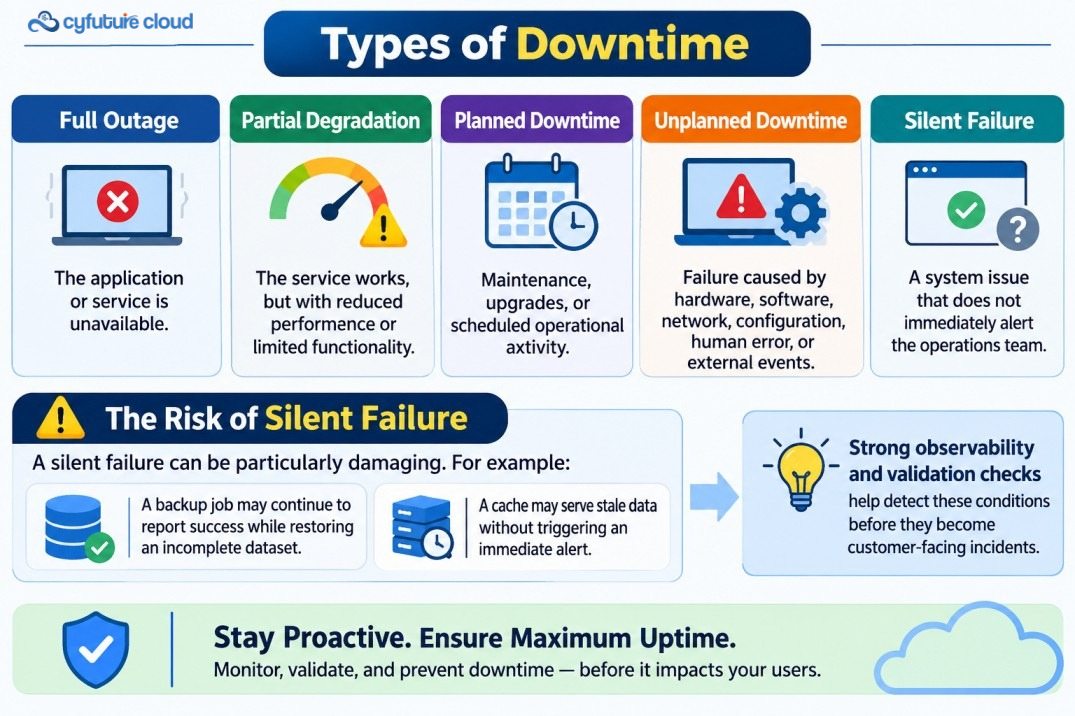
- Full outage: The application or service is unavailable.
- Partial degradation: The service works, but with reduced performance or limited functionality.
- Planned downtime: Maintenance, upgrades, or scheduled operational activity.
- Unplanned downtime: Failure caused by hardware, software, network, configuration, human error, or external events.
- Silent failure: A system issue that does not immediately alert the operations team.
A silent failure can be particularly damaging. For example, a backup job may continue to report success while restoring an incomplete dataset, or a cache may serve stale data without triggering an immediate alert. Strong observability and validation checks help detect these conditions before they become customer-facing incidents.
SLAs, SLOs, SLIs, and error budgets
An SLA is a contractual commitment between a provider and customer. It may cover availability, support response, credits, exclusions, and escalation procedures.
An SLO is an internal reliability target for a service. An SLI is a measurable indicator of service performance, such as successful-request ratio, latency, or error rate.
An error budget is the permissible amount of unreliability before an SLO is breached:
Error budget=1−SLO
For a 99.95% availability SLO, the error budget is 0.05%, or approximately 4 hours 22 minutes per year.
An SLA is a business agreement. SLOs and SLIs are operational tools used to manage reliability. A provider may meet its infrastructure SLA while an application still misses its business SLO because of an application defect, a database bottleneck, a third-party API failure, or an internal deployment error.
Example
A customer-facing API has an internal SLO of 99.95% successful requests over 30 days. If the API handles 10 million requests in that period, the error budget permits approximately 5,000 failed requests. Engineering teams can use this budget to decide when to slow feature releases, prioritise reliability work, or investigate emerging risks.
RTO and RPO: Recovery targets that matter
Recovery Time Objective (RTO) is the maximum acceptable time to restore a service after disruption.
Recovery Point Objective (RPO) is the maximum acceptable amount of data loss, measured in time.
If a business sets an RTO of 15 minutes and an RPO of five minutes, it expects the service to be restored within 15 minutes and to lose no more than five minutes of data.
RTO and RPO must be realistic, tested, and aligned with the criticality of each workload. A payment platform may require a much tighter RTO and RPO than an internal reporting dashboard. A recovery target that has not been tested is an assumption, not a capability.
Why downtime is costly for enterprises
Downtime affects more than server availability. It can disrupt revenue, operations, customer trust, regulatory obligations, and engineering delivery.
Potential business impacts include:
- Lost revenue from unavailable transactions or services.
- Reduced employee productivity.
- Poor customer experience and support escalation.
- Damage to brand trust.
- Regulatory and contractual risk.
- Increased operational costs.
- Delayed product releases.
- Data-loss risk.
- SLA penalties or service credits.
The financial impact of downtime varies substantially by industry, business model, customer contract, time of day, and duration. Enterprises should calculate downtime cost using their own transaction volume, average order value, workforce productivity, contractual commitments, and customer-impact data—not generic industry estimates.
Architecture for high availability
High availability begins with architecture, not monitoring alone. Monitoring can detect a failure, but architecture determines whether the service can continue operating despite it.
Redundancy
Redundancy is the use of additional components or capacity to prevent a single failure from affecting the service.
Redundant components may include:
- Redundant compute nodes.
- Multiple availability zones.
- Multiple regions, where appropriate.
- Redundant network paths.
- Redundant power supplies.
- Redundant storage.
- Redundant load balancers.
- Redundant databases or database clusters.
Redundancy must be designed around realistic failure scenarios, including correlated failures. Two application nodes in the same rack, connected to the same network path, may not provide meaningful redundancy for certain failure modes.
Load balancing
A load balancer distributes incoming traffic across healthy application instances. Cyfuture Cloud describes its load-balancer service as helping ensure that applications deployed across cloud environments remain available, secure, and responsive.
Load balancing may include:
- Layer 4 load balancing: Routes traffic based on network-layer information such as IP address and port.
- Layer 7 load balancing: Routes traffic based on application-layer information such as HTTP headers, URLs, or cookies.
- Health checks: Continuously test whether an instance can serve traffic.
- Connection draining: Allows existing requests to complete before removing an instance.
- Session persistence: Directs a user’s related requests to the same backend where required.
- Geographic traffic routing: Directs users to the nearest or most appropriate service location.
- Automatic removal of unhealthy instances: Prevents traffic from reaching failing nodes.
Auto scaling
Auto scaling adjusts compute capacity based on demand. It can scale horizontally by adding instances, or vertically by increasing CPU, memory, or storage capacity.
Cyfuture Cloud offers autoscaling and auto-provisioning tools, and describes autoscaling as allocating additional CPU and RAM when load rises and releasing resources when demand falls.
Effective auto scaling requires:
- Horizontal scaling policies.
- Vertical scaling where appropriate.
- Scale-out and scale-in policies.
- CPU, memory, request-rate, queue-depth, and custom metrics.
- Warm-up periods for newly launched instances.
- Scaling limits to control cost and capacity.
- Capacity planning for sudden demand spikes.
Auto scaling is not a substitute for capacity planning. A scaling policy that reacts only after saturation may be too late for a sudden traffic spike.
Stateless application design
A stateless application does not retain essential user or session data on the compute instance itself. Instead, it stores persistent data in external databases, caches, queues, and object storage.
Stateless design makes it easier to:
- Replace failed instances quickly.
- Scale horizontally.
- Deploy updates without losing session state.
- Recover from node-level failures.
- Use autoscaling effectively.
Cyfuture Cloud offers Kubernetes, microservices, autoscaling, object storage, databases, Redis Cache, and load-balancing services that can support this type of architecture.
Data resilience
Application availability is incomplete without data resilience. A service can recover quickly, but it may still cause business harm if it loses recent transactions or corrupts critical data.
Data-resilience controls include:
- Replication.
- Snapshots.
- Backups.
- Point-in-time recovery.
- Database failover.
- Read replicas.
- Storage redundancy.
- Backup encryption.
- Backup retention.
- Backup testing.
- Immutable or logically isolated backups, where appropriate.
Backups are not a disaster-recovery strategy unless they are regularly tested and can be restored within the required RTO and RPO. Cyfuture Cloud offers backup as a service, data backup and restore, remote backup, and disaster-recovery services.
Managed operations and automation
Managed cloud hosting should reduce manual operational burden through automation. Automation improves consistency, reduces configuration drift, and makes recovery more repeatable.
Infrastructure as Code
Infrastructure as Code (IaC) is the practice of defining infrastructure through version-controlled configuration files.
IaC supports:
- Repeatable deployments.
- Environment consistency.
- Change tracking.
- Faster recovery.
- Reduced configuration drift.
- Automated provisioning.
When infrastructure is defined as code, teams can recreate environments, review changes before deployment, and restore configurations after an incident.
CI/CD and progressive delivery
Continuous integration (CI) automatically builds and tests code changes. Continuous delivery (CD) automates the process of preparing and releasing validated changes.
Progressive-delivery techniques reduce the risk of a bad release affecting all users:
- Automated testing.
- Staging environments.
- Canary deployments.
- Blue-green deployments.
- Rolling updates.
- Feature flags.
- Automated rollback.
- Deployment windows.
- Change-management controls.
A canary deployment releases a change to a small percentage of traffic first. If error rates, latency, or business metrics remain stable, the release can be expanded gradually.
Patching and lifecycle management
Managed services can help handle security patches, operating-system updates, platform upgrades, dependency updates, firmware updates, maintenance windows, and rollback plans.
However, patching should follow a controlled process, especially for production workloads. Enterprises should validate patches in staging environments, maintain rollback plans, monitor post-deployment behaviour, and coordinate maintenance windows with business stakeholders.
Incident response
Even resilient systems need an incident-response process. A mature process includes:
- Alerting.
- On-call rotations.
- Runbooks.
- Escalation paths.
- Root-cause analysis.
- Post-incident reviews.
- Blameless incident culture.
- Communication protocols.
- Status updates.
- Service restoration.
A runbook should explain how to diagnose a known failure mode, mitigate its impact, restore service, and communicate with stakeholders. It should be tested before it is needed during a major incident.
Observability and monitoring
Monitoring answers whether a system is working. Observability helps teams understand why it is behaving in a particular way.
Cyfuture Cloud offers real-time monitoring and logging services, along with application-performance and database-performance services.
Key observability signals
- Metrics: Numerical measurements such as CPU usage, latency, error rate, and request volume.
- Logs: Time-stamped records of system and application events.
- Traces: End-to-end views of a request as it moves through services.
- Events: Significant system changes or alerts.
Together, these signals help teams identify whether an issue originates in the application, database, network, infrastructure, or an external dependency.
Service-level indicators
Examples of SLIs include:
- Availability ratio.
- Request success rate.
- Error rate.
- Latency percentiles, such as p50, p90, p95, and p99.
- Queue depth.
- Saturation.
- Database connection errors.
- Cache hit ratio.
- API response time.
- Certificate expiry.
- Backup success rate.
Latency percentiles matter because averages can hide tail latency. A service may have an acceptable average response time while a small but important percentage of requests experience unacceptable delays.
Alerting
Alerts should be actionable, prioritised, and linked to runbooks. Avoid alert fatigue by using thresholds, anomaly detection, escalation rules, and alert deduplication.
A useful alert answers three questions: what is affected, what is the likely impact, and what should the responder do first.
Security and compliance
Availability and security are interconnected. A security incident can cause downtime, data loss, regulatory exposure, and reputational damage.
Security controls should include:
- Identity and access management.
- Role-based access control.
- Multi-factor authentication.
- Least-privilege access.
- Network segmentation.
- Firewalls and web application firewalls.
- Encryption in transit and at rest.
- Key management.
- Vulnerability management.
- Endpoint protection.
- Logging and audit trails.
- Backup security.
- Disaster-recovery security.
- Compliance frameworks, where applicable.
Cyfuture Cloud lists security services including WAF, DDoS protection, IPS/IDS, antivirus and anti-malware, SIEM and SOAR, multi-factor authentication, SSL, vulnerability assessment, penetration testing, cloud key management, managed HSM, zero trust, and identity services.
Compliance requirements depend on the customer’s industry, geography, data type, and contractual obligations. A cloud platform can provide security controls and compliance support, but the enterprise remains responsible for implementing and operating controls appropriate to its data and applications.
Disaster recovery and business continuity
Disaster recovery is broader than backup. Backup preserves data; disaster recovery restores the ability to operate.
A disaster-recovery programme should include:
- Business impact analysis.
- Criticality classification.
- RTO and RPO definition.
- Active-active architecture.
- Active-passive architecture.
- Warm standby.
- Cold standby.
- Multi-region recovery.
- Failover testing.
- Chaos engineering.
- Game days.
- Runbook validation.
- Communication plans.
- Vendor and dependency mapping.
An active-active architecture runs workloads in more than one location simultaneously. An active-passive architecture keeps a secondary environment ready to take over if the primary environment fails. A warm standby has partially provisioned capacity, while a cold standby may require more time to provision and restore.
Failover should be tested regularly under realistic conditions. A recovery plan that has never been tested cannot be assumed to work.
Capacity, performance, and cost management
High availability also requires predictable performance and financial discipline. Overprovisioning may improve resilience, but it can increase cost. Underprovisioning may create performance degradation or outages.
Enterprises should manage:
- Right-sizing compute resources.
- Storage tiering.
- Reserved capacity versus on-demand capacity.
- Autoscaling thresholds.
- Cost observability.
- Resource tagging.
- Waste identification.
- Performance baselining.
- Load testing.
- Capacity forecasting.
- Cost-performance trade-offs.
Cyfuture Cloud describes a pay-per-use model, autoscaling, and auto-provisioning tools that can help align capacity with demand.
A practical approach is to maintain sufficient headroom for critical workloads while using autoscaling, storage tiering, and resource tagging to avoid paying for idle capacity.
How Cyfuture Cloud helps enterprises meet availability and SLA goals
Cyfuture Cloud provides managed cloud hosting and infrastructure services that can help enterprises design, deploy, operate, monitor, and scale cloud environments.
Its official cloud-hosting information highlights dedicated vCPU and RAM, NVMe SSD storage, automated failover, a 99.99% uptime SLA, free migration, and 24×7 support.
Cyfuture Cloud also lists capabilities that can support resilient enterprise architectures:
- Managed cloud hosting.
- Cloud infrastructure provisioning.
- Compute, storage, and networking services.
- Backup and disaster-recovery support.
- Monitoring and observability.
- Security controls.
- Managed operations.
- Technical support.
- Capacity planning.
- Migration support.
- Scalable cloud architecture.
- Enterprise-grade infrastructure services.
Specific service capabilities listed by Cyfuture Cloud include autoscaling, Kubernetes, microservices, load balancing, CDN, object storage, database services, Redis Cache, backup as a service, remote backup, disaster recovery, real-time monitoring and logging, WAF, DDoS protection, IPS/IDS, SIEM and SOAR, multi-factor authentication, and cloud key management.
Cyfuture Cloud can act as an infrastructure partner that helps enterprises design resilient cloud environments, reduce operational complexity, and align infrastructure with business-continuity requirements.
Practical implementation framework
Step 1: Classify workloads
Group applications by business criticality, revenue impact, compliance needs, user expectations, and recovery requirements.
For example, a customer-facing checkout service may require tighter availability and recovery targets than an internal analytics dashboard.
Step 2: Define reliability targets
Set realistic SLOs, SLIs, RTOs, and RPOs for each workload. Make these targets measurable, owned by a named team, and reviewed regularly.
Step 3: Design for failure
Use redundancy, isolation, health checks, load balancing, auto scaling, and multi-zone or multi-region architecture where justified. Consider dependencies, data consistency requirements, and failure domains.
Step 4: Automate operations
Use IaC, CI/CD, automated backups, patching workflows, monitoring, and automated recovery procedures. Automation should be version-controlled, tested, and reviewed like application code.
Step 5: Test continuously
Conduct failover tests, backup-restoration tests, load tests, security tests, and disaster-recovery drills. Test the full recovery path, including DNS, networking, databases, application services, and third-party integrations.
Step 6: Measure and improve
Review SLIs, error budgets, incidents, alerts, capacity trends, and cost data. Use findings to improve architecture, operational processes, and reliability targets.
Realistic expectations: Zero downtime as a design goal
Even highly available systems can experience failures. Dependencies can fail outside the primary platform, human error remains a major cause of incidents, maintenance is sometimes necessary, and recovery time depends on architecture and preparation.
Availability targets should reflect business risk tolerance. A 99.99% target may be appropriate for a revenue-critical service, while a lower target may be acceptable for an internal tool with limited business impact.
SLA credits do not compensate for all business losses. They provide a contractual remedy, but they do not restore lost revenue, customer trust, or operational time.
The most effective enterprises do not aim to eliminate every failure. They design systems that detect failures quickly, limit their impact, recover automatically where possible, and restore service within agreed business tolerances.
FAQs
What is fully managed cloud hosting?
Fully managed cloud hosting is a cloud service model in which the provider handles significant infrastructure and operational responsibilities, such as provisioning, monitoring, maintenance, backup, security monitoring, and support. The customer remains responsible for application configuration, data governance, access controls, and business-continuity decisions.
Can managed cloud hosting guarantee zero downtime?
No. cloud hosting can reduce the probability, duration, and business impact of outages, but it cannot eliminate every possible failure scenario. “Zero downtime” should be treated as a design and operational objective, not an absolute guarantee.
What is the difference between an SLA, SLO, SLI, and error budget?
An SLA is a contractual commitment. An SLO is an internal reliability target. An SLI is a measurable indicator of service performance. An error budget is the permitted amount of unreliability before an SLO is breached.
What is the difference between RTO and RPO?
RTO is the maximum acceptable time to restore a service after disruption. RPO is the maximum acceptable amount of data loss, measured in time.
How does managed cloud hosting improve application availability?
It can improve availability through managed infrastructure, monitoring, automated failover, load balancing, autoscaling, backups, disaster-recovery services, and operational support. However, application architecture and operational governance remain essential.
How often should enterprises test disaster recovery?
The appropriate frequency depends on workload criticality, regulatory requirements, and change velocity. Critical systems should be tested regularly, and every material architecture or recovery-process change should trigger a new test.
What should enterprises look for in a cloud SLA?
Enterprises should review the availability definition, measurement method, exclusions, maintenance windows, credit terms, support response commitments, escalation process, and responsibilities of both parties.
How does Cyfuture Cloud support managed cloud hosting?
Cyfuture Cloud offers managed cloud services, autoscaling, load balancing, monitoring and logging, backup and disaster-recovery services, security services, migration support, and 24×7 support. Its cloud-hosting information highlights dedicated vCPU and RAM, NVMe SSD storage, automated failover, and a 99.99% uptime SLA.
Conclusion
Fully managed cloud hosting is most valuable when it becomes part of a broader reliability strategy. Compute capacity, redundancy, and failover are necessary, but they are not sufficient on their own.
Enterprises achieve resilient operations by combining managed infrastructure with clear SLOs, measurable SLIs, realistic RTOs and RPOs, automated operations, observability, security controls, and regular recovery testing. Cyfuture Cloud provides managed cloud hosting, autoscaling, load balancing, monitoring, backup, disaster recovery, security services, and 24×7 support to help enterprises pursue these objectives.
Building resilient, enterprise-grade cloud infrastructure requires more than compute capacity. Speak with Cyfuture Cloud specialists to assess your availability targets, recovery requirements, workload architecture, security controls, and managed-cloud needs.











Stay Ahead of the Curve.
Join the Cloud Movement, today!
Send this to a friend