Get 69% Off on Cloud Hosting : Claim Your Offer Now!


- Products
- Solutions
-
Solutions
-
 Cloud
Hosting
-
VPS
Hosting
-
 GPU
Cloud
-
 Dedicated
Server
-
 Server
Colocation
-
 Backup as a Service
-
 CDN
Network
-
 Window
Cloud Hosting
-
 Linux
Cloud Hosting
-
Managed
Cloud Service
-
 Storage
as a Service
-
VMware
Public Cloud
-
Multi-Cloud
Hosting
-
Cloud
Server Hosting
-
Bare
Metal Server
-
Virtual
Machine
-
 Magento
Hosting
-
 Remote
Backup
-
 DevOps
-
 Kubernetes
-
 Cloud
Storage
-
 NVMe
Hosting
-
 DR
as s Service
-
-
Solutions
- Marketplace
- Pricing
- Resources
- Company
 Remote
Backup
 NVMe
Hosting
 Pricing
Calculator
 Unlock Cost
Optimization
 Overview
 Documentation
 Price
Calculator
 Tools
 FAQs
 Terms
of Service
 Privacy
Policy
 Migration
 Container
 Power
 Utilities
 VMware
Private Cloud
 VMware
on AWS
 VMware
on Azure
 Certifications
 Partners
 Careers
 Support
 Service
Level Agreement
 Contact
Table of Contents
- What is an AI Factory?
- 1. What business outcomes must the AI Factory support?
- 2. Is the data ready for AI workloads?
- 3. Which AI workloads will the AI Factory support?
- 4. What compute architecture is required?
- 5. Can the data pipeline keep GPUs utilised?
- 6. Is the network ready for distributed AI?
- 7. Is storage designed for the AI lifecycle?
- 8. Are power, cooling, and facility capacity realistic?
- 9. Is the software stack production-ready?
- 10. Are security, privacy, and compliance designed in?
- 11. Who owns operations, monitoring, and lifecycle management?
- 12. What is the realistic total cost of ownership?
- AI Factory Readiness Assessment
- Build AI Factory readiness with Cyfuture Cloud
- FAQs
- What is an AI Factory?
- Is an AI Factory the same as a GPU cluster?
- What are the most important components of an AI Factory?
- How much GPU capacity does an AI Factory need?
- Does every AI Factory require liquid cooling?
- What data readiness is required before building an AI Factory?
- How can Cyfuture Cloud help organisations plan AI Factory infrastructure?
- Conclusion
Building an AI Factory is not simply a matter of buying GPUs. It is a systems-engineering decision involving data readiness, compute density, networking, storage, security, power, cooling, operations, and governance.
An organisation can have access to powerful accelerators and still struggle to deliver AI outcomes if its data pipelines cannot feed them, its network cannot support distributed workloads, or its facility cannot handle the resulting heat. Conversely, a well-planned AI Factory can turn fragmented AI experiments into a repeatable production capability.
This AI Factory readiness checklist is designed for CTOs, CIOs, AI leaders, cloud architects, data-centre teams, and enterprise decision-makers. It helps you answer a practical question before committing budget, hardware, or engineering capacity: Is our organisation ready to build an AI Factory that can support AI workloads reliably, securely, and economically at scale?
What is an AI Factory?
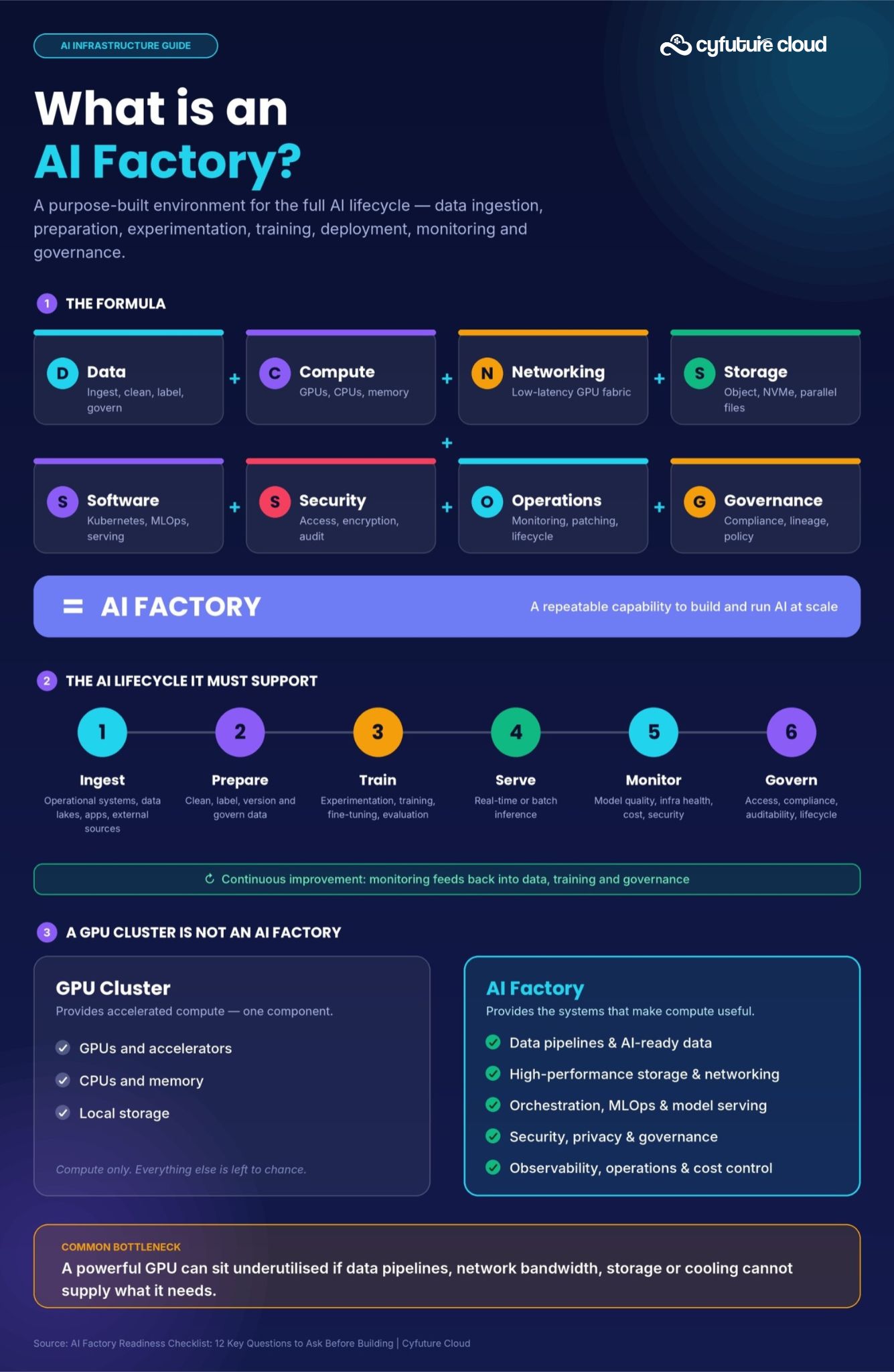
An AI Factory is a purpose-built environment for the full AI lifecycle: data ingestion, preparation, experimentation, training, fine-tuning, deployment, monitoring, security, and continuous improvement.
It is more than a GPU cluster. A GPU cluster provides accelerated compute; an AI Factory provides the surrounding systems that make that compute useful.
AI Factory=Data+Compute+Networking+Storage+Software+Security+Operations+Governance
In practical terms, an AI Factory must support:
- Ingesting data from operational systems, data lakes, applications, and external sources.
- Preparing, cleaning, labelling, versioning, and governing data.
- Running experimentation, model training, fine-tuning, and evaluation.
- Serving models for real-time or batch inference.
- Monitoring model quality, infrastructure health, cost, and security.
- Managing access, compliance, auditability, and lifecycle governance.
The exact architecture depends on workload type, data sensitivity, performance requirements, and business objectives. There is no single AI Factory design that suits every enterprise.
1. What business outcomes must the AI Factory support?
Infrastructure should follow a defined use case, not the reverse. Before selecting GPUs or designing a data centre, organisations should identify the business outcomes the AI Factory must support.
Potential use cases include:
- Internal productivity and automation.
- Customer-facing AI applications.
- AI-powered search or assistants.
- Predictive analytics.
- Computer vision.
- Recommendation systems.
- Research and simulation.
- Industry-specific use cases.
For each use case, define the business problem, expected outcome, success metric, priority, users, stakeholders, and required time to value. For example, an AI-powered customer-support assistant may be measured by resolution time, containment rate, customer satisfaction, and cost per interaction—not merely by model accuracy.
Readiness signal: A clear, measurable use case with an accountable business owner.
Red flag: “We need AI infrastructure” without a defined workload or success metric.
2. Is the data ready for AI workloads?
Data readiness is often more difficult than compute planning. A high-performance GPU cluster cannot compensate for incomplete, inaccurate, inaccessible, or poorly governed data.
AI-ready data should be:
AI-ready data=available+accurate+governed+secure+accessible
Assess data sources, quality, volume, velocity, governance, metadata, lineage, access controls, residency, retention, cleaning, labelling, feature engineering, and versioning.
Data lineage records where data originated, how it was transformed, and where it was used. Metadata describes data attributes such as source, owner, format, sensitivity, and update frequency. Both are important for reproducibility, auditability, and model governance.
Readiness signal: Documented data sources, ownership, quality checks, access rules, and governance controls.
Red flag: No clarity on data ownership, quality, lineage, or access permissions.
3. Which AI workloads will the AI Factory support?
Different workloads create different infrastructure demands. A design that suits large-scale training may be unsuitable for latency-sensitive inference, and vice versa.
Common workload categories include:
- Model training.
- Fine-tuning.
- Inference.
- Retrieval-augmented generation (RAG).
- Computer vision.
- Speech and audio.
- Recommendation systems.
- Scientific computing.
- Simulation.
- High-performance data analytics.
- Edge or on-premises deployment.
Training often prioritises sustained throughput and distributed compute. Inference may prioritise latency, concurrency, cost per request, and availability. RAG adds retrieval and vector-search requirements, while computer vision may require high-throughput image or video processing.
Readiness signal: A workload map with expected scale, latency, throughput, and performance requirements.
Red flag: A single GPU specification is expected to solve every workload requirement.
4. What compute architecture is required?
Compute planning should consider workload type, model size, precision, performance targets, and growth. GPUs are important, but they are only one component of the compute architecture.
Key considerations include:
- GPUs, CPUs, memory, and local storage.
- Accelerated computing requirements.
- Single-node versus multi-node systems.
- GPU density and rack-scale architecture.
- Dedicated versus shared infrastructure.
- On-demand versus reserved capacity.
A powerful GPU can remain underutilised if the surrounding system cannot supply data, network bandwidth, storage, or cooling at the required rate. Compute sizing should therefore begin with workload characteristics, not GPU count.
Readiness signal: A workload-based compute sizing model and a plan for future capacity.
Red flag: Compute is selected only by GPU count or peak marketing performance.
5. Can the data pipeline keep GPUs utilised?
Data movement can become a major bottleneck. GPUs need a continuous supply of training data, model parameters, checkpoints, and inference requests.
The data pipeline must account for:
- Data ingestion.
- Preprocessing.
- Tokenisation.
- Feature extraction.
- Data loading.
- Caching.
- Checkpointing.
- Model artefacts.
- Logs.
- Training datasets.
- Inference requests.
- Storage latency.
- Input/output operations per second (IOPS).
- Sequential and random-read performance.
IOPS measures how many separate read or write operations a storage system can handle per second. Sequential throughput measures how quickly large continuous files can be read or written. Training may emphasise sequential throughput; inference may emphasise low-latency access to models, embeddings, and user data.
Readiness signal: A data-pipeline design with storage, throughput, latency, and failure-handling requirements.
Red flag: GPUs are planned without a corresponding data-ingestion and storage strategy.
6. Is the network ready for distributed AI?
Distributed AI workloads require fast, low-latency communication between GPUs, servers, storage, and applications. Network design is not an afterthought; it directly affects scaling efficiency.
East-west traffic moves between systems inside the data centre, such as GPU-to-GPU and server-to-server communication. North-south traffic moves between users, applications, and the data centre.
Collective communication operations are common in distributed training:
- All-reduce: Combines results across GPUs.
- All-gather: Shares data across GPUs.
- Reduce-scatter: Distributes reduced data across GPUs.
Poor network design can reduce scaling efficiency, even when individual GPUs are powerful.
Scaling efficiency=performance with N GPUsN×performance with 1 GPU
This formula compares actual multi-GPU performance with the ideal linear improvement from adding GPUs. If adding GPUs does not produce proportional gains, the constraint may be network capacity, workload parallelism, storage, or software design.
Readiness signal: A network design based on workload communication patterns and expected growth.
Red flag: Network capacity is treated as an afterthought after GPU procurement.
7. Is storage designed for the AI lifecycle?
AI storage must support different stages of the AI lifecycle. Raw data, cleaned data, training datasets, model checkpoints, model artefacts, embeddings, vector databases, logs, inference outputs, backups, and archives all have different performance and retention needs.
Storage options may include:
- Object storage for large unstructured datasets and archives.
- Parallel file systems for high-throughput shared access.
- High-performance NVMe storage for low-latency workloads.
- Tiered storage to balance performance, capacity, and cost.
- Backup and recovery systems for resilience.
NVMe (Non-Volatile Memory Express) is a storage protocol designed for high-speed flash storage. It can reduce latency compared with older storage interfaces, but the right storage design still depends on access patterns, concurrency, and data locality.
Readiness signal: A storage architecture with performance, capacity, protection, and lifecycle policies.
Red flag: Storage is selected only by total capacity without considering throughput, latency, or data-growth patterns.
8. Are power, cooling, and facility capacity realistic?
Dense AI infrastructure creates high power and thermal demands. Rack power density, GPU power consumption, power distribution, redundancy, heat generation, airflow, and cooling capacity must be assessed before deployment.
Cooling options include air cooling, direct-to-chip liquid cooling, cold plates, rear-door heat exchangers, hybrid cooling, and coolant distribution units. Liquid cooling is not automatically required for every AI deployment, but it becomes increasingly relevant as rack density increases.
The basic heat-removal relationship is:
Q=m˙cpΔTQ = \dot{m} c_p \Delta TQ=m˙cpΔT
Here, QQQ is heat-removal rate, m˙\dot{m}m˙ is coolant mass-flow rate, cpc_pcp is specific heat capacity, and ΔT\Delta TΔT is the permitted temperature rise. In simple terms, the cooling system must move enough coolant to remove the heat generated by the hardware.
Readiness signal: A facility assessment covering power, cooling, space, redundancy, maintenance, and growth.
Red flag: GPU capacity is planned without confirming facility power and thermal capacity.
9. Is the software stack production-ready?
Hardware alone does not create a functioning AI Factory. The software stack must support the full model lifecycle, from experimentation to production deployment.
Key components include:
- Operating systems and GPU drivers.
- CUDA-compatible libraries, where applicable.
- Deep-learning frameworks.
- Containerisation.
- Kubernetes or another orchestration layer.
- Job schedulers.
- MLOps platforms.
- Model registries.
- Model-serving frameworks.
- Monitoring and observability.
- Resource isolation.
- Multi-tenancy.
- Version control.
- Reproducibility.
- CI/CD for AI.
- Automated testing.
MLOps applies software-engineering practices—version control, testing, automation, monitoring, and deployment—to machine-learning systems. It helps teams move models from notebooks and experiments into governed production environments.
Readiness signal: A software stack that supports reproducibility, deployment, monitoring, and version control.
Red flag: Infrastructure is planned without an operating model for deployment, monitoring, or model updates.
10. Are security, privacy, and compliance designed in?
AI systems introduce risks beyond traditional IT security. Security must cover data, models, infrastructure, applications, APIs, and user interactions.
Key controls include:
- Data classification.
- Identity and access management.
- Least-privilege access.
- Encryption at rest and in transit.
- Network segmentation.
- Secure boot.
- Firmware and driver updates.
- Audit logs.
- Data residency.
- Privacy requirements.
- Intellectual-property protection.
- Model security.
- Prompt injection and jailbreak risks, where relevant.
- Content filtering.
- Responsible AI policies.
- Model governance.
- Regulatory requirements.
- Backup and disaster recovery.
Security should be designed into the AI Factory from the beginning. Retrofitting governance after deployment is usually more expensive and less effective.
Readiness signal: A documented security and governance model with clear ownership and controls.
Red flag: Security is considered only after the AI Factory is built.
11. Who owns operations, monitoring, and lifecycle management?
AI infrastructure requires ongoing operations, not just initial deployment. Someone must own infrastructure monitoring, GPU health, network health, storage health, application performance, cost, capacity, patching, incident response, and model lifecycle management.
The distinction between related terms matters:
- Observability: Understanding what is happening inside the system.
- Monitoring: Tracking defined metrics and thresholds.
- Operations: Keeping the system available, secure, and efficient.
Operational responsibilities should include capacity forecasting, performance tuning, model retraining, model retirement, change management, disaster recovery, and business continuity.
Readiness signal: Named teams, escalation paths, monitoring dashboards, and lifecycle processes.
Red flag: No clear owner for infrastructure, model operations, security, or cost management.
12. What is the realistic total cost of ownership?
AI Factory economics must include more than GPU cost. The total cost of ownership (TCO) should include GPU acquisition or cloud consumption, servers, networking, storage, power, cooling, data-centre space, software licences, engineering and operations staff, security tools, maintenance, upgrades, model development, data preparation, testing, downtime risk, capacity underutilisation, migration costs, and opportunity cost.
The distinction between CapEx and OpEx matters:
CapEx=Upfront capital expenditure for infrastructure
OpEx=Ongoing operating expenditure for consumption, operations, maintenance, and support
Cloud-based GPU infrastructure can reduce upfront capital investment, but organisations should still evaluate data-transfer costs, workload persistence, performance isolation, contract terms, and long-term cost predictability. Cloud is not automatically cheaper; it is a different economic and operational model.
Readiness signal: A total-cost-of-ownership model based on actual workload assumptions.
Red flag: The business case is based only on GPU price or theoretical performance.
AI Factory Readiness Assessment
|
Readiness area |
Key question |
What good readiness looks like |
Common red flag |
|
Business value |
What outcome must AI deliver? |
Defined use case and success metrics |
No clear business owner |
|
Data |
Is the data AI-ready? |
Governed, secure, high-quality data pipeline |
Unclear data ownership |
|
Workloads |
Which workloads will run? |
Mapped training, inference, and HPC needs |
One-size-fits-all infrastructure |
|
Compute |
Is the architecture fit for purpose? |
Workload-based sizing and growth plan |
GPU count used as the only metric |
|
Data pipeline |
Can GPUs stay utilised? |
High-throughput ingestion and storage design |
Storage treated as an afterthought |
|
Network |
Can distributed workloads scale? |
Low-latency, high-bandwidth network design |
Network bottlenecks not assessed |
|
Storage |
Can the lifecycle be supported? |
Tiered, protected, high-performance storage |
Capacity-only planning |
|
Power and cooling |
Can the facility support the load? |
Facility and thermal assessment |
Power and cooling ignored |
|
Software |
Is the stack production-ready? |
Reproducible, automated, monitored stack |
No deployment or MLOps plan |
|
Security |
Are risks controlled? |
End-to-end security and governance |
Security added late |
|
Operations |
Who owns the lifecycle? |
Clear ownership and monitoring |
No operational model |
|
Economics |
Is the investment sustainable? |
Full TCO and workload-based model |
Cost based only on GPUs |
Build AI Factory readiness with Cyfuture Cloud
Cyfuture Cloud can help organisations assess and plan for AI-ready infrastructure, GPU cloud capacity, data and storage architecture, networking requirements, security and compliance, managed operations, scalability planning, AI workload deployment, and cost and capacity optimisation.
Its published GPU as a Service (GPUaaS) offering describes on-demand GPU instances and dedicated clusters for AI training, inference, and HPC, alongside managed infrastructure and advisory services. The platform page also lists NVIDIA GPU families including H100, H200, A100, L40S, V100, and B300, with multi-GPU configurations and Kubernetes-based orchestration described for distributed workloads.
For high-density AI and HPC workloads, Cyfuture Cloud describes a liquid-cooled AI data centre supporting rack densities above 240 kW and 10 MW of direct liquid-cooled AI data-centre capacity. Liquid-cooled infrastructure may be relevant where dense GPU racks require substantial heat removal, but the appropriate design depends on workload, facility, redundancy, and operational requirements.
Cyfuture Cloud also lists object, standard, nearline, coldline, and archival storage; Kubernetes; autoscaling and auto-provisioning tools; monitoring and logging; private connectivity; and security services including identity, encryption-related controls, network protection, and managed security offerings.
Cyfuture Cloud can help organisations move from an AI ambition to a practical deployment plan by aligning compute, data, networking, storage, security, and operations.
FAQs
What is an AI Factory?
An AI Factory is a purpose-built environment for the full AI lifecycle. It combines data, compute, networking, storage, software, security, operations, and governance to produce and operate AI systems at scale.
Is an AI Factory the same as a GPU cluster?
No. A GPU cluster is one component of an AI Factory. An AI Factory also includes data pipelines, storage, networking, orchestration, security, observability, operations, and governance.
What are the most important components of an AI Factory?
The most important components are AI-ready data, fit-for-purpose compute, high-performance storage and networking, production-ready software, security and governance, operational ownership, and a realistic cost model.
How much GPU capacity does an AI Factory need?
GPU capacity depends on model size, dataset size, precision, batch size, workload duration, concurrency, performance targets, and growth plans. There is no universal GPU count; capacity should be sized from workload requirements.
Does every AI Factory require liquid cooling?
No. Liquid cooling becomes increasingly relevant as rack power density rises, but the appropriate cooling approach depends on the specific hardware, facility design, redundancy requirements, and operational maturity.
What data readiness is required before building an AI Factory?
Organisations should have documented data sources, ownership, quality controls, lineage, access rules, residency requirements, retention policies, and secure data pipelines before scaling AI infrastructure.
How can Cyfuture Cloud help organisations plan AI Factory infrastructure?
Cyfuture Cloud can help organisations assess GPU capacity, data and storage architecture, networking, security, managed operations, scalability, and cost optimisation for AI workloads.
Conclusion
An AI Factory is not a hardware purchase. It is an integrated environment that turns data, compute, networking, storage, software, security, operations, and governance into a repeatable capability for building and running AI systems.
The organisations that succeed are those that assess readiness before committing to infrastructure. They define business outcomes, prepare data, map workloads, size compute realistically, design for data movement and network scale, plan for power and cooling, build operational maturity, and model total cost of ownership.
Editorial note: AI Factory requirements vary significantly by workload, data sensitivity, infrastructure model, and business objectives. Use this checklist as a planning framework and validate technical, security, and financial assumptions before committing to an architecture.
Planning an AI Factory for training, inference, or enterprise AI workloads? Speak with Cyfuture Cloud specialists to assess data readiness, GPU capacity, networking, storage, security, operations, and total cost of ownership.



Stay Ahead of the Curve.
Join the Cloud Movement, today!
Send this to a friend