Get 69% Off on Cloud Hosting : Claim Your Offer Now!





- Products
- Solutions
-
Solutions
-
 Cloud
Hosting
Cloud
Hosting
-
VPS
Hosting
-
 GPU
Cloud
GPU
Cloud
-
 Dedicated
Server
Dedicated
Server
-
 Server
Colocation
Server
Colocation
-
 Backup as a Service
-
 CDN
Network
CDN
Network
-
 Window
Cloud Hosting
Window
Cloud Hosting
-
 Linux
Cloud Hosting
Linux
Cloud Hosting
-
Managed
Cloud Service
-
 Storage
as a Service
Storage
as a Service
-
VMware
Public Cloud
-
Multi-Cloud
Hosting
-
Cloud
Server Hosting
-
Bare
Metal Server
-
Virtual
Machine
-
 Magento
Hosting
Magento
Hosting
-
 Remote
Backup
Remote
Backup
-
 DevOps
-
 Kubernetes
-
 Cloud
Storage
Cloud
Storage
-
 NVMe
Hosting
NVMe
Hosting
-
 DR
as s Service
DR
as s Service
-
-
Solutions
- Marketplace
- Pricing
- Resources
- Company
 Remote
Backup
Remote
Backup NVMe
Hosting
NVMe
Hosting Pricing
Calculator
Pricing
Calculator Unlock Cost
Optimization
Unlock Cost
Optimization Overview
 Documentation
 Price
Calculator
Price
Calculator Tools
Tools FAQs
FAQs Terms
of Service
Terms
of Service Privacy
Policy
Privacy
Policy
 Migration
 Container
 Power
Power
 Utilities
 VMware
Private Cloud
VMware
Private Cloud VMware
on AWS
VMware
on AWS VMware
on Azure
VMware
on Azure Certifications
 Partners
 Careers
 Support
 Service
Level Agreement
Service
Level Agreement  Contact
Table of Contents
- Understanding Block Storage: The Performance Powerhouse
- Understanding Object Storage: The Scalability Champion
- Head-to-Head Comparison: Making the Right Choice
- The Cyfuture Cloud Advantage: Flexible Storage for Every Need
- Hybrid Approaches: Getting the Best of Both Worlds
- The Verdict: It Depends on Your Workload
- Take the Next Step with Cyfuture Cloud
- Frequently Asked Questions
- Can I use both object and block storage together in my cloud infrastructure?
- Is object storage always cheaper than block storage?
- Can I convert data from block storage to object storage or vice versa?
- What’s the difference between object storage and file storage?
- How does Cyfuture Cloud ensure data durability and availability across both storage types?
In today’s data-driven world, businesses generate and store unprecedented amounts of information daily. Choosing the right cloud storage solution isn’t just a technical decision—it’s a strategic one that impacts performance, costs, and scalability. If you’re navigating the cloud storage landscape, you’ve likely encountered two primary options: object storage and block storage. But which one is better for your cloud infrastructure?
The answer isn’t one-size-fits-all. Object storage is generally better for the cloud due to its immense scalability, cost-effectiveness, and flexibility for unstructured data like media, backups, and data lakes. Block storage is superior for performance-sensitive, transactional workloads requiring low-latency access, such as databases and operating systems. Understanding the nuances of each storage type will empower you to make informed decisions that align with your business needs.
Understanding Block Storage: The Performance Powerhouse
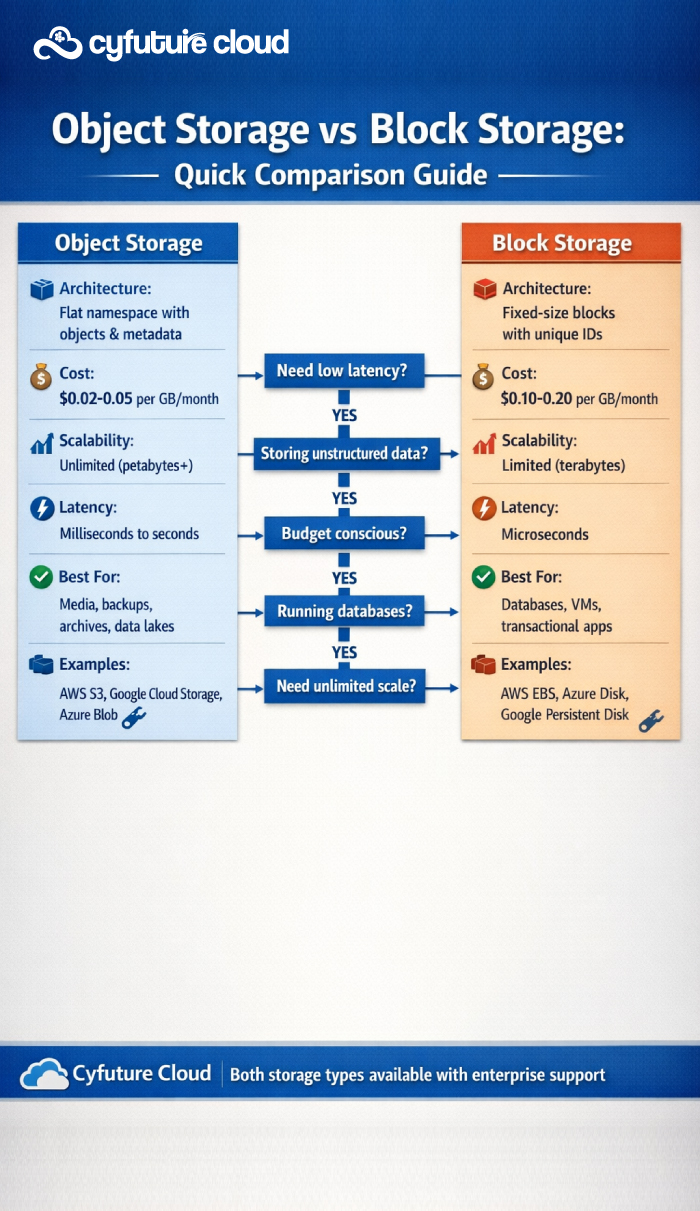
Block storage organizes data into fixed-size blocks, each with its own unique identifier. Think of it as a raw hard drive that can be formatted and used by your operating system or applications. When you need to access data, the system retrieves specific blocks directly, making it incredibly fast and efficient for applications that require frequent read and write operations.
Examples include AWS EBS (Elastic Block Store), Azure Disk Storage, and Google Persistent Disks.
Key Characteristics of Block Storage:
- Very low latency: Data access happens in milliseconds, making it ideal for time-sensitive operations
- High performance: Delivers excellent IOPS (Input/Output Operations Per Second) for demanding workloads
- Incremental changes: Allows quick, incremental modifications without rewriting entire files
- Direct attachment: Functions like a local disk attached to virtual machines or servers
Best Use Cases for Block Storage:
Block storage excels in scenarios where performance is non-negotiable. It’s best for transactional databases (MySQL, PostgreSQL, Oracle), high-performance applications, virtual machine boot volumes, and enterprise applications requiring consistent low latency. If your application needs to frequently update small portions of data—like a database processing thousands of transactions per second—block storage is your go-to solution.
The Trade-offs:
While block storage offers exceptional performance, it comes at a cost. It’s more expensive than object storage, has limited scalability compared to object storage, and becomes harder to manage at scale. Additionally, block storage typically requires more manual configuration and maintenance, making it less suited for massive, distributed data architectures.
Understanding Object Storage: The Scalability Champion
Object storage takes a fundamentally different approach. Instead of breaking data into blocks, it stores entire files (objects) along with rich metadata and a unique identifier. These objects live in a flat address space, eliminating the hierarchical folder structure you might be familiar with. This architecture enables virtually unlimited scalability and makes object storage perfect for modern cloud-native applications.
Examples include AWS S3, Google Cloud Storage, Azure Blob Storage, and Cyfuture Cloud’s Object Storage solutions.
Key Characteristics of Object Storage:
- Highly scalable: Can grow from gigabytes to petabytes without architectural changes
- Cost-effective: Significantly lower per-GB costs, especially for long-term storage
- Rich metadata: Each object can carry extensive metadata for better organization and searchability
- API-driven access: Easy integration with applications via RESTful APIs (typically S3-compatible)
Best Use Cases for Object Storage:
Object storage shines when dealing with massive amounts of unstructured data. It’s best for multimedia files (images, videos, audio), backup and archives, data lakes for analytics, content distribution networks (CDNs), and cloud-native application storage. If you’re building a streaming platform, managing petabytes of backup data, or creating a data lake for big data analytics, object storage is the clear winner.
The Trade-offs:
The primary limitation of object storage is higher latency compared to block storage, making it unsuitable for applications requiring real-time data access. Additionally, it’s not ideal for frequently modified files—every change typically requires rewriting the entire object, which can be inefficient for transactional workloads.
Head-to-Head Comparison: Making the Right Choice
When deciding between object and block storage, consider these critical factors:
Performance: Block storage delivers superior IOPS and lower latency, making it essential for databases and real-time applications. Object storage prioritizes throughput over latency, perfect for large file transfers and batch processing.
Scalability: Object storage offers virtually unlimited horizontal scalability at a fraction of the cost. Block storage scales vertically but becomes complex and expensive at massive scales.
Cost: Object storage typically costs 50-70% less than block storage for the same capacity, with even greater savings for archival tiers. Block storage’s premium pricing reflects its performance capabilities.
Data Management: Block storage allows granular, incremental updates ideal for structured data. Object storage excels with immutable or append-only data patterns, offering built-in versioning and lifecycle management.
Access Patterns: Block storage suits random access patterns with frequent modifications. Object storage is optimized for write-once, read-many scenarios.
The Cyfuture Cloud Advantage: Flexible Storage for Every Need
At Cyfuture Cloud, we understand that modern businesses need both performance and scalability. That’s why we offer comprehensive storage solutions tailored to your specific requirements:
Our block storage services deliver enterprise-grade performance with SSD-backed volumes, guaranteed IOPS, and seamless integration with virtual machines and containerized applications. Whether you’re running mission-critical databases or high-performance computing workloads, Cyfuture Cloud’s block storage ensures your applications run at peak efficiency.
Our object storage solutions provide S3-compatible, infinitely scalable storage with multiple redundancy options, lifecycle policies for automated tiering, and robust security features including encryption at rest and in transit. Store petabytes of data without worrying about capacity planning or cloud infrastructure management.
Hybrid Approaches: Getting the Best of Both Worlds
Many organizations find that combining both storage types delivers optimal results. For example, you might use block storage for your production databases while leveraging object storage for database backups, logs, and analytics. Cyfuture Cloud makes it easy to implement tiered storage architectures, automatically moving data between storage types based on access patterns and age.
This hybrid cloud approach maximizes cost efficiency—keeping hot, frequently accessed data on high-performance block storage while migrating cold data to economical object storage. With Cyfuture Cloud’s integrated management tools, you can orchestrate these transitions seamlessly.
The Verdict: It Depends on Your Workload
Choose Object Storage when: You need to store large volumes of unstructured data, require cost-effective long-term archival, are building cloud-native applications, or need to scale storage capacity rapidly without infrastructure concerns.
Choose Block Storage when: Your applications demand consistent low latency, you’re running transactional databases, you need high IOPS for performance-critical workloads, or you require a boot volume for virtual machines.
The reality is that most modern cloud architectures benefit from both storage types, strategically deployed based on workload characteristics. The key is understanding your data access patterns, performance requirements, and budget constraints.
Take the Next Step with Cyfuture Cloud
Choosing the right storage solution can dramatically impact your application performance and operational costs. At Cyfuture Cloud, our storage experts help businesses design optimal architectures that balance performance, scalability, and cost-effectiveness.
Frequently Asked Questions
Can I use both object and block storage together in my cloud infrastructure?
Absolutely! In fact, this is a recommended best practice for most enterprise workloads. At Cyfuture Cloud, many of our clients implement hybrid storage architectures where block storage powers their performance-critical databases and applications, while object storage handles backups, media files, logs, and archival data. This approach optimizes both performance and cost. Our integrated platform makes it seamless to move data between storage types and implement automated tiering policies based on your access patterns.
Is object storage always cheaper than block storage?
Yes, object storage is typically 50-70% less expensive than block storage for equivalent capacity. For example, while block storage might cost $0.10-0.20 per GB per month, object storage usually ranges from $0.02-0.05 per GB per month. However, the total cost consideration should include access patterns, data transfer fees, and API request costs. For frequently accessed data requiring low latency, the performance benefits of block storage often justify its higher cost. Cyfuture Cloud offers transparent pricing for both storage types, and our team can help you model the most cost-effective solution for your specific workload.
Can I convert data from block storage to object storage or vice versa?
Yes, you can migrate data between storage types, though it requires planning and execution rather than a simple “conversion” process. Moving data from block storage to object storage involves copying files through your application or using cloud migration tools. Cyfuture Cloud provides migration assistance and tools to help you transition data between storage types smoothly, with minimal downtime. We can also implement automated policies that move aging data from expensive block storage to cost-effective object storage based on access frequency and retention requirements.
What’s the difference between object storage and file storage?
While both handle files, they differ fundamentally in architecture and use cases. File storage organizes data in hierarchical folders (like your computer’s file system) and typically uses protocols like NFS or SMB, making it ideal for shared file systems and traditional applications. Object storage uses a flat address space where each file becomes an “object” with metadata and a unique identifier, accessed via HTTP/S APIs. Object storage excels at massive scale and cloud-native applications, while file storage is better for shared workspaces and legacy applications. Cyfuture Cloud offers all three storage types—object, block, and file—ensuring you have the right tool for every job.
How does Cyfuture Cloud ensure data durability and availability across both storage types?
At Cyfuture Cloud, data protection is our top priority. For object storage, we implement multi-region replication with 99.999999999% (11 nines) durability, storing multiple copies of your data across geographically distributed data centers. Our object storage includes built-in versioning, lifecycle management, and configurable redundancy levels. For block storage, we provide snapshot capabilities, point-in-time recovery, and high-availability configurations with automatic failover. Both storage types include encryption at rest and in transit, comprehensive access controls, and 24/7 monitoring. Our SLA guarantees 99.95% uptime, and our support team is always available to ensure your data remains safe, accessible, and compliant with industry regulations.











Stay Ahead of the Curve.
Join the Cloud Movement, today!
Send this to a friend