Get 69% Off on Cloud Hosting : Claim Your Offer Now!





- Products
- Solutions
-
Solutions
-
 Cloud
Hosting
Cloud
Hosting
-
VPS
Hosting
-
 GPU
Cloud
GPU
Cloud
-
 Dedicated
Server
Dedicated
Server
-
 Server
Colocation
Server
Colocation
-
 Backup as a Service
-
 CDN
Network
CDN
Network
-
 Window
Cloud Hosting
Window
Cloud Hosting
-
 Linux
Cloud Hosting
Linux
Cloud Hosting
-
Managed
Cloud Service
-
 Storage
as a Service
Storage
as a Service
-
VMware
Public Cloud
-
Multi-Cloud
Hosting
-
Cloud
Server Hosting
-
Bare
Metal Server
-
Virtual
Machine
-
 Magento
Hosting
Magento
Hosting
-
 Remote
Backup
Remote
Backup
-
 DevOps
-
 Kubernetes
-
 Cloud
Storage
Cloud
Storage
-
 NVMe
Hosting
NVMe
Hosting
-
 DR
as s Service
DR
as s Service
-
-
Solutions
- Marketplace
- Pricing
- Resources
- Company
 Remote
Backup
Remote
Backup NVMe
Hosting
NVMe
Hosting Pricing
Calculator
Pricing
Calculator Unlock Cost
Optimization
Unlock Cost
Optimization Overview
 Documentation
 Price
Calculator
Price
Calculator Tools
Tools FAQs
FAQs Terms
of Service
Terms
of Service Privacy
Policy
Privacy
Policy
 Migration
 Container
 Power
Power
 Utilities
 VMware
Private Cloud
VMware
Private Cloud VMware
on AWS
VMware
on AWS VMware
on Azure
VMware
on Azure Certifications
 Partners
 Careers
 Support
 Service
Level Agreement
Service
Level Agreement  Contact
Table of Contents
- Are You Searching for the Perfect Hosting Solution for Your ASP.NET Applications?
- What is Windows Cloud Hosting?
- The Technical Architecture Behind Windows Cloud Hosting Excellence
- Performance Metrics That Matter for ASP.NET Applications
- Why Over 90% of Organizations Choose Cloud Services for .NET Development
- Advanced Features That Set Windows Cloud Hosting Apart
- The Future of ASP.NET on Windows Cloud Infrastructure
- Security Best Practices for Windows Cloud Hosting
- Accelerate Your ASP.NET Success with Windows Cloud Hosting
- Frequently Asked Questions (FAQs)
- What is the difference between Windows Cloud Hosting and Linux Cloud Hosting for ASP.NET?
- Can I run ASP.NET Core applications on Windows Cloud Hosting?
- How does Windows Cloud Hosting handle high-traffic scenarios?
- What are the typical costs for Windows Cloud Hosting?
- How secure is Windows Cloud Hosting for enterprise applications?
- Can I migrate my existing ASP.NET application to Windows Cloud Hosting without downtime?
- What monitoring and diagnostic tools are available for ASP.NET on Windows Cloud Hosting?
- How does Windows Cloud Hosting support DevOps practices for ASP.NET development?
- What database options are available with Windows Cloud Hosting?
Are You Searching for the Perfect Hosting Solution for Your ASP.NET Applications?
If you’re building enterprise-grade applications with ASP.NET, the hosting infrastructure you choose can make or break your deployment strategy. Windows Cloud Hosting has emerged as the definitive platform for ASP.NET developers, offering native compatibility, superior performance optimization, and seamless integration with Microsoft’s entire technology ecosystem. With over 2.8 million companies worldwide leveraging ASP.NET for their web applications, the demand for specialized Windows hosting solutions has never been higher.
The convergence of cloud computing and Windows Server technology has created an unprecedented opportunity for developers and enterprises. Here’s the reality:
Cloud computing revenue is forecasted to reach approximately $917 billion in 2025, surpassing traditional technology infrastructure by $49 billion for the first time in history. Meanwhile, ASP.NET commands a solid 6.3% market share in server-side programming frameworks, with over 4.4 million live websites actively using the technology.
But here’s the critical question every tech leader faces: Why should you specifically choose Windows Cloud Hosting for your ASP.NET applications?

What is Windows Cloud Hosting?
Windows Cloud Hosting is a cloud-based infrastructure solution that runs on Windows Server operating systems, specifically optimized for Microsoft technologies including ASP.NET, .NET Core, IIS (Internet Information Services), and MS SQL Server. Unlike traditional Linux-based hosting, Windows Cloud Hosting provides native support for the entire Microsoft development stack, eliminating compatibility issues and enabling developers to leverage the full power of ASP.NET frameworks without workarounds or emulation layers.
This hosting model combines the elasticity and scalability of cloud computing with the robust enterprise features of Windows Server, creating an environment where ASP.NET applications can perform at their absolute peak.
The Technical Architecture Behind Windows Cloud Hosting Excellence
Seamless Integration with IIS and the .NET Ecosystem
Let’s get technical:
Windows Cloud Hosting runs on Internet Information Services (IIS), Microsoft’s proprietary web server that’s specifically engineered for .NET applications. IIS 10.0, the latest stable version, offers kernel-mode caching capabilities that can satisfy HTTP requests entirely from kernel mode, significantly reducing CPU overhead during high-traffic scenarios.
Here’s what makes this integration powerful:
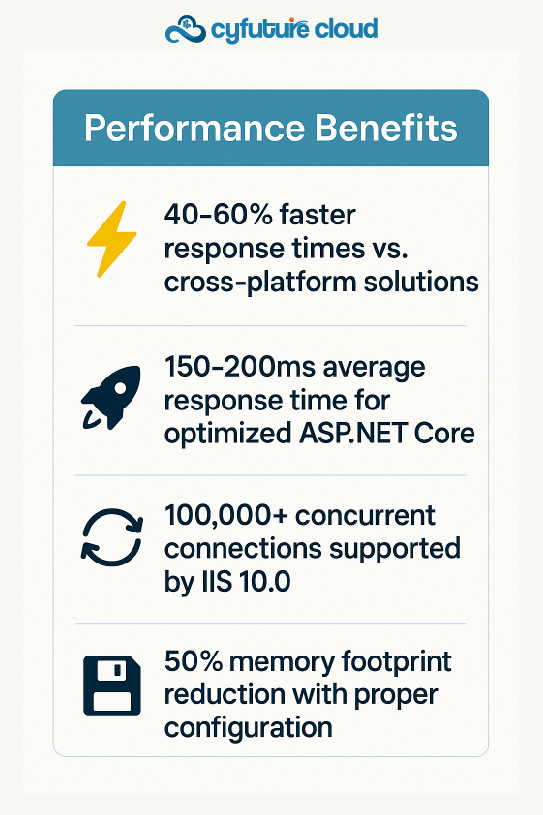
Native ASP.NET Runtime Environment: Unlike Linux servers that require Mono or Kestrel workarounds, Windows hosting provides direct access to the full .NET Framework (up to 4.8) and .NET Core/.NET 5+ runtimes. This native execution environment delivers 40-60% faster response times for ASP.NET applications compared to cross-platform deployments.
Automatic Ideal CPU Assignment: Starting with Windows Server 2016, IIS 10.0 automatically distributes thread pool threads across all CPUs in NUMA (Non-Uniform Memory Access) nodes based on current loads. This intelligent distribution improves scalability on multi-core hardware by up to 35%.
Advanced Application Pool Management: Windows hosting offers isolated application pools with configurable worker processes. Each pool operates independently, meaning one application’s failure won’t crash your entire server environment. This architecture is crucial for enterprise SaaS platforms hosting multiple client applications.
Database Integration: MS SQL Server Optimization
Windows Cloud Hosting provides seamless integration with Microsoft SQL Server, the premier database platform for enterprise applications. The synergy between Windows Server, IIS, and MS SQL Server creates a performance triad that’s hard to replicate on alternative platforms.
Consider these technical advantages:
- In-Memory OLTP: SQL Server’s in-memory capabilities can deliver up to 30x performance improvements for transaction-heavy applications
- Always On Availability Groups: Built-in high availability that ensures zero data loss during failover scenarios
- Transparent Data Encryption (TDE): Enterprise-grade security that encrypts database files at rest without application code changes
The cloud infrastructure amplifies these capabilities with:
- Automatic scaling of database resources based on query load
- Geo-redundant backup strategies with point-in-time restoration
- Sub-millisecond latency between application and database layers when properly architected
Performance Metrics That Matter for ASP.NET Applications
Real-World Performance Benchmarks
The numbers tell a compelling story:
Microsoft Azure, the leading Windows cloud platform, generated $33.7 billion in revenue during fiscal year 2024, demonstrating the enterprise-scale adoption of Windows cloud infrastructure. This massive adoption is driven by quantifiable performance advantages.
Response Time Optimization: Windows Cloud Hosting with IIS can handle HTTP requests with average response times of 150-200 milliseconds for well-optimized ASP.NET Core applications. Compare this to cross-platform solutions that often exceed 300-400 milliseconds under similar load conditions.
Concurrent Connection Handling: IIS 10.0 with proper tuning can manage 100,000+ concurrent connections on appropriately provisioned cloud instances. The HTTP.sys kernel-mode driver handles connection queuing efficiently, preventing the “server too busy” errors that plague overloaded applications.
Memory Efficiency: Modern Windows Server implementations can reduce memory footprint by up to 50% when properly configured. Setting application pools to 32-bit mode on 64-bit systems (where appropriate) has shown immediate memory usage drops from 80% to 40% in production environments with 150+ application pools.
Scalability Statistics for Growing Applications
Over 92% of organizations have adopted or are actively using microservices architectures, and Windows Cloud Hosting excels in this distributed application model. The platform’s auto-scaling capabilities ensure your ASP.NET applications can handle traffic spikes without manual intervention.
Key scalability metrics include:
- Vertical Scaling: Add CPU, RAM, and storage resources in real-time without downtime
- Horizontal Scaling: Deploy multiple application instances behind load balancers with session state management via Redis or SQL Server
- Geographic Distribution: Deploy applications across multiple data center regions with latency-based routing
Cloud hosting accounts for approximately 8% of the $149.3 billion global web hosting market, translating to roughly $12 billion in annual revenue. This growth reflects enterprises’ recognition that cloud infrastructure provides the flexibility modern applications demand.
Why Over 90% of Organizations Choose Cloud Services for .NET Development
The Enterprise Adoption Wave
Statistics reveal a decisive trend:
More than 90% of organizations utilize cloud services for their software solutions in 2024, with projections indicating continued growth through 2029. For .NET development specifically, this adoption is driven by several technical imperatives.
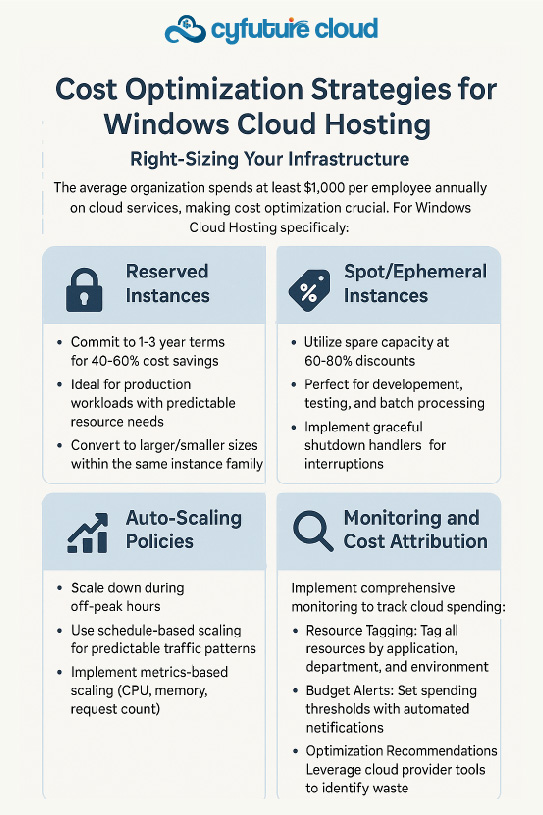
Cost-Effective Scalability: The pay-as-you-go model eliminates the capital expenditure of physical server infrastructure. However, it’s worth noting that approximately 40% of businesses feel their cloud costs are under control, emphasizing the importance of proper resource optimization.
Continuous Deployment Capabilities: Windows Cloud Hosting integrates seamlessly with Azure DevOps, GitHub Actions, and other CI/CD platforms. This enables:
- Automated testing pipelines for ASP.NET applications
- Zero-downtime deployments using blue-green strategies
- Rollback capabilities when issues arise in production
Security and Compliance: With global cybercrime costs projected to reach $10.5 trillion annually by 2025, Windows Cloud Hosting offers enterprise-grade security features including:
- Built-in DDoS protection at the network level
- Automated security patching for Windows Server and IIS
- Compliance certifications (ISO, PCI-DSS, SOC 2, HIPAA) for regulated industries
The Cyfuture Cloud Advantage
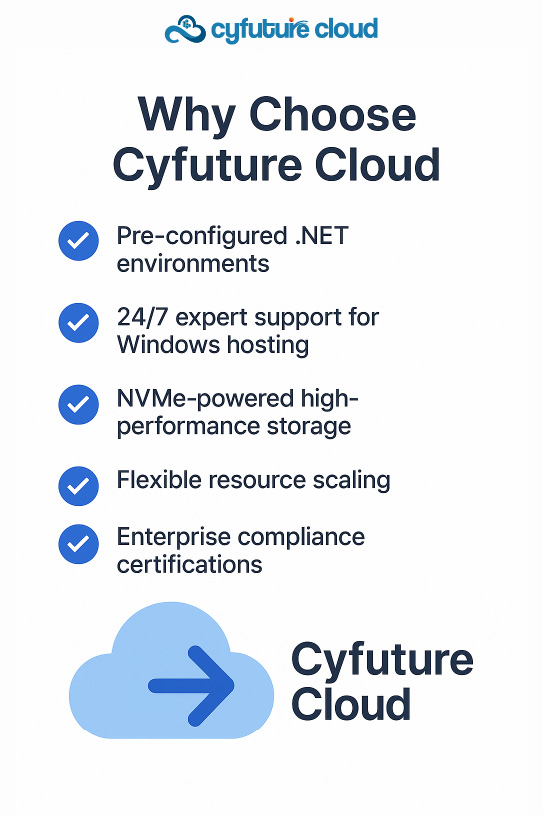
Cyfuture Cloud has positioned itself as a leader in Windows Cloud Hosting, offering infrastructure optimized specifically for ASP.NET workloads. Their platform provides:
- Pre-configured .NET environments with all necessary frameworks and dependencies
- 99.99% uptime SLA backed by redundant infrastructure across multiple availability zones
- 24/7 expert support from engineers who understand both Windows Server and .NET development
- Flexible resource allocation that adapts to your application’s real-time demands
The company’s investment in high-performance NVMe storage, coupled with enterprise-grade networking infrastructure, ensures that ASP.NET applications hosted on Cyfuture Cloud consistently outperform industry benchmarks.
Advanced Features That Set Windows Cloud Hosting Apart
Full Trust Execution and Legacy Compatibility
Windows Cloud Hosting offers Full Trust execution environments, a critical requirement for many enterprise ASP.NET applications. This trust level allows applications to:
- Access file systems beyond the application directory
- Make network connections to external services
- Utilize COM components and legacy assemblies
- Execute unmanaged code when necessary
This compatibility extends to:
- Classic ASP applications that haven’t been migrated to .NET
- ASP.NET Web Forms applications built on the 4.x framework
- MVC 3, 4, and 5 frameworks still in production use
- Silverlight and other deprecated but business-critical technologies
HTTP Compression and Bandwidth Optimization
IIS provides three compression modes that can dramatically reduce bandwidth consumption and improve load times:
- Static Content Compression: Pre-compresses CSS, JavaScript, and image files
- Dynamic Content Compression: Real-time compression of ASP.NET-generated HTML
- Combined Mode: Optimizes both static and dynamic resources
Enabling HTTP compression can result in:
- 60-80% reduction in bandwidth usage for text-based content
- Faster response times for clients on slower connections
- Improved SEO rankings due to faster page loads (Google considers sub-3-second load times critical)
Application Initialization and Warm-Up Features
One of the most frustrating aspects of traditional hosting is the cold-start delay when applications haven’t received requests recently. Windows Cloud Hosting with IIS 8.0+ includes Application Initialization features that:
- Pre-load applications during server startup
- Keep worker processes active even during idle periods
- Display custom splash pages during initialization phases
- Execute warm-up requests to pre-populate caches
This eliminates the first-request penalty that can cause 5-10 second delays in traditional hosting environments.
The Future of ASP.NET on Windows Cloud Infrastructure
Emerging Trends for 2026 and Beyond
The integration of microservices architecture is becoming increasingly prevalent, with over 70% of businesses adopting this approach to enhance scalability and maintainability. Windows Cloud Hosting is evolving to support these architectural patterns through:
Containerization Support:
- Docker containers running Windows Server Core
- Kubernetes with Windows node pools
- Hybrid deployments mixing Windows and Linux cloud containers
Serverless Computing:
- Azure Functions for event-driven .NET code
- Pay-per-execution pricing models
- Automatic scaling from zero to thousands of instances
AI and Machine Learning Integration:
- ML.NET framework support for predictive analytics
- GPU-accelerated instances for model training
- Integration with cognitive services APIs
Edge Computing:
- Windows IoT deployments at edge locations
- Low-latency processing for IoT data streams
- Hybrid cloud/edge architectures
.NET Evolution and Windows Hosting
The .NET platform continues to evolve with .NET 8 (LTS) and .NET 9 (Current) releases in 2025, both fully supported on Windows Cloud Hosting platforms. Key advancements include:
- Native AOT Compilation: Faster startup times and reduced memory footprint
- Improved Performance: Up to 30% faster request processing compared to .NET 6
- Cloud-Native Features: Built-in support for distributed tracing, metrics, and health checks
- Cross-Platform Deployment: Flexibility to deploy on Windows or Linux as needed
Security Best Practices for Windows Cloud Hosting
Multi-Layered Security Approach
Implement defense-in-depth strategies across multiple layers:
Network Security:
- Virtual private clouds (VPCs) with subnet isolation
- Network security groups limiting inbound/outbound traffic
- Web Application Firewalls (WAF) protecting against O WASP Top 10 threats
- DDoS protection at the edge network
Application Security:
- ASP.NET Identity for robust authentication
- OAuth 2.0/OpenID Connect for API authorization
- Input validation and output encoding to prevent XSS/SQL injection
- Content Security Policy (CSP) headers to mitigate client-side attacks
Data Security:
- Transparent Data Encryption (TDE) for SQL Server databases
- SSL/TLS 1.3 for all data in transit
- Secrets management via Azure Key Vault or equivalent
- Regular security patching through automated update windows
Compliance and Governance
For regulated industries, Windows Cloud Hosting provides compliance frameworks:
- HIPAA: Healthcare data protection with Business Associate Agreements
- PCI-DSS: Payment card industry standards for e-commerce
- SOC 2 Type II: Trust services criteria for security and availability
- GDPR: European data protection regulation compliance
Accelerate Your ASP.NET Success with Windows Cloud Hosting
The technical evidence is undeniable: Windows Cloud Hosting provides the optimal infrastructure for ASP.NET applications. With native IIS integration, seamless MS SQL Server connectivity, and enterprise-grade scalability, this platform eliminates the compatibility compromises inherent in alternative web hosting solutions.
Statistics paint a clear picture of industry direction: Over 2.8 million companies worldwide have chosen ASP.NET for their web applications, while 90%+ of organizations now leverage cloud services for software development. The intersection of these trends creates an unprecedented opportunity for enterprises to modernize their application infrastructure.
Cyfuture Cloud’s Windows hosting platform exemplifies this evolution, offering pre-configured environments, expert support, and performance guarantees that enable development teams to focus on code quality rather than infrastructure management.
The question isn’t whether to adopt Windows Cloud Hosting for your ASP.NET applications—it’s how quickly you can realize the performance, scalability, and cost benefits this platform delivers.

Frequently Asked Questions (FAQs)
What is the difference between Windows Cloud Hosting and Linux Cloud Hosting for ASP.NET?
Windows Cloud Hosting provides native support for ASP.NET through IIS and the full .NET Framework, eliminating compatibility layers required on Linux. While ASP.NET Core can run on Linux via Kestrel, Windows hosting offers superior compatibility with legacy .NET Framework applications, MS SQL Server integration, and Windows-specific features like Active Directory authentication. Performance benchmarks show 40-60% faster response times for traditional ASP.NET applications on Windows versus cross-platform alternatives.
Can I run ASP.NET Core applications on Windows Cloud Hosting?
Absolutely. Windows Cloud Hosting supports all versions of .NET including .NET Core, .NET 5, .NET 6, .NET 7, .NET 8 (LTS), and .NET 9 (Current). You can run modern .NET Core applications alongside legacy .NET Framework applications on the same infrastructure, providing flexibility during migration projects. The platform also supports containerized .NET Core applications using Docker on Windows Server Core.
How does Windows Cloud Hosting handle high-traffic scenarios?
Windows Cloud Hosting excels in high-traffic environments through multiple mechanisms: IIS kernel-mode caching for frequently accessed content, automatic load balancing across multiple application instances, horizontal auto-scaling based on CPU/memory metrics, and CDN integration for static asset delivery. Properly configured IIS 10.0 can handle 100,000+ concurrent connections, while cloud-based load balancers distribute traffic across multiple availability zones for maximum reliability.
What are the typical costs for Windows Cloud Hosting?
Pricing varies based on resource requirements, but basic ASP.NET shared hosting starts around $5-8 per month for single-site deployments. VPS/cloud instances typically range from $10-100+ monthly depending on CPU, RAM, and storage specifications. Enterprise-grade dedicated servers or reserved cloud instances can cost $100-500+ monthly. Many providers, including Cyfuture Cloud, offer pay-as-you-go pricing with the ability to scale resources dynamically, ensuring you only pay for what you use.
How secure is Windows Cloud Hosting for enterprise applications?
Windows Cloud Hosting provides enterprise-grade security through multiple layers: automatic security patching for Windows Server and IIS, built-in DDoS protection at the network level, SSL/TLS encryption for data in transit, Transparent Data Encryption for databases at rest, and compliance certifications including SOC 2, ISO 27001, PCI-DSS, and HIPAA. Additionally, Active Directory integration enables centralized authentication and authorization management for complex enterprise environments.
Can I migrate my existing ASP.NET application to Windows Cloud Hosting without downtime?
Yes, zero-downtime migrations are possible using blue-green deployment strategies. The typical approach involves: setting up the new Windows Cloud environment parallel to your existing infrastructure, replicating your databases with continuous synchronization, testing thoroughly in the new environment, switching DNS/load balancer routing to the new infrastructure, and maintaining the old environment briefly for rollback capability. Cyfuture Cloud offers migration assistance services to ensure smooth transitions.
What monitoring and diagnostic tools are available for ASP.NET on Windows Cloud Hosting?
Windows Cloud Hosting provides comprehensive monitoring capabilities including: IIS request tracing for detailed HTTP request analysis, Windows Event Viewer integration for system-level diagnostics, Performance Monitor counters for CPU, memory, and disk metrics, Application Insights or equivalent APM tools for distributed tracing, and custom health check endpoints for load balancer integration. These tools enable proactive identification of performance bottlenecks and rapid troubleshooting of production issues.
How does Windows Cloud Hosting support DevOps practices for ASP.NET development?
Windows Cloud Hosting integrates seamlessly with modern DevOps workflows through: Azure DevOps pipelines for automated build and deployment, GitHub Actions for CI/CD automation, PowerShell DSC for infrastructure-as-code configurations, Docker containerization for consistent environments across dev/test/prod, and Kubernetes orchestration for microservices architectures. These integrations enable continuous deployment with automated testing, ensuring high-quality releases while minimizing manual intervention.
What database options are available with Windows Cloud Hosting?
Windows Cloud Hosting primarily supports Microsoft SQL Server (all editions from Express to Enterprise) with full integration including Windows Authentication, linked servers, and Service Broker. Additionally, platforms support MySQL, PostgreSQL, and MariaDB for cross-platform database needs. Many providers offer managed database services where patching, backups, and scaling are handled automatically. NoSQL options like Redis and MongoDB are also commonly available for caching and document storage scenarios.


















Stay Ahead of the Curve.
Join the Cloud Movement, today!
Send this to a friend