Get 69% Off on Cloud Hosting : Claim Your Offer Now!





- Products
- Solutions
-
Solutions
-
 Cloud
Hosting
Cloud
Hosting
-
VPS
Hosting
-
 GPU
Cloud
GPU
Cloud
-
 Dedicated
Server
Dedicated
Server
-
 Server
Colocation
Server
Colocation
-
 Backup as a Service
-
 CDN
Network
CDN
Network
-
 Window
Cloud Hosting
Window
Cloud Hosting
-
 Linux
Cloud Hosting
Linux
Cloud Hosting
-
Managed
Cloud Service
-
 Storage
as a Service
Storage
as a Service
-
VMware
Public Cloud
-
Multi-Cloud
Hosting
-
Cloud
Server Hosting
-
Bare
Metal Server
-
Virtual
Machine
-
 Magento
Hosting
Magento
Hosting
-
 Remote
Backup
Remote
Backup
-
 DevOps
-
 Kubernetes
-
 Cloud
Storage
Cloud
Storage
-
 NVMe
Hosting
NVMe
Hosting
-
 DR
as s Service
DR
as s Service
-
-
Solutions
- Marketplace
- Pricing
- Resources
- Company
 Remote
Backup
Remote
Backup NVMe
Hosting
NVMe
Hosting Pricing
Calculator
Pricing
Calculator Unlock Cost
Optimization
Unlock Cost
Optimization Overview
 Documentation
 Price
Calculator
Price
Calculator Tools
Tools FAQs
FAQs Terms
of Service
Terms
of Service Privacy
Policy
Privacy
Policy
 Migration
 Container
 Power
Power
 Utilities
 VMware
Private Cloud
VMware
Private Cloud VMware
on AWS
VMware
on AWS VMware
on Azure
VMware
on Azure Certifications
 Partners
 Careers
 Support
 Service
Level Agreement
Service
Level Agreement  Contact
Table of Contents
- Understanding VPS: The Basics
- VPS vs Other Hosting Types: Making the Right Choice
- Key Features and Benefits of VPS Hosting
- Types of VPS Hosting: Finding Your Perfect Match
- When Should You Choose VPS Hosting?
- Getting Started with VPS: A Beginner’s Roadmap
- Understanding VPS Technical Specifications
- VPS Security Best Practices: Protecting Your Digital Assets
- Common VPS Challenges and How to Overcome Them
- Why Cyfuture Cloud VPS Stands Out
- Conclusion: Making the Smart Choice for Your Hosting Needs
- Frequently Asked Questions (FAQs)
In today’s digital landscape, choosing the right hosting solution can make or break your online presence. Whether you’re launching an e-commerce store, scaling a growing website, or developing web applications, understanding your hosting options is crucial. Among these options, Virtual Private Server (VPS) hosting has emerged as the sweet spot for businesses and developers seeking the perfect balance between performance, control, and affordability.
This comprehensive guide will walk you through everything you need to know about VPS servers, from the basics to advanced considerations, helping you make an informed decision for your hosting needs.
Understanding VPS: The Basics
What is a Virtual Private Server?
A Virtual Private Server (VPS) is a virtualized, isolated partition on a physical server that acts as an independent server with its own dedicated resources including CPU, RAM, storage, and operating system. Through advanced virtualization technology, one physical server is divided into multiple virtual machines, each functioning independently while sharing the underlying hardware infrastructure.
Think of it this way: if a dedicated server is like owning a standalone house, and shared hosting is like living in a dormitory where you share everything with others, then VPS hosting is like owning a condominium. You have your own private space with dedicated resources, but you’re part of a larger building that shares the physical infrastructure.
How Virtualization Makes It Possible
The magic behind VPS hosting lies in virtualization technology. A hypervisor—specialized software that creates and manages virtual machines—sits on top of the physical server hardware. This hypervisor allocates specific portions of the server’s CPU, RAM, storage, and bandwidth to each virtual server, ensuring complete isolation between users.
What makes this particularly powerful is that each VPS operates completely independently. Even though multiple VPS instances share the same physical hardware, one user’s activities, security issues, or resource consumption cannot affect another user’s virtual server. This isolation is a key differentiator from shared hosting environments.
VPS vs Other Hosting Types: Making the Right Choice
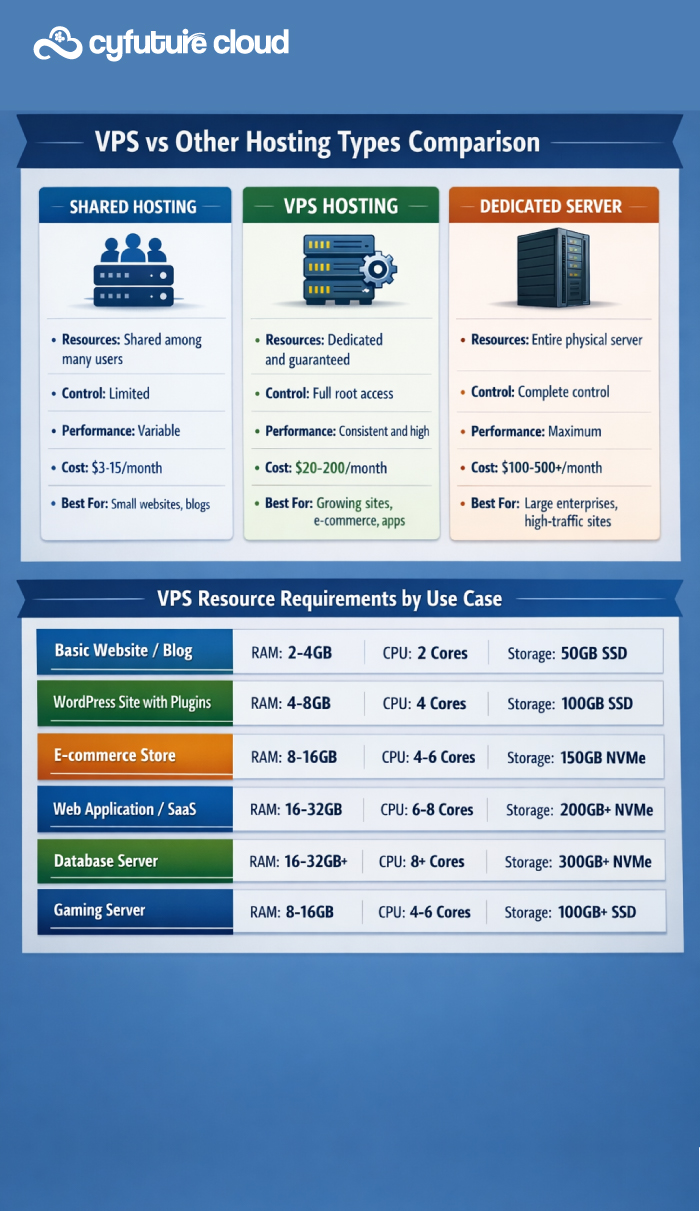
The fundamental difference between VPS and shared hosting lies in resource allocation. In shared hosting environments, hundreds of websites share the same server resources—CPU, RAM, and bandwidth. When one website experiences a traffic spike, it can slow down all other sites on the server. This is known as the ‘bad neighbor effect.’
VPS hosting eliminates this problem by providing dedicated, guaranteed resources. Your allocated CPU cores, RAM, and storage are yours alone. Even if another VPS on the same physical server experiences high traffic, your website’s performance remains unaffected. This predictability is crucial for businesses that depend on consistent uptime and performance.
VPS vs Dedicated Servers
While dedicated servers offer maximum resources and performance by giving you an entire physical server, they come with a significantly higher price tag and may provide more resources than you actually need. VPS hosting bridges this gap by offering dedicated resources at a fraction of the cost.
For most growing businesses, VPS provides ample resources while maintaining cost-effectiveness. You get root access, customization capabilities, and dedicated resources without paying for an entire physical server. When you do outgrow your VPS, upgrading to a dedicated server is straightforward.
Key Features and Benefits of VPS Hosting
Dedicated Resources You Can Count On
Unlike shared hosting where resources are pooled and distributed on-demand, VPS hosting guarantees specific amounts of CPU, RAM, and storage exclusively for your use. This means your website’s performance is predictable and reliable, unaffected by other users’ activities.
Root Access and Complete Control
VPS hosting provides full administrative control through root access (on Linux) or Administrator access (on Windows). This level of control allows you to install custom software, configure server settings, implement specific security measures, and optimize your environment exactly how you need it. It’s your server to command.
Enhanced Security and Isolation
Security is paramount in today’s digital world. VPS hosting provides a secure, isolated environment where your data and applications are separated from other users at the hypervisor level. You can implement your own firewall rules, security protocols, and access controls without worrying about vulnerabilities from neighboring accounts.
Scalability for Growing Needs
One of VPS hosting’s greatest advantages is scalability. As your website grows and demands more resources, you can easily upgrade your VPS plan—often with minimal downtime. Need more RAM? Additional CPU cores? Extra storage? These upgrades are typically just a few clicks away, allowing your hosting to grow alongside your business.
Cost-Effective Performance
VPS hosting delivers the performance and control of a dedicated server at a fraction of the cost. For businesses that have outgrown shared hosting but don’t need an entire dedicated server, VPS provides exceptional value. You’re only paying for the resources you need, not an entire physical machine.
Types of VPS Hosting: Finding Your Perfect Match
Managed VPS vs Unmanaged VPS
The choice between managed and unmanaged VPS hosting is one of the most important decisions you’ll make:
Managed VPS is ideal for businesses that want to focus on their core operations rather than server management. With managed VPS, your hosting provider handles server maintenance, security updates, software patches, monitoring, and troubleshooting. This is perfect for businesses without dedicated IT staff or those who prefer to leave the technical details to experts.
Unmanaged VPS gives you complete control but requires technical expertise. You’re responsible for all aspects of server management, from initial setup and software installation to security patches and performance optimization. This option is suitable for developers, system administrators, and businesses with in-house technical teams who want maximum control and customization.
Operating System Choices
Linux VPS is the most popular choice, offering distributions like Ubuntu, CentOS, Debian, and others. Linux is open-source, generally more cost-effective, and provides excellent performance for web hosting. It’s the go-to choice for running PHP, Python, Ruby, and Node.js applications.
Windows VPS is necessary if you’re running ASP.NET applications, need Microsoft SQL Server, or require other Windows-specific software. While typically more expensive due to licensing costs, Windows VPS provides a familiar interface and seamless integration with Microsoft technologies.
When Should You Choose VPS Hosting?
Recognizing when it’s time to upgrade to VPS hosting is crucial for maintaining optimal performance and user experience. Here are the key indicators:
Signs You’ve Outgrown Shared Hosting
- Your website is experiencing slow loading times or frequent downtime
- You’re receiving resource limit notifications from your host
- Your traffic has grown significantly, with thousands of monthly visitors
- You need to install custom software or configure specific server settings
- You require enhanced security for sensitive data or e-commerce transactions
Ideal Use Cases for VPS Hosting
- Growing Websites: Blogs, portfolios, and content sites that have surpassed shared hosting limitations
- E-commerce Stores: Online shops requiring secure payment processing, consistent performance, and the ability to handle traffic spikes during sales
- Web Applications: SaaS platforms, customer portals, and custom applications needing specific configurations
- Development Environments: Testing grounds for developers needing isolated, configurable environments
- Database Servers: Hosting databases that require consistent performance and dedicated resources
- Gaming Servers: Private game servers requiring dedicated resources and low latency
Getting Started with VPS: A Beginner’s Roadmap
Setting up your first VPS doesn’t have to be intimidating. Here’s a step-by-step overview to help you get started:
Step 1: Choose the Right Provider
Look for providers offering reliable uptime guarantees (99.9% or higher), responsive 24/7 support, and transparent pricing. Consider factors like data center locations, backup options, and the provider’s reputation in the industry. Cyfuture Cloud, for instance, provides enterprise-grade infrastructure with data centers strategically located for optimal performance.
Step 2: Select Your Plan Based on Requirements
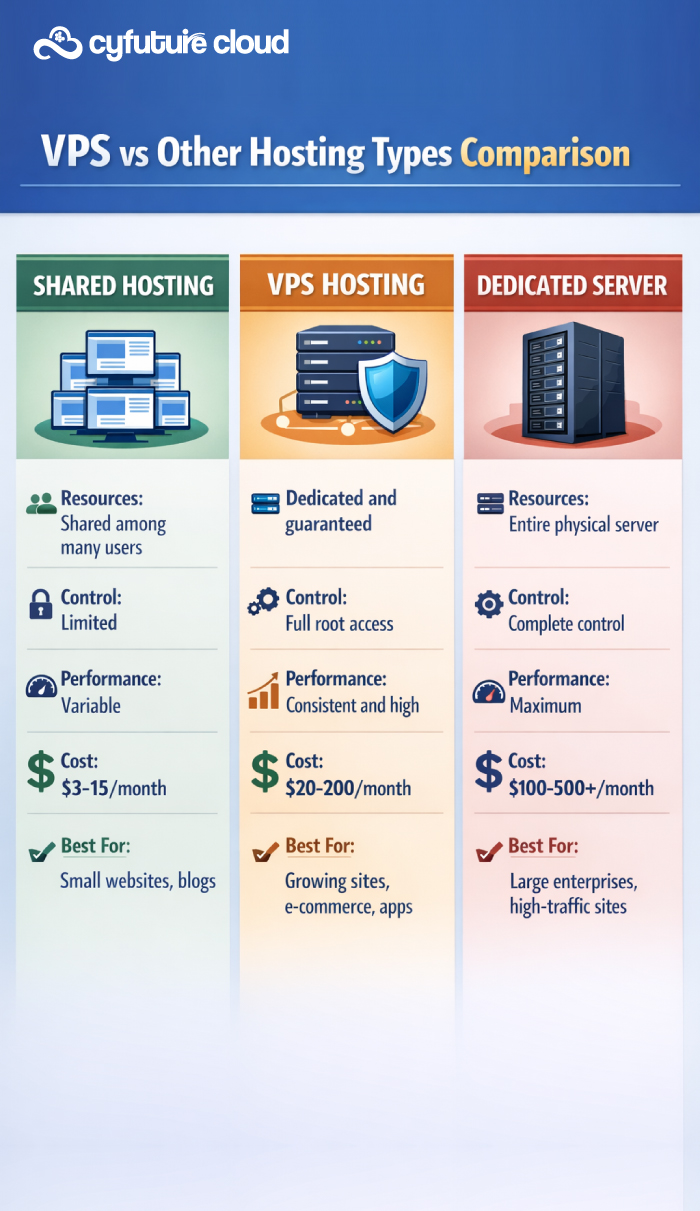
Assess your needs carefully. For a basic website or blog, start with 2GB RAM and 2 CPU cores. E-commerce sites typically need 4-8GB RAM and 4 CPU cores. Resource-intensive applications may require 8GB+ RAM and 6+ CPU cores. Remember, you can always scale up as your needs grow.
Consider storage requirements too. Standard SSD storage works well for most applications, but high-traffic sites benefit from NVMe SSD drives offering superior performance. Factor in bandwidth needs—most providers offer unmetered or generous data transfer limits.
Step 3: Choose Your Operating System
For most web applications, Linux distributions are the preferred choice. Ubuntu is beginner-friendly with extensive documentation. CentOS offers stability for production environments. Debian provides a balance of stability and modern features. Choose Windows Server if you’re running ASP.NET applications or need Microsoft technologies.
Step 4: Configure and Secure Your Server
Once your VPS is provisioned, immediate security configuration is essential. Change default passwords, set up SSH key authentication, configure your firewall, and enable automatic security updates. If you’ve chosen managed VPS, your provider handles these crucial steps for you.
Install a control panel like cPanel or Plesk for easier management, or use the command line if you’re comfortable with it. Deploy your website or application, configure your domain, and set up SSL certificates for secure connections.
Understanding VPS Technical Specifications
Making sense of technical specifications helps you choose the right VPS configuration for your needs:
RAM (Memory) Requirements
RAM is crucial for server performance. Basic websites run smoothly on 2-4GB. WordPress sites with plugins need 4-8GB. E-commerce platforms require 8-16GB. Database-heavy applications may need 16GB or more. Insufficient RAM leads to slow performance and crashes.
CPU Cores and Processing Power
CPU handles all computational tasks. Simple sites work well with 2 cores. Medium-traffic sites need 4 cores. High-traffic or computation-intensive applications require 6-8 cores or more. Modern VPS providers offer the latest generation processors for optimal performance.
Storage: SSD vs NVMe
Standard SSD storage provides excellent performance for most applications with fast read/write speeds. NVMe SSDs offer significantly faster performance—ideal for database-intensive applications, high-traffic sites, or I/O-heavy operations. The price difference is often minimal for the performance gain.
Bandwidth and Data Transfer
Bandwidth determines how much data your server can transfer monthly. Calculate based on average page size multiplied by expected monthly visitors. Most quality VPS providers offer generous or unmetered bandwidth, eliminating concerns about overage charges.
VPS Security Best Practices: Protecting Your Digital Assets
Security should be your top priority when managing a VPS. Here are essential practices to keep your server secure:
- Regular Updates and Patches: Keep your operating system, control panel, and all installed software up to date. Security vulnerabilities are constantly discovered, and updates patch these holes.
- Firewall Configuration: Configure your firewall to allow only necessary ports and services. Block unused ports and implement IP whitelisting for administrative access.
- SSH Key Authentication: Disable password-based SSH login and use key-based authentication instead. This prevents brute-force attacks on your server.
- Regular Backups: Implement automated daily backups and store them in separate locations. Test your backup restoration process regularly to ensure it works when needed.
- Monitoring and Logging: Set up monitoring tools to track server performance and security events. Review logs regularly to detect unusual activities.
- DDoS Protection: Choose a provider offering DDoS protection to shield your server from distributed denial-of-service attacks that could take your site offline.
Common VPS Challenges and How to Overcome Them
Even with VPS hosting’s advantages, you may encounter challenges. Here’s how to address them:
Performance Issues
If your site is slow, check resource usage first. High CPU or RAM usage indicates you need to optimize your applications or upgrade your plan. Implement caching, optimize databases, and use a CDN to improve performance.
Technical Complexity
Managing an unmanaged VPS can be overwhelming for beginners. Consider starting with managed VPS where experts handle technical aspects. As you gain confidence, you can transition to unmanaged VPS for more control.
Cost Management
VPS costs can increase with upgrades and add-ons. Plan your resources carefully and monitor usage to avoid unnecessary expenses. Choose providers with transparent pricing and no hidden fees.
Why Cyfuture Cloud VPS Stands Out
Cyfuture Cloud has established itself as a trusted VPS hosting provider by focusing on what matters most to businesses—reliability, performance, and exceptional support. Here’s what sets us apart:
Enterprise-Grade Infrastructure
Our state-of-the-art data centers feature redundant power supplies, advanced cooling systems, and enterprise-grade hardware. We use the latest generation Intel Xeon processors and NVMe SSD storage to ensure your applications run at peak performance.
99.95% Uptime Guarantee
We understand that downtime costs money. Our robust infrastructure and proactive monitoring ensure your VPS stays online. We back this commitment with a 99.95% uptime SLA, giving you peace of mind that your online presence is always available.
24/7 Expert Support
Technical issues don’t follow business hours, and neither does our support team. Our experienced engineers are available round-the-clock to assist with any challenges, from initial setup to performance optimization. Whether you have a simple question or a critical issue, we’re here to help.
Flexible and Scalable Solutions
Start small and scale seamlessly as your business grows. Our VPS plans can be upgraded with just a few clicks, adding more RAM, CPU, or storage without lengthy migrations or downtime. This flexibility ensures you only pay for what you need while having room to grow.
Comprehensive Management Options
Whether you prefer hands-on control or want us to handle everything, we’ve got you covered. Choose from fully managed VPS where we handle all technical aspects, or unmanaged VPS for complete control. We also offer semi-managed options for the perfect balance.
Strategic Data Center Locations
Our data centers are strategically located to serve businesses across regions, ensuring low latency and fast loading times for your users. Choose the location closest to your target audience for optimal performance.
Transparent Pricing
No hidden fees, no surprise charges. Our pricing is clear and straightforward, with all features included in your plan. What you see is what you pay, making budgeting predictable and stress-free.

Conclusion: Making the Smart Choice for Your Hosting Needs
Virtual Private Server hosting represents the ideal middle ground for businesses that have outgrown shared hosting but don’t yet need the full power and expense of a dedicated server. With dedicated resources, enhanced security, complete control, and the ability to scale seamlessly, VPS hosting provides the foundation your growing online presence needs.
The key to VPS success lies in choosing the right provider and configuration for your specific needs. Whether you’re launching an e-commerce store, scaling a high-traffic website, developing web applications, or hosting databases, VPS hosting offers the performance, security, and flexibility to support your goals.
As your business grows, your hosting should grow with you. VPS hosting’s scalability ensures you’re never locked into insufficient resources or paying for more than you need. With providers like Cyfuture Cloud offering managed and unmanaged options, 24/7 support, and enterprise-grade infrastructure, transitioning to VPS has never been easier.
Take the next step in your hosting journey. Assess your current needs, evaluate your growth trajectory, and make the move to VPS hosting. Your website’s performance, security, and your peace of mind will thank you.
Frequently Asked Questions (FAQs)
- What is the main difference between VPS and shared hosting?
The fundamental difference lies in resource allocation and isolation. In shared hosting, hundreds of websites share the same server resources (CPU, RAM, bandwidth), which can lead to performance issues when other sites experience traffic spikes—the ‘bad neighbor effect.’ VPS hosting provides dedicated, guaranteed resources that are exclusively yours. Each VPS operates in an isolated environment, ensuring your website’s performance is never affected by other users on the same physical server. You also get root access with VPS, allowing complete control over your server environment, which is not available in shared hosting.
- Do I need technical knowledge to use VPS hosting?
Not necessarily. The technical knowledge required depends on whether you choose managed or unmanaged VPS hosting. With managed VPS, the hosting provider handles all technical aspects including server setup, security updates, software patches, monitoring, and troubleshooting. This makes it accessible even if you have limited technical expertise. However, if you choose unmanaged VPS, you’ll need solid technical skills in Linux/Windows server administration, security configuration, and troubleshooting. For beginners, Cyfuture Cloud’s managed VPS services are ideal—our experts handle the technical complexities while you focus on your business.
- How much does VPS hosting cost, and what factors affect pricing?
VPS hosting typically ranges from $20-$200+ per month, depending on several factors. The main pricing determinants include: allocated RAM (2GB to 32GB+), CPU cores (2 to 16+ cores), storage type and capacity (standard SSD vs. NVMe SSD, 50GB to 500GB+), bandwidth allocation, management level (managed costs more than unmanaged but saves time and technical overhead), operating system (Windows licenses add costs), and additional features like backups, DDoS protection, and control panels. At Cyfuture Cloud, we offer competitive pricing with transparent costs—no hidden fees. Our entry-level VPS plans start affordably while providing room to scale as your needs grow.
- Can I upgrade my VPS resources as my website grows?
Absolutely! One of VPS hosting’s greatest advantages is seamless scalability. As your traffic increases or your applications demand more resources, you can upgrade your VPS plan with minimal to no downtime. Most quality providers, including Cyfuture Cloud, allow you to increase RAM, add CPU cores, expand storage, or upgrade bandwidth with just a few clicks through your control panel. This flexibility means you can start with a basic plan and scale up incrementally as needed, ensuring you only pay for what you use while having room to grow. Downgrading is also possible if you find you’ve over-provisioned resources.
- How does Cyfuture Cloud ensure the security of my VPS?
Security is our top priority at Cyfuture Cloud. We implement multiple layers of protection including: advanced DDoS protection to shield your server from distributed attacks, regular security patches and updates for all managed VPS plans, isolated virtualization ensuring complete separation between VPS instances, enterprise-grade firewalls with customizable rules, automated backup systems with multiple restore points, 24/7 security monitoring and threat detection, optional SSL certificates for encrypted connections, and compliance with international security standards. For managed VPS customers, our security experts proactively monitor and respond to threats. We also provide security best practices guidance and can assist with custom security configurations based on your specific requirements.








Stay Ahead of the Curve.
Join the Cloud Movement, today!
Send this to a friend