Get 69% Off on Cloud Hosting : Claim Your Offer Now!





- Products
- Solutions
-
Solutions
-
 Cloud
Hosting
Cloud
Hosting
-
VPS
Hosting
-
 GPU
Cloud
GPU
Cloud
-
 Dedicated
Server
Dedicated
Server
-
 Server
Colocation
Server
Colocation
-
 Backup as a Service
-
 CDN
Network
CDN
Network
-
 Window
Cloud Hosting
Window
Cloud Hosting
-
 Linux
Cloud Hosting
Linux
Cloud Hosting
-
Managed
Cloud Service
-
 Storage
as a Service
Storage
as a Service
-
VMware
Public Cloud
-
Multi-Cloud
Hosting
-
Cloud
Server Hosting
-
Bare
Metal Server
-
Virtual
Machine
-
 Magento
Hosting
Magento
Hosting
-
 Remote
Backup
Remote
Backup
-
 DevOps
-
 Kubernetes
-
 Cloud
Storage
Cloud
Storage
-
 NVMe
Hosting
NVMe
Hosting
-
 DR
as s Service
DR
as s Service
-
-
Solutions
- Marketplace
- Pricing
- Resources
- Company
 Remote
Backup
Remote
Backup NVMe
Hosting
NVMe
Hosting Pricing
Calculator
Pricing
Calculator Unlock Cost
Optimization
Unlock Cost
Optimization Overview
 Documentation
 Price
Calculator
Price
Calculator Tools
Tools FAQs
FAQs Terms
of Service
Terms
of Service Privacy
Policy
Privacy
Policy
 Migration
 Container
 Power
Power
 Utilities
 VMware
Private Cloud
VMware
Private Cloud VMware
on AWS
VMware
on AWS VMware
on Azure
VMware
on Azure Certifications
 Partners
 Careers
 Support
 Service
Level Agreement
Service
Level Agreement  Contact
Table of Contents
- What Is VPS Hosting? (Virtual Private Server Explained)
- How VPS Hosting Works — Virtualization & Isolation
- Why Choose VPS Hosting? Key Benefits
- Who Should Use VPS Hosting? Practical Use Cases
- VPS vs Shared Hosting vs Dedicated Hosting
- Managed vs Unmanaged VPS Hosting
- How Much Does VPS Hosting Cost?
- Choosing the Right VPS Plan: What to Consider
- Security Best Practices for VPS Hosting
- Performance Optimization Tips for VPS Hosting
- Common Myths About VPS Hosting
- Future of VPS Hosting
- Conclusion: Is VPS Right for You?
Virtual Private Server (VPS) hosting is one of the most popular hosting choices for businesses and developers who need balanced performance, flexibility, and value. Positioned between shared hosting and dedicated servers, VPS combines the affordability of shared plans with the control and power of dedicated environments.
This comprehensive guide explains what VPS hosting is, how it works, its benefits, real use cases, pricing factors, security considerations, and how it compares to other hosting types — with a human tone and search-optimized structure.
What Is VPS Hosting? (Virtual Private Server Explained)
VPS Hosting — short for Virtual Private Server hosting — refers to a hosting environment where a single physical server is partitioned into multiple isolated virtual machines (VMs). Each VPS operates like a standalone server with its own dedicated resources, operating system, and configurations.
In simpler terms:
-
It feels like having your own server
-
But at a fraction of the cost of a dedicated machine
-
With greater control and stability than shared hosting
A VPS gives you dedicated CPU, RAM, and storage resources that are not affected by other users on the same physical host — even though the server hardware is shared.
How VPS Hosting Works — Virtualization & Isolation
At the heart of VPS hosting is virtualization technology. A hypervisor (software such as KVM, Xen, or Virtuozzo) partitions a physical server into multiple virtual dedicated servers.
Each VPS gets:
-
Its own operating system (Linux or Windows)
-
Isolated filesystem
-
Dedicated memory and CPU share
-
Network access and control
These virtual environments act independently, giving users root or administrator access, full installation control, and customizable software stacks.
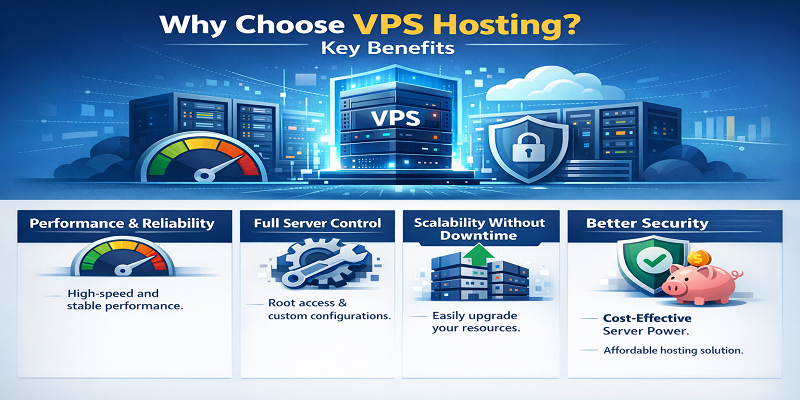
Why Choose VPS Hosting? Key Benefits
1. Performance and Reliability
Unlike shared hosting where resources are dynamically shared, VPS ensures dedicated allocations — meaning heavier site traffic or processes on one VPS won’t slow down neighbors.
2. Full Server Control
VPS lets you:
-
Install custom tools and software
-
Configure server settings
-
Choose your OS and stack
-
Deploy development environments
This makes VPS ideal for developers, businesses, SaaS platforms, and agencies.
3. Scalability Without Downtime
Many VPS plans allow on-the-fly scaling — adding RAM, CPU, or storage without server rebuilds.
4. Better Security
Resource isolation reduces risks from other tenants; additional security measures like firewalls, custom access controls, and monitoring strengthen your setup.
5. Cost-Effective Server Power
Compared with dedicated hosting, VPS gives nearly all of the benefits at a fraction of the price — excellent for mid-sized workloads.
Who Should Use VPS Hosting? Practical Use Cases
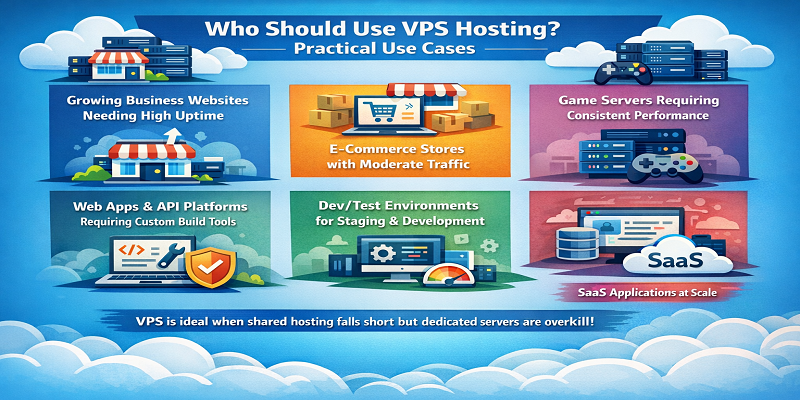
VPS is ideal when shared hosting falls short but dedicated servers are overkill:
🔹 Growing business websites needing high uptime
🔹 E-commerce stores with moderate traffic
🔹 Game servers requiring consistent performance
🔹 Web apps & API platforms requiring custom build tools
🔹 Dev/test environments for staging and development
🔹 WordPress sites needing speed & security
🔹 SaaS applications at scale
VPS strikes the balance between affordability and control that many online projects require.
| Feature | Shared Hosting | VPS Hosting | Dedicated Hosting |
|---|---|---|---|
| Cost | Lowest | Moderate | Highest |
| Performance | Shared | Dedicated | Full |
| Control | Limited | Root/Admin | Full |
| Scalability | Limited | High | High |
| Security | Lower | Medium–High | Highest |
| Isolation | No | Yes | Yes |
VPS is often the best choice once a site outgrows shared hosting but doesn’t justify the cost of a full dedicated server.
Managed vs Unmanaged VPS Hosting
Managed VPS
-
Provider handles updates, patches, monitoring
-
Ideal for businesses without sysadmin expertise
-
Higher monthly cost
Unmanaged VPS
-
You manage everything (software installs, updates, security)
-
More control & customization
-
Lower cost but requires technical skills
Choosing between the two depends on your team’s capabilities and budget.
How Much Does VPS Hosting Cost?
VPS pricing varies widely based on:
-
CPU allocation
-
RAM size
-
Storage type (SSD vs NVMe)
-
Bandwidth
-
Managed vs unmanaged services
-
Data center geography
Typical entry ranges for VPS (as examples):
-
Basic VPS: $5–$20/m
-
Mid-range VPS: $20–$80/m
-
High-performance VPS: $80+/m
Prices also vary based on support, uptime SLAs, and additional services like backups, monitoring, and security layers.
Choosing the Right VPS Plan: What to Consider
1. CPU & RAM Needs
More resource-intensive apps (CMS, databases, game servers) need more CPU and RAM.
2. Storage Type
NVMe SSDs deliver faster performance compared to traditional SSDs or HDDs.
3. Bandwidth & Network
Unmetered or high-capacity network is important for high-traffic sites or streaming apps.
4. Control Panel & OS
Easy control panels (cPanel, Plesk) help non-technical users; Ubuntu, CentOS, Debian are common Linux choices.
5. Backup & Security Features
Automated backups and built-in firewall & DDoS protection are critical.
Security Best Practices for VPS Hosting
Because VPS gives you root access, security is in your hands:
✅ Always update and patch your OS
✅ Use strong SSH keys and disable password logins
✅ Install firewalls (UFW, iptables) and intrusion detection
✅ Regular backups and offsite snapshots
✅ Set up monitoring and alerts
Managed VPS hosting providers often include many of these protections by default.
Performance Optimization Tips for VPS Hosting
To get the most out of your VPS:
-
Use NGINX or LiteSpeed instead of Apache for web servers
-
Enable caching (Redis, Varnish, OPCache)
-
Use CDN for global content delivery
-
Optimize application code and databases
-
Monitor performance with tools like htop, New Relic, or Munin
These upgrades keep your VPS responsive under load.
Common Myths About VPS Hosting
MYTH: VPS is only for developers
FACT: Businesses, e-commerce, and WordPress sites also benefit.
MYTH: VPS is too expensive
FACT: VPS bridges the gap between shared hosting and dedicated, often delivering better ROI.
MYTH: VPS is hard to manage
FACT: Managed VPS makes it accessible for non-technical users.
Future of VPS Hosting
VPS continues to evolve with:
-
Cloud-based VPS (virtual machines backed by cloud infrastructure)
-
Auto-scaling and container-ready VPS
-
Integration with Kubernetes and microservices
-
Improved security and automation
This makes VPS a future-ready choice for modern web applications and business growth.
Conclusion: Is VPS Right for You?
Yes — if you need balanced power, control, and affordability.
VPS hosting sits at the intersection of performance and value. It’s perfect for growing websites, applications, developers, and businesses that have outgrown basic shared hosting but aren’t ready to invest in dedicated servers.
Choosing the right VPS depends on your technical needs, budget, and future growth plans. With the right setup, VPS can deliver enterprise-level performance without enterprise pricing.
Recent Post


















Stay Ahead of the Curve.
Join the Cloud Movement, today!
Send this to a friend