Get 69% Off on Cloud Hosting : Claim Your Offer Now!





- Products
- Solutions
-
Solutions
-
 Cloud
Hosting
Cloud
Hosting
-
VPS
Hosting
-
 GPU
Cloud
GPU
Cloud
-
 Dedicated
Server
Dedicated
Server
-
 Server
Colocation
Server
Colocation
-
 Backup as a Service
-
 CDN
Network
CDN
Network
-
 Window
Cloud Hosting
Window
Cloud Hosting
-
 Linux
Cloud Hosting
Linux
Cloud Hosting
-
Managed
Cloud Service
-
 Storage
as a Service
Storage
as a Service
-
VMware
Public Cloud
-
Multi-Cloud
Hosting
-
Cloud
Server Hosting
-
Bare
Metal Server
-
Virtual
Machine
-
 Magento
Hosting
Magento
Hosting
-
 Remote
Backup
Remote
Backup
-
 DevOps
-
 Kubernetes
-
 Cloud
Storage
Cloud
Storage
-
 NVMe
Hosting
NVMe
Hosting
-
 DR
as s Service
DR
as s Service
-
-
Solutions
- Marketplace
- Pricing
- Resources
- Company
 Remote
Backup
Remote
Backup NVMe
Hosting
NVMe
Hosting Pricing
Calculator
Pricing
Calculator Unlock Cost
Optimization
Unlock Cost
Optimization Overview
 Documentation
 Price
Calculator
Price
Calculator Tools
Tools FAQs
FAQs Terms
of Service
Terms
of Service Privacy
Policy
Privacy
Policy
 Migration
 Container
 Power
Power
 Utilities
 VMware
Private Cloud
VMware
Private Cloud VMware
on AWS
VMware
on AWS VMware
on Azure
VMware
on Azure Certifications
 Partners
 Careers
 Support
 Service
Level Agreement
Service
Level Agreement  Contact
Table of Contents
If you have been exploring NVIDIA’s data center GPUs, you have probably come across both the H100 and the newer H200.
At first glance, they look very similar. Both are built on NVIDIA’s Hopper architecture and target AI training, inference, and high-performance computing.
But once you start digging into the specifications, the differences begin to matter.
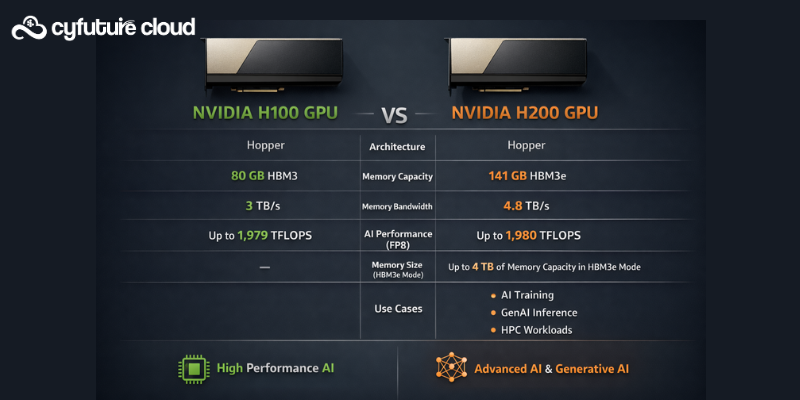
Memory capacity changes, bandwidth improvements, and workload performance are not identical between the two.
Some gains are obvious on paper, while others only show up in real-world AI and HPC use cases.
So instead of comparing model names alone, you need to understand where the H200 actually improves on the H100 and what that means for your workloads.
Here is a clear breakdown of the key differences between the NVIDIA H100 GPU and NVIDIA H200 GPU.
Overview of H100 GPU and H200 GPU
The NVIDIA H100 GPU was NVIDIA’s flagship Hopper GPU, replacing the A100 gpu and setting a new standard for large-scale AI training and inference. It quickly became the backbone of modern AI clusters, including NVIDIA DGX H100 systems and cloud offerings like Azure ND H100 v5.
The H200 GPU is not a brand-new architecture. Instead, it is an evolution of the H100, designed to remove memory bottlenecks that appear in large language models, recommendation systems, and data-heavy HPC simulations.
In short, H100 focuses on raw compute leadership, while H200 pushes memory capacity and bandwidth to better support today’s massive models.
Architecture and Core Specifications
Both NVIDIA H100 GPU and NVIDIA H200 GPU are based on the Hopper architecture and support the same core technologies:
- Transformer Engine
- FP8 and FP16 precision
- NVLink and NVSwitch
- CUDA, cuDNN, and TensorRT
- NVIDIA GPU with CC support (H100+)
When it comes to compute, the similarities are striking. The H100 CUDA cores, Tensor Cores, and overall instruction set remain largely unchanged in H200. This means that for compute-bound workloads, performance gains are incremental rather than dramatic.
The key architectural difference lies not in compute units, but in how fast data can move to and from memory.
NVIDIA H100 GPU vs H200 GPU: Specification Comparison
|
Feature |
NVIDIA H100 GPU |
NVIDIA H200 GPU |
|
GPU Architecture |
Hopper |
Hopper (Enhanced) |
|
GPU Name Usage |
GPU H100, H100 GPU |
GPU H200, H200 GPU |
|
Memory Type |
HBM3 |
HBM3e |
|
Memory Capacity |
80GB |
Higher than H100 (HBM3e-based) |
|
Memory Bandwidth |
High |
Significantly higher than H100 |
|
CUDA Cores |
Same Hopper-based H100 CUDA cores |
Similar core count as H100 |
|
AI Precision Support |
FP8, FP16, TF32 |
FP8, FP16, TF32 |
|
Transformer Engine |
Supported |
Supported |
|
NVLink / NVSwitch |
Yes |
Yes |
|
Primary Advantage |
Strong compute performance |
Memory bandwidth & capacity |
|
Ideal Workloads |
AI training, inference, HPC |
Large LLMs, memory-bound AI |
|
Cloud Availability |
Widely available (Azure ND H100 v5) |
Limited but growing |
|
Typical Pricing |
Lower than H200 |
Higher due to newer memory |
|
Price Comparison |
H100 GPU price is more stable |
H200 GPU price carries premium |
|
Upgrade Value |
Major step up from A100 |
Best for memory-constrained models |
Memory and Bandwidth Differences
This is where H100 GPU vs H200 GPU becomes a meaningful discussion.
The standard NVIDIA H100 GPU typically ships with 80GB of HBM3 memory. While this is already substantial, large AI models quickly expose memory limitations, especially during training and fine-tuning.
The NVIDIA H200 upgrades this by introducing HBM3e memory, significantly increasing both capacity and bandwidth.
Why This Matters
- Larger batch sizes without model sharding
- Faster access to model weights
- Reduced data movement overhead
- Better performance for memory-bound workloads
For organizations running trillion-parameter models or memory-heavy inference pipelines, H200 can deliver noticeable efficiency gains even when raw compute remains similar.
Performance for AI and HPC Workloads
In real-world benchmarks, H200 GPU vs H100 GPU performance depends heavily on workload type.
- Compute-bound tasks (dense matrix operations, smaller models):
Performance is very similar between H100 and H200. - Memory-bound tasks (LLMs, retrieval-augmented generation, graph analytics):
H200 pulls ahead due to higher memory bandwidth and capacity.
For AI inference at scale, H200 reduces latency spikes caused by memory stalls. In HPC simulations, faster memory access improves throughput in data-intensive scenarios.
If you are upgrading from A100, both H100 and H200 represent a major leap. But if you already run H100 clusters, the value of H200 depends on how memory-constrained your workloads are.
Pricing Comparison: NVIDIA H100 vs H200
Pricing is often the deciding factor.
The NVIDIA H100 price varies widely depending on region, form factor, and deployment model. On-premises buyers may look at the H100 GPU price, while cloud users focus on per-hour costs.
Typical pricing considerations include:
- H100 GPU cost vs H200 GPU price
- NVIDIA H100 80GB price compared to H200
- NVIDIA H100 price in India vs global pricing
- NVIDIA H100 price 2025 list price trends
The NVIDIA H100 vs H200 price gap reflects the newer memory technology in H200. H200 commands a premium, especially in early availability phases.
For enterprises purchasing full systems, NVIDIA DGX H100 price and future DGX H200 system pricing become relevant. These systems bundle networking, cooling, and software, which significantly affects total cost.
Cloud Availability and Azure H100 Pricing
Many teams do not buy GPUs outright. Instead, they rely on cloud platforms.
Microsoft Azure offers Azure ND H100 v5 instances, which are widely used for AI training and inference.
Key pricing considerations include:
- Azure ND H100 v5 pricing
- Azure ND H100 v5 pricing per hour
- Azure ND96isr H100 v5 price per hour
- Azure H100 pricing for on-demand usage
Azure ND H100 v5 documentation provides details on GPU count, memory, and networking. For teams evaluating cost efficiency, Azure ND H100 v5 pricing per hour often determines whether workloads remain in the cloud or move on-prem.
As of now,NVIDIA H200 GPU cloud availability is more limited, but H200 GPU instances and rental options are gradually emerging. Over time, expect H200 cloud server pricing models similar to H100, but at a higher hourly rate.
Use Cases: When to Choose H100 or H200
Choose H100 GPU if:
- Your workloads are compute-bound
- You want broader availability today
- You rely on Azure ND H100 v5 or similar cloud offerings
- You need a proven, widely supported platform
H100 remains a strong choice for most AI training pipelines and general HPC workloads.
Choose H200 GPU if:
- Your models are memory-bound
- You work with very large LLMs
- You want to reduce memory bottlenecks
- You plan for long-term scalability
H200 makes the most sense when memory efficiency directly affects performance and cost.
Final Verdict: H100 vs H200
The H100 vs H200 comparison is not about which GPU is “better” in absolute terms.
The NVIDIA H100 GPU delivers exceptional compute performance and remains the most widely deployed Hopper GPU across enterprises and cloud providers.
The NVIDIA H200 GPU cloud server refines that foundation by addressing one of the biggest challenges in modern AI: memory bandwidth and capacity.
If your workloads struggle with memory limits, H200 offers tangible benefits. If compute is your primary concern, H100 continues to provide excellent value, especially when factoring in availability, cloud pricing, and ecosystem maturity.
Ultimately, the right choice depends on your workload profile, budget, and deployment strategy—not just the model number on the GPU.
Recent Post


















Stay Ahead of the Curve.
Join the Cloud Movement, today!
Send this to a friend