Get 69% Off on Cloud Hosting : Claim Your Offer Now!





- Products
- Solutions
-
Solutions
-
 Cloud
Hosting
Cloud
Hosting
-
VPS
Hosting
-
 GPU
Cloud
GPU
Cloud
-
 Dedicated
Server
Dedicated
Server
-
 Server
Colocation
Server
Colocation
-
 Backup as a Service
-
 CDN
Network
CDN
Network
-
 Window
Cloud Hosting
Window
Cloud Hosting
-
 Linux
Cloud Hosting
Linux
Cloud Hosting
-
Managed
Cloud Service
-
 Storage
as a Service
Storage
as a Service
-
VMware
Public Cloud
-
Multi-Cloud
Hosting
-
Cloud
Server Hosting
-
Bare
Metal Server
-
Virtual
Machine
-
 Magento
Hosting
Magento
Hosting
-
 Remote
Backup
Remote
Backup
-
 DevOps
-
 Kubernetes
-
 Cloud
Storage
Cloud
Storage
-
 NVMe
Hosting
NVMe
Hosting
-
 DR
as s Service
DR
as s Service
-
-
Solutions
- Marketplace
- Pricing
- Resources
- Company
 Remote
Backup
Remote
Backup NVMe
Hosting
NVMe
Hosting Pricing
Calculator
Pricing
Calculator Unlock Cost
Optimization
Unlock Cost
Optimization Overview
 Documentation
 Price
Calculator
Price
Calculator Tools
Tools FAQs
FAQs Terms
of Service
Terms
of Service Privacy
Policy
Privacy
Policy
 Migration
 Container
 Power
Power
 Utilities
 VMware
Private Cloud
VMware
Private Cloud VMware
on AWS
VMware
on AWS VMware
on Azure
VMware
on Azure Certifications
 Partners
 Careers
 Support
 Service
Level Agreement
Service
Level Agreement  Contact
Table of Contents
- What Are Windows Cloud VMs?
- Top Benefits of Windows Cloud VMs
- Understanding Windows Cloud VM Pricing
- Real-World Use Cases for Windows Cloud VMs
- Conclusion: Transform Your Business with Windows Cloud VMs
- Frequently Asked Questions (FAQs)
- 1. How quickly can I deploy a Windows Cloud VM with Cyfuture Cloud?
- 2. Can I upgrade or downgrade my VM resources later?
- 3. What Windows Server versions does Cyfuture Cloud support?
- 4. How does Cyfuture Cloud handle data backups and disaster recovery?
- 5. What kind of technical support does Cyfuture Cloud provide?
In today’s fast-paced digital landscape, businesses are increasingly moving their Windows workloads to the cloud to unlock unprecedented flexibility, scalability, and cost-efficiency. Windows Cloud Virtual Machines (VMs) have emerged as a game-changing solution, enabling organizations to run Windows Server applications, host databases, and maintain critical business infrastructure without the burden of physical hardware management.
Whether you’re a startup seeking affordable cloud infrastructure, an enterprise requiring high-availability systems, or a developer needing flexible testing environments, Windows Cloud VMs from Cyfuture Cloud offer the perfect blend of performance, reliability, and value. This comprehensive guide explores everything you need to know about Windows Cloud VMs, from their compelling benefits to transparent pricing and real-world applications.
What Are Windows Cloud VMs?
A Windows Cloud VM is a virtualized Windows Server instance running on cloud infrastructure, accessible remotely over the internet. Unlike traditional physical servers that require significant capital investment, space, and maintenance, cloud VMs operate on powerful hardware maintained by cloud service providers like Cyfuture Cloud. You get dedicated computing resources—CPU cores, RAM, and storage—without owning any physical equipment.
These virtual machines run genuine Windows Server operating systems (2016, 2019, or 2022) and support all native Windows applications, frameworks like .NET and ASP.NET, and services such as Active Directory, SQL Server, and IIS. Access is typically provided through Remote Desktop Protocol (RDP), giving you the same familiar Windows interface you’re accustomed to—right from your browser or local desktop.
Top Benefits of Windows Cloud VMs
1. Unmatched Scalability and Flexibility
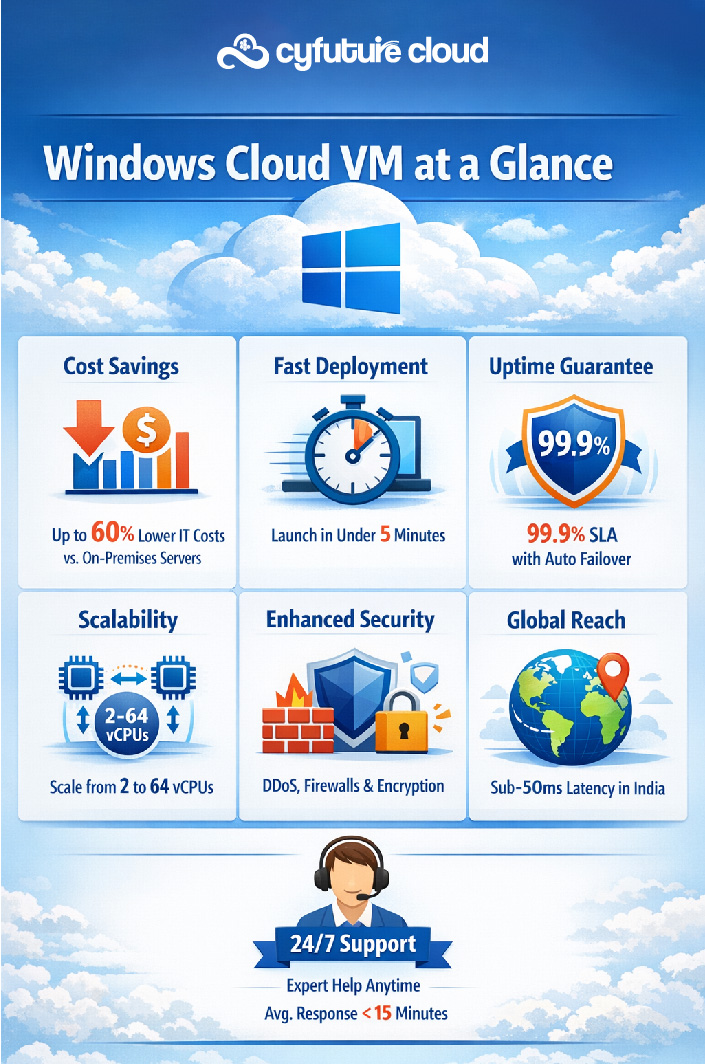
One of the most compelling advantages of Windows Cloud VMs is the ability to scale resources on demand. Need more processing power for a seasonal traffic surge? Simply upgrade your CPU cores within minutes. Planning to handle a large data processing job? Add more RAM with a few clicks. This elasticity ensures you’re never constrained by hardware limitations and can adapt to changing business needs in real-time.
Cyfuture Cloud’s Windows VMs allow you to scale both vertically (increasing resources on existing VMs) and horizontally (adding more VM instances), ensuring optimal performance regardless of workload fluctuations.
2. Significant Cost Optimization
Traditional server infrastructure requires substantial upfront capital expenditure for hardware, plus ongoing costs for electricity, cooling, physical security, and IT staff to manage it all. Windows Cloud VMs eliminate these expenses entirely. You pay only for the computing resources you consume, converting large capital expenses into predictable operational costs.
With Cyfuture Cloud’s transparent pricing model, you know exactly what you’re spending each month. There are no surprise fees, no depreciation concerns, and no expensive hardware refresh cycles. Small businesses can access enterprise-grade infrastructure without enterprise budgets, while larger organizations can optimize their IT spending significantly.
3. Enterprise-Grade Reliability and Uptime
Cyfuture Cloud guarantees 99.9% uptime through redundant infrastructure, automated failover mechanisms, and geographically distributed data centers. Your Windows VMs run on enterprise-grade hardware with built-in redundancy at every level—power supplies, network connections, storage systems, and more.
Automated daily backups ensure your data remains safe and recoverable. In the unlikely event of hardware failure, your VM automatically migrates to healthy infrastructure with minimal disruption. This level of reliability would cost millions to replicate on-premises.
4. Robust Security and Compliance
Security is paramount in cloud infrastructure. Cyfuture Cloud implements multi-layered security protocols including DDoS protection, firewall configurations, intrusion detection systems, and encrypted data transmission. Windows VMs benefit from regular security patches and updates managed by Microsoft and Cyfuture Cloud’s expert team.
Our infrastructure meets industry-leading compliance standards including ISO 27001, SOC 2, and GDPR requirements, making it suitable for organizations in regulated industries like healthcare, finance, and legal services. You maintain complete control over your data while benefiting from enterprise-level security infrastructure.
Understanding Windows Cloud VM Pricing
Cyfuture Cloud believes in transparent, straightforward pricing with no hidden fees. Our Windows Cloud VM pricing is based on the resources you consume, allowing you to choose configurations that perfectly match your requirements and budget.
Sample Pricing Tiers
Here’s an overview of our competitive pricing structure:
|
Configuration |
vCPU Cores |
RAM |
Starting Price/Month |
|
Basic |
2 vCPU |
4 GB |
₹2,999 |
|
Standard |
4 vCPU |
8 GB |
₹5,999 |
|
Premium |
8 vCPU |
16 GB |
₹11,999 |
|
Enterprise |
16+ vCPU |
32+ GB |
Custom Quote |
Note: Prices include Windows Server licensing, SSD storage (50-100 GB), and standard bandwidth. Additional storage and premium support available.
Real-World Use Cases for Windows Cloud VMs
1. Application Hosting
Host your ASP.NET, .NET Core, or legacy Windows applications with confidence. Windows Cloud VMs provide the perfect environment for IIS web servers, supporting everything from simple websites to complex enterprise applications. Businesses can deploy customer-facing portals, internal business applications, and API services with guaranteed uptime and performance.
2. Database Hosting
Microsoft SQL Server runs seamlessly on Windows Cloud VMs, offering high-performance database hosting with automated backups and point-in-time recovery. Whether you’re running transactional databases, data warehouses, or reporting services, our VMs deliver the IOPS and memory required for demanding database workloads.
3. Development and Testing Environments
Create isolated development, testing, and staging environments that mirror your production setup. Developers can spin up new VMs for feature branches, run automated tests, and tear down environments when projects complete—all without affecting production systems or waiting for hardware procurement.
4. Remote Desktop Services
Enable secure remote work with Windows Cloud VMs functioning as virtual desktop infrastructure (VDI). Employees can access their Windows desktop environment from anywhere, using any device. This solution has become essential for distributed teams, providing consistent user experiences while maintaining centralized IT control and security.
5. Business Continuity and Disaster Recovery
Use Windows Cloud VMs as part of your disaster recovery strategy. Maintain replica systems that can be activated within minutes if your primary infrastructure fails. Regular snapshots and geographic redundancy ensure your business can continue operating even during unexpected disruptions.
Conclusion: Transform Your Business with Windows Cloud VMs
Windows Cloud VMs represent more than just a hosting solution—they’re a strategic business enabler. By eliminating hardware constraints, reducing costs, and providing enterprise-grade reliability, cloud VMs allow organizations to focus on what truly matters: innovation, growth, and serving customers.
Cyfuture Cloud’s Windows VM solutions combine competitive pricing, robust infrastructure, and exceptional support to deliver maximum value. Whether you’re migrating legacy applications, building new cloud-native solutions, or establishing disaster recovery capabilities, our platform provides the foundation for your success.
Frequently Asked Questions (FAQs)
1. How quickly can I deploy a Windows Cloud VM with Cyfuture Cloud?
You can deploy a fully configured Windows Cloud VM in under 5 minutes. Simply select your desired configuration (CPU, RAM, storage), choose your Windows Server version, and click deploy. Our automated provisioning system handles all the setup, and you’ll receive RDP credentials immediately. For custom configurations or enterprise deployments, our team can have your infrastructure ready within 24 hours.
2. Can I upgrade or downgrade my VM resources later?
Absolutely! One of the key advantages of cloud VMs is flexibility. You can upgrade CPU cores, RAM, and storage at any time through our control panel. Upgrades typically complete within 5-10 minutes with minimal downtime (usually just a quick restart). Downgrades are also supported if you find you’re over-provisioned. This elasticity ensures you’re always paying for exactly what you need.
3. What Windows Server versions does Cyfuture Cloud support?
We support all current Windows Server versions including Windows Server 2016, 2019, and 2022 (both Standard and Data center editions). You can choose the version that best matches your application requirements during VM creation. All versions include Microsoft’s latest security patches and updates, which are automatically applied during scheduled maintenance windows (or you can manage updates manually if preferred).
4. How does Cyfuture Cloud handle data backups and disaster recovery?
We provide automated daily backups of your entire VM, stored in geographically separate data centers for redundancy. Backups are retained for 30 days by default (customizable up to 90 days). You can restore your VM to any backup point with a single click, typically completing within 15-20 minutes. For mission-critical applications, we offer real-time replication to secondary data centers, enabling sub-5-minute recovery time objectives (RTO). All backup data is encrypted at rest and in transit.
5. What kind of technical support does Cyfuture Cloud provide?
Cyfuture Cloud offers 24/7/365 technical support through multiple channels including phone, email, live chat, and support tickets. Our standard support (included free) provides response times under 4 hours for non-critical issues. We also offer premium support packages with 15-minute response times, dedicated account managers, and proactive monitoring. Our support team consists of certified Windows Server and cloud infrastructure experts who can assist with everything from basic VM management to complex troubleshooting and optimization.
Recent Post











Stay Ahead of the Curve.
Join the Cloud Movement, today!
Send this to a friend