Get 69% Off on Cloud Hosting : Claim Your Offer Now!





- Products
- Solutions
-
Solutions
-
 Cloud
Hosting
Cloud
Hosting
-
VPS
Hosting
-
 GPU
Cloud
GPU
Cloud
-
 Dedicated
Server
Dedicated
Server
-
 Server
Colocation
Server
Colocation
-
 Backup as a Service
-
 CDN
Network
CDN
Network
-
 Window
Cloud Hosting
Window
Cloud Hosting
-
 Linux
Cloud Hosting
Linux
Cloud Hosting
-
Managed
Cloud Service
-
 Storage
as a Service
Storage
as a Service
-
VMware
Public Cloud
-
Multi-Cloud
Hosting
-
Cloud
Server Hosting
-
Bare
Metal Server
-
Virtual
Machine
-
 Magento
Hosting
Magento
Hosting
-
 Remote
Backup
Remote
Backup
-
 DevOps
-
 Kubernetes
-
 Cloud
Storage
Cloud
Storage
-
 NVMe
Hosting
NVMe
Hosting
-
 DR
as s Service
DR
as s Service
-
-
Solutions
- Marketplace
- Pricing
- Resources
- Company
 Remote
Backup
Remote
Backup NVMe
Hosting
NVMe
Hosting Pricing
Calculator
Pricing
Calculator Unlock Cost
Optimization
Unlock Cost
Optimization Overview
 Documentation
 Price
Calculator
Price
Calculator Tools
Tools FAQs
FAQs Terms
of Service
Terms
of Service Privacy
Policy
Privacy
Policy
 Migration
 Container
 Power
Power
 Utilities
 VMware
Private Cloud
VMware
Private Cloud VMware
on AWS
VMware
on AWS VMware
on Azure
VMware
on Azure Certifications
 Partners
 Careers
 Support
 Service
Level Agreement
Service
Level Agreement  Contact
Table of Contents
Choosing the right hosting solution is one of the most critical decisions for small business owners, bloggers, and startups launching their online presence. Among the many options available, Virtual Private Server (VPS) hosting with 2GB RAM has emerged as a popular middle-ground solution. But is it really enough for your small website? Let’s dive deep into this question and help you make an informed decision.

Understanding VPS Hosting and RAM’s Role
Before we answer whether 2GB RAM is sufficient, it’s essential to understand what VPS hosting offers. A Virtual Private Server provides dedicated resources within a shared physical server environment, giving you more control and stability than traditional shared hosting. RAM (Random Access Memory) is the workspace where your server processes active tasks—from loading web pages to running database queries. The more RAM you have, the more simultaneous operations your server can handle efficiently.
What Constitutes a Small Website?
A “small website” typically refers to sites receiving low-to-medium traffic levels, usually between 1,000 to 10,000 monthly visitors. This category includes personal blogs, portfolio websites, small business sites with informational content, and modest e-commerce stores with limited product catalogs. These sites generally feature dynamic content powered by content management systems like WordPress, but don’t require extensive server resources for complex applications or high-volume transactions.
The Verdict: Is 2GB RAM Enough?
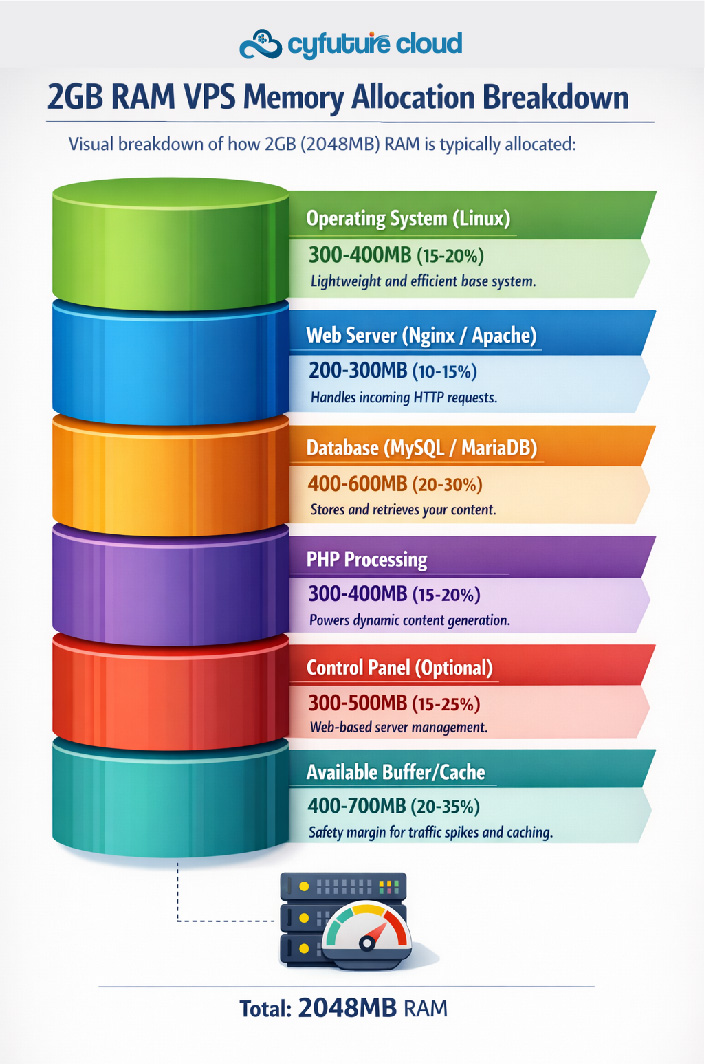
Yes, a VPS server with 2GB RAM is generally well-suited for small websites. This configuration provides sufficient resources for running essential web services while offering better stability and performance than shared hosting alternatives. Here’s what you can realistically expect:
Performance and Capabilities
A 2GB RAM VPS is ideal for handling small-to-medium traffic levels efficiently. It can comfortably support basic WordPress blogs, portfolio sites, and single-site setups without performance degradation. The configuration allows you to run core services like Apache or Nginx web servers alongside MySQL or MariaDB databases, while still maintaining adequate headroom for system operations.
For small e-commerce stores experiencing moderate traffic, 2GB RAM can adequately handle transaction processing, product catalog management, and customer interactions. However, during seasonal sales or promotional campaigns that spike traffic, you might notice performance constraints. Additionally, if you’re managing multiple low-traffic sites on the same server, 2GB can accommodate this setup, though careful resource management becomes crucial.
What Makes 2GB RAM Work
The key to maximizing 2GB RAM lies in proper server configuration and optimization. Implementing caching plugins for WordPress, such as WP Super Cache or W3 Total Cache, significantly reduces memory consumption by serving static versions of your pages. Using lightweight web servers like Nginx instead of Apache can save valuable RAM, as Nginx is designed for better resource efficiency.
Database optimization is equally important—regular cleanup of post revisions, spam comments, and transient data keeps your MySQL database lean and responsive. Leveraging a Content Delivery Network (CDN) for static assets like images, CSS, and JavaScript files offloads processing from your server, freeing up RAM for dynamic content generation.
Control panels like cPanel or Plesk can run smoothly on 2GB RAM, though they do consume approximately 300-500MB of memory. If you’re comfortable with command-line management, forgoing these panels can provide extra resources for your website applications.
Understanding the Limitations
While 2GB RAM offers a reliable baseline, it’s important to recognize its boundaries. High-traffic scenarios exceeding 15,000-20,000 monthly visitors may strain the server, leading to slower response times or occasional timeouts. Resource-intensive plugins, especially poorly coded ones or those performing complex operations, can quickly consume available memory.
If you plan to host multiple high-traffic websites, run memory-heavy applications, or operate both web and email servers on the same VPS, 2GB will likely prove insufficient. Similarly, websites with large databases, extensive product catalogs, or real-time features like chat systems may require additional resources to maintain optimal performance.
When 1GB Might Suffice vs. When You Need 4GB+
For extremely low-traffic websites or static sites with minimal dynamic content, a 1GB RAM VPS might technically work. However, this configuration leaves little room for growth and can struggle during traffic fluctuations. The minimal cost difference between 1GB and 2GB makes the latter a more prudent, future-proofed investment.
Conversely, if you’re experiencing consistent traffic growth, planning to scale your business rapidly, or running resource-intensive applications, upgrading to 4GB or more becomes necessary. High-growth scenarios, complex e-commerce platforms with advanced features, and applications requiring multiple databases or microservices architectures all benefit from larger memory allocations.
Optimizing Your 2GB VPS for Maximum Performance
To get the most from your 2GB RAM VPS, implement these optimization strategies:
Server-Level Optimizations: Choose Linux-based operating systems over Windows, as they consume significantly less memory. Configure PHP with appropriate memory limits and enable OPcache to reduce code compilation overhead. Implement server-level caching with Redis or Memcached for database query results.
Application Optimizations: Audit your WordPress plugins regularly and remove unnecessary ones. Use lightweight, well-coded themes optimized for performance. Enable GZIP compression to reduce bandwidth usage and speed up content delivery. Implement lazy loading for images to defer loading until they’re needed.
Database Management: Schedule regular database optimization tasks to remove overhead. Limit post revisions and auto-saves in WordPress. Use table indexing strategically to speed up queries. Consider moving static content to external storage solutions.
Monitoring and Maintenance: Set up server monitoring tools to track RAM usage patterns. Create alerts for when memory consumption exceeds 80% to prevent crashes. Regularly update all software components to benefit from performance improvements and security patches.
Why Choose Cyfuture Cloud’s 2GB VPS Solutions
Cyfuture Cloud understands the unique challenges faced by small businesses and startups. Our 2GB VPS hosting plans are specifically engineered to deliver optimal performance for growing websites while maintaining cost-effectiveness. With enterprise-grade infrastructure, 99.95% uptime guarantees, and 24/7 expert support, we ensure your website remains fast, secure, and always accessible.
Our flexible scaling options mean you can start with 2GB and seamlessly upgrade as your business grows—no migration headaches, no downtime. Whether you need managed services or prefer complete control, Cyfuture Cloud’s VPS solutions adapt to your technical expertise and business requirements.

Making the Right Choice
A VPS server with 2GB RAM strikes an excellent balance between affordability and performance for small websites. It provides the stability and resources necessary for professional online presence while offering room for moderate growth. With proper optimization and configuration, 2GB RAM can serve your small website reliably for months or even years.
The key is understanding your current needs and anticipating future growth. If you’re launching a new website or migrating from shared hosting, 2GB RAM offers a future-proofed baseline that won’t disappoint. As your traffic grows and requirements evolve, you can always scale up—but starting with 2GB ensures you won’t face immediate resource constraints.
Remember, the success of your hosting solution depends not just on RAM allocation but also on how well your server is configured and maintained. With the right optimization strategies and a reliable hosting provider like Cyfuture Cloud, a 2GB VPS can be the perfect foundation for your small website’s success.
Frequently Asked Questions (FAQs)
Q1: Can I run WordPress on a 2GB RAM VPS?
A: Absolutely! A 2GB RAM VPS is perfectly suited for WordPress websites with low-to-medium traffic. With proper optimization using caching plugins like W3 Total Cache or WP Super Cache, you can comfortably handle 5,000-10,000 monthly visitors. For best performance, limit your active plugins to essential ones, use a lightweight theme, and implement image optimization. Cyfuture Cloud’s 2GB VPS plans come pre-optimized for WordPress hosting, ensuring smooth performance right from the start.
Q2: How many websites can I host on a 2GB RAM VPS?
A: You can typically host 2-3 small websites with low-to-medium traffic on a 2GB RAM VPS. However, the exact number depends on several factors: the traffic each site receives, the CMS platform used, the number of plugins/extensions, and how well each site is optimized. If you’re hosting multiple static HTML sites or low-traffic blogs, you might accommodate more. For business-critical sites or those expecting growth, we recommend dedicating the full 2GB to a single site for optimal performance.
Q3: What happens when my website outgrows 2GB RAM?
A: The beauty of VPS hosting with Cyfuture Cloud is seamless scalability. As your traffic grows and you notice performance degradation—such as slower page loads, increased response times, or occasional timeouts—you can easily upgrade to a 4GB or 8GB plan. Our upgrade process involves minimal downtime (often just minutes), and your data, configurations, and applications transfer automatically. We recommend monitoring your RAM usage regularly and upgrading before consistently hitting 80-90% utilization to maintain optimal performance.
A: Yes, significantly better! While shared hosting might seem cost-effective initially, a 2GB RAM VPS offers dedicated resources, meaning your website performance isn’t affected by other users on the same server—a common problem with shared hosting. You get better stability, faster loading times, improved security through isolation, root access for custom configurations, and the ability to install custom software. For growing small businesses, the investment in a 2GB VPS with Cyfuture Cloud pays dividends through improved user experience, better SEO rankings, and reduced downtime.
Q5: Do I need technical expertise to manage a 2GB RAM VPS?
A: Not necessarily! Cyfuture Cloud offers both managed and unmanaged VPS options. Our managed 2GB VPS plans include server setup, security patches, software updates, and 24/7 monitoring—perfect for business owners without technical backgrounds. If you prefer control and have some technical knowledge, our unmanaged plans provide full root access at a lower cost. Additionally, you can opt for control panels like cPanel or Plesk, which provide intuitive web-based interfaces for managing your server without command-line knowledge. Our expert support team is always available to assist with any technical challenges you encounter.
Recent Post



















Stay Ahead of the Curve.
Join the Cloud Movement, today!
Send this to a friend